

How to Use Heyflow for Successful TikTok Ads Campaigns







Trusted by 3,000+ marketers






Your TikTok ad creative is performing brilliantly. The hook lands, the views climb, and the clicks roll in. Then you open your dashboard and conversions are flat. So what changes between the click and the conversion? TikTok traffic is often mobile-only, impulsive, and operates on a three-second attention ceiling that punishes anything slow, generic, or desktop-built. The post-click gap is where ad spend quietly disappears. Heyflow, an AI-first funnel builder trained on 150K funnels and $2B in ad spend, was built for exactly this challenge.
Key Facts
On TikTok, the funnel decides the outcome as much as the ad does. Traffic is often mobile-only, impulsive, and routed through an in-app webview that breaks standard browser tracking, so ad spend quietly disappears after the click, not before it.
Tracking is the whole game: Native server-side tracking through the TikTok Events API is one of the most decisive factors for reliable attribution, and mapping hashed fields like Email, Phone, and External ID raises Event Match Quality to lower your cost per qualified lead.
Speed is non-negotiable: 53% of mobile visitors leave a page that takes longer than three seconds to load, so page speed directly affects both your CPM and your conversions.
Heyflow clears every TikTok requirement in one tool: it combines native TikTok Pixel and Events API integration, mobile-first design, and page speed scores above 90 in a single tool, built specifically for paid social traffic.
Why Generic Funnel Builders Burn TikTok Ad Spend
Being mobile-friendly isn't the same as being built for TikTok. The in-app webview breaks browser tracking, and three-second attention spans punish anything that isn't instant. That's where most funnels quietly fall short.
Your creative does its job and pulls people in. Then they land on a funnel that was never made for impulsive, mid-scroll mobile behaviour, and the conversion rate falls off a cliff. The click-through rate your ads manager celebrates? It has little to do with what actually happens after the click.
The bigger issue hides in the in-app webview. TikTok opens every link inside its own embedded browser, where client-side pixels are often blocked or never fire. When events don't reach TikTok's algorithm, the optimization signal disappears. And without that signal, the algorithm can't find your converters. This means that delivery quality drops and CPMs creep upward.
So this is more than a tracking nuisance. TikTok says it plainly in its own Events API documentation: when browser issues stop conversions from being reported, its algorithm has less to work with, and capturing those missing events server-side through the Events API improves delivery, targeting, and measurement. Clean tracking is what lets TikTok find your converters in the first place. That's why getting ad tracking right isn't a nice-to-have for TikTok advertisers. It's the whole game.
TikTok Shop or External Funnel?
Before you pick a funnel builder, understand what you're actually dealing with on TikTok: low-intent, cold traffic that needs warming up before it converts. TikTok Shop checkout converts far higher than the average external TikTok ad page; figures of around 4.7% versus roughly 0.46% are commonly cited. But that gap says less about external funnels than about how most of them are built: slow, static, and never engineered for TikTok traffic.
The real fork isn't Shop vs. external. It's how far you need to warm cold audiences before they buy.
TikTok Shop. A strong starting point for product e-commerce sellers whose catalogue fits in-app checkout, where warmer users buy without ever leaving TikTok. It works best while you're capturing the most ready-to-buy slice of your audience.
External funnel builder. The moment you scale budget, you have to break through colder audiences, and that's where in-app checkout alone runs out of road. An external funnel does the warming TikTok Shop can't: a Heyflow quiz or advertorial builds desire and trust step by step, qualifies the lead, and only then asks for the conversion. This holds whether you're running DTC e-commerce or consumer lead gen.
So this isn't really a permanent either/or. TikTok Shop can carry early, warm-traffic sales, but as soon as you push spend into colder reach, a funnel built to warm up impulsive traffic becomes the deciding factor, in e-commerce and lead generation alike.
If that's where you're heading, the rest of this article covers exactly what your funnel builder must do to convert impulsive TikTok traffic.
What Makes Heyflow the Perfect Funnel Builder for TikTok
On TikTok, success comes down less to generic funnel features and more to a handful of capabilities the channel forces on you. Just look at how the traffic behaves: impulsive, often mobile-only, and routed through an in-app webview that quietly breaks standard tracking. A funnel that ignores any of this leaks money, no matter how good it looks.
So the five criteria below aren't product bells and whistles. They're channel requirements: native Pixel integration, server-side events, sub-three-second load times, mobile-first interaction design, and compliance readiness, plus Event Match Quality, the hidden performance lever most advertisers overlook.
Funnel Builder Requirements for TikTok | Heyflow |
|---|---|
Native TikTok Pixel integration | ✅ paste Pixel ID directly, no GTM |
Native TikTok Events API + Event Match Quality | ✅ server-side tracking, hashed-PII mapping |
Mobile page speed under 2 seconds | ✅ page speed score >90 by default |
Mobile-first interaction design | ✅ 100% responsive, pixel-perfect control |
Compliance | ✅ SOC 2, ISO 27001, GDPR, HIPAA |
1: Native TikTok Pixel Integration
Browser-side event tracking is the baseline every TikTok ad funnel must clear. The TikTok Pixel automatically captures ViewContent, ButtonClick, and FormSubmit events, feeding the algorithm the signals it needs to find converters. Connecting it directly, not through GTM, reduces failure points and keeps event delivery clean.
Heyflow connects the Pixel natively by pasting the Pixel ID into Connect and Tracking, with no code or tag manager required. One honest limitation: custom events on TikTok cannot currently be used for conversion optimization; only standard events like ButtonClick and Lead qualify.
2: Native TikTok Events API & Event Match Quality
Browser pixels frequently fail inside TikTok's in-app webview, blocked by ad blockers, privacy settings, or webview restrictions that prevent client-side scripts from firing. The TikTok Events API solves this by sending conversion events directly from the server, bypassing the browser entirely and restoring the optimization signal TikTok's algorithm depends on.
Heyflow sends events server-side natively, with no GTM, Stape, or third-party middleware required. When both Pixel and Events API fire, TikTok deduplicates automatically using the event ID, so every conversion counts only once.
This is also where Event Match Quality comes in. EMQ is the score TikTok uses to judge how accurately each conversion ties back to a real user. By mapping hashed fields like Email, Phone, and External ID, you lift that score, sharpen algorithm optimization, and lower your cost per qualified lead. Heyflow supports this hashed field mapping natively, with no custom code required.
3: Mobile Page Speed Under Two Seconds
Load time is the most punishing variable in TikTok advertising. Research shows that 53% of mobile visitors abandon pages that take longer than three seconds to load, meaning a sluggish funnel quietly burns more than half of paid traffic before the first form field is even seen. Slower pages also signal lower quality to TikTok's algorithm, which inflates CPMs and reduces delivery to high-intent users. Heyflow funnels achieve a page speed score above 90 by default, even on slow mobile connections or older devices, so the two-second threshold is cleared without manual performance engineering.
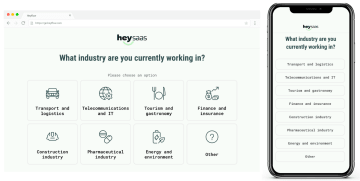
Good to know: Heyflow also captures partial submissions, so impulsive TikTok traffic that drops off before completing the form still generates recoverable leads.
4: Mobile-First Interaction Design
TikTok users arrive at mid-scroll with under three seconds of decision-making tolerance, so any desktop-first funnel collapses on contact. Multi-column layouts, dense forms, or fields that demand pinching and zooming kill conversion before the first answer is captured.
Heyflow is mobile-first by default: every block is independently optimized for mobile, 100% responsive across all screen sizes, with zero developer input required. Pixel-perfect design customisation also means the funnel can visually mirror any TikTok ad creative, preserving message match from the first frame to the first form field.
5: Compliance Readiness and Event Match Quality
European TikTok advertisers cannot afford to ignore consent management. Non-compliant landing pages risk reduced delivery, inflated CPMs, and regulatory exposure that quietly drains ad budgets long before the conversion data tells you why.
Heyflow holds SOC 2 Type II, ISO 27001, GDPR, and HIPAA compliance on all plans, so the funnel itself is not the weak link in your TikTok ad policy posture.
Try Heyflow for freeHow to Use Heyflow for Successful TikTok Ads Campaigns
Running TikTok ads through Heyflow comes down to a three-part workflow: connect TikTok tracking so events reach the algorithm cleanly, map form fields to maximize Event Match Quality so optimization accelerates, and reduce the creative refresh bottleneck with AI Campaigns. The steps below walk through each one in the order most TikTok advertisers will actually execute them.
Step 1: Connect TikTok Events API in Heyflow
In TikTok Ads Manager, open the Events Manager via Tools > Events and click Connect Data Source. Select Web, choose Manual Setup, then select Events API and name your Pixel.
Click Next to reveal your Pixel ID and create an Access Token – you'll need both.
In Heyflow, go to Connect > Tracking, select TikTok Events API, paste in the Pixel ID and Access Token, and click Connect. No GTM or Stape required.
(Recommended) Also activate the TikTok Pixel integration with the same Pixel ID – Heyflow auto-deduplicates, so each event counts once.
Test via TikTok's Test Events: copy the Test Event Code into Heyflow, republish, and run your live funnel once. When events arrive correctly, remove the Test Event Code, save, and republish to go live.
Step 2: Map Fields to Maximize Event Match Quality
In the integration's Field Mapping tab, map your Heyflow fields to TikTok's matching fields:
Email → Email
Phone → Phone
External ID → External ID
Each block you want to map needs a system label first, and mapped data is only appended on submit events.
Step 3: Refresh Creatives Faster with AI
TikTok creatives fatigue fast, so the real bottleneck is rarely the idea: it's the rebuild. This is where Heyflow's AI does the heavy lifting, building campaigns Heyflow puts at 20× faster than doing it by hand.
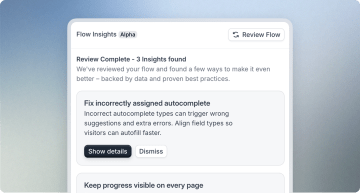
Prompt the build: Describe your goal, audience, and USP, and Heyflow's funnel-building agent generates an on-brand, mobile-first funnel designed to convert from the start.
Fine-tune in the no-code editor: Adjust every detail until it matches your campaign, no code required.
Connect to TikTok: Link the AI-built funnel using the Events API setup from Step 1, and you're live on fresh creative in a fraction of the usual time.
So you keep the experimentation speed TikTok rewards without rebuilding from scratch every time a funnel fatigues.
Conclusion: The TikTok Funnel Builder Built to Double Conversion Rates
TikTok performance comes down to a few non-negotiables: fast mobile load times, reliable server-side tracking through the TikTok Events API, and compliance readiness. Heyflow is a funnel builder purpose-built for post-click conversion, and it clears every one of them. Replacing static forms with interactive Heyflow funnels has delivered conversion-rate uplifts of at least 80% for Heyflow customers across a range of verticals.
The next step is deliberately low-risk: start building your funnel free until your campaign goes live, with expert support included from day one. That way you can validate TikTok performance against real ad spend before committing to anything further.
Test Your TikTok Funnel on Real Ad Spend
FAQ
Which funnel builders support the TikTok Events API natively?
Heyflow supports the TikTok Events API natively with server-side event delivery, so no GTM or Stape workaround is required. The connection is made directly by entering the Pixel ID and Access Token in Heyflow's Connect and Tracking tab.
Why does TikTok traffic convert worse than Meta on the same funnel?
Three factors compound: TikTok's in-app web view blocks many browser pixels, so optimization signals never reach the algorithm. Users arrive at mid-scroll with under three seconds of decision tolerance. And desktop-first funnels are simply not built for that impulsive, mobile-only behaviour.
Do I need both the TikTok Pixel and TikTok Events API?
Yes. The Pixel captures browser-side events like ViewContent and FormSubmit, while the Events API provides server-side backup when browser tracking fails inside TikTok's in-app webview. TikTok automatically deduplicates using the event ID, so each conversion is counted only once.
Does my funnel builder need to be GDPR compliant for TikTok ads in Europe?
Yes. European advertisers must implement consent management and use a builder certified for SOC2, GDPR, and ideally HIPAA. Non-compliant landing pages risk reduced ad delivery, inflated CPMs, and potential regulatory fines that quietly erode campaign ROI. Heyflow's data security and privacy features cover these requirements natively, so your funnel is not the weak link in your compliance posture.
Recommended articles

How to Increase Your Meta Ads CVR With the Heyflow AI Funnel Builder Platform
A flat Meta Ads conversion rate is usually a post-click problem. See three ways to fix your funnel and tracking with Heyflow, from full AI automation to manual control.
Read more
How to Create an Advertorial Landing Page That Sells (With Examples)
Learn how to create an advertorial landing page that sells, with examples by vertical, built by Heyflow’s AI and connected to your funnel in a click.
Read more
MCP: The Easiest Way to Create a Sales Funnel With AI
Prompt a sales funnel through MCP and it's hosted the moment it's built, connected in a click. That's what makes it the easiest way to build one with AI.
Read more