

The Best Lead Generation Software for Capturing More Leads in 2026







Trusted by 3,000+ marketers






Most people who land on your website aren't ready to buy yet. They're comparing options, doing research, or just browsing. The job of lead generation software is to capture those visitors before they leave and turn passive browsers into qualified leads your sales team can actually close.
But not all tools get you there. Some bring in more leads without filtering out the bad ones. Others look affordable until renewal pricing hits. And many still aren't built for the mobile traffic that now drives most paid campaigns.
This guide compares 8 top platforms on features, pricing, and real user reviews, so you can find the right fit for your goals and budget in 2026.
Key takeaways
Capturing a lead isn't the goal, qualifying it is. The best lead generation software doesn't just collect contacts; it filters and routes them so your sales team works with prospects who are actually ready to convert.
Prioritize the features that actually move conversions. Conditional logic, A/B testing, native server-side tracking, and lead quality gates (phone validation, OTP) matter far more than template count.
AI is becoming table stakes, but only where it removes real work. The most useful implementations generate full funnels or campaigns from a prompt and surface optimization suggestions from real conversion data, not just write a headline.
Heyflow is the go-to no-code platform for building high-converting lead funnels, landing pages, and interactive forms, with built-in A/B testing, advanced AI features, and CRM integrations.
Benefits of lead generation software
Why should you invest in lead generation software? It saves you time, keeps your outreach organized, and helps you connect with the right people faster. But it can do much more:
Expand market reach: With smart filters, you can reach prospects in your niche and those just outside it. Think partnerships, adjacent markets, or new demographics ready to engage.
Data-backed decisions that drive growth: Real-time analytics show you the bottlenecks in your funnel, whether it's a drop-off at the demo request stage or a delay in follow-ups. Your team can tweak strategies to turn potential leads into paying customers faster.
Consistent, professional brand experience: Whether it's landing pages, follow-up emails, or ads, every interaction looks polished and aligned with your brand. This level of consistency builds trust and keeps your business top-of-mind for prospects.
Ongoing engagement with minimal effort: Lead nurturing doesn't end with the first email. With automated workflows, you can send timely content, like newsletters or case studies, based on where leads are in their journey, keeping them engaged and moving toward conversion.
Higher lead quality, not just quantity: The best lead capture software doesn't just bring in more leads, it filters out the bad ones. Features like phone validation, OTP verification, and conditional logic ensure your sales team spends time on prospects who are actually ready to buy.
Top 8 best lead generation software tools at a glance
Before we jump in, here's a quick overview of the top lead generation platforms covered in this guide.
Best for | 🔑 Key features | 💸 Starting price | |
Heyflow | Interactive lead funnels & landing pages | Lead funnel builder, A/B testing, conditional logic, mobile optimization, CRM integrations, customizable templates, advanced AI Capabilities | From $45/mo |
Apollo.io | Large-scale B2B outreach | Dialer, analytics, lead scoring, email automation, social media integration | Free plan; paid from $49/user/mo (annual) |
Mailchimp | Email marketing automation | AI-powered tools, marketing automation, transactional emails | Free plan (250 contacts); paid from $13/mo |
OptinMonster | On-site lead capture | Templates, exit-intent tech, lead verification, mobile optimization | From $7/mo (introductory) |
LeadQuizzes | Interactive quizzes & surveys | Lead capture, social sharing, multiple quiz types, real-time notifications | From $13/mo |
HubSpot | All-in-one marketing (large budgets) | Forms, lead flows, lead scoring, CRM integration | Free plan; paid from $20/seat/mo |
Pipedrive | Simple pipelines & lead management | Prospector, scheduler, lead routing, social media integration | From $14/seat/mo |
Leadpages | Simple landing pages | Lead gen tools, checkout functionality, mobile-responsive design | From $49/mo |
The best lead generation software, reviewed
1. Heyflow: Best for interactive forms, lead funnels and landing pages
Heyflow is your go-to platform for building interactive landing pages, forms, and lead generation flows, without need of coding skills. It's purpose-built for marketing teams that want to capture and qualify more leads from paid campaigns without depending on developers.
With Heyflow, you can design personalized quizzes, product configurators, and multi-step forms that feel more like conversations than checklists. Every element is optimized for mobile with page speed scores above 90, so you keep visitors engaged no matter how or when they find you.
Key features of Heyflow
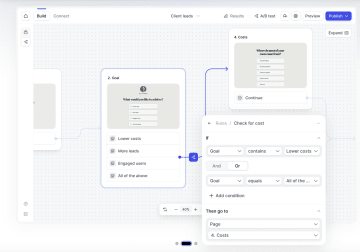
Advanced conditional logic: Create personalized user journeys by adjusting questions or steps based on previous answers. Heyflow's logic map gives you a visual overview of every branch, so complex funnels stay manageable.
Native server-side tracking (Meta CAPI + TikTok Events API): Send conversion signals directly from Heyflow's servers — no GTM, Zapier, or Stape needed. Heyflow is the only no-code builder with native TikTok Events API, meaning your ad signals stay clean even as cookies disappear.
Lead quality gates: Heyflow filters out junk leads at multiple layers. Phone Network Validation (powered by Twilio) checks that a number is real and active before it ever enters your CRM. SMS OTP then confirms a real human is behind it. Partial Submits capture data even from visitors who abandon mid-flow, so you don't lose leads just because someone got distracted.
A/B testing: Test different versions of your flows (for example, layout changes, new CTAs, question order) without any coding. Granular filters and significance indicators help you act on real data, not gut feel.
Built-in SMS verification: Reduce junk leads with native OTP verification, so only real users with valid phone numbers make it through your funnel.
Advanced integrations: Connect with Google Tag Manager, Meta Conversions API (native server-side), TikTok Events API (native server-side), HubSpot, Salesforce, Pipedrive, Zapier (3,000+ apps), and more. For regulated industries like insurance, finance, and legal, built-in TrustedForm and Jornaya (LeadiD) integrations provide TCPA-compliant lead certification, giving every submission a certified timestamp and unique ID.
AI Campaigns: Generate on-brand Meta ad campaigns directly from Heyflow in under 20 minutes, from funnel creation to live ad. Heyflow's agentic AI generates the ad creatives (image and video), copy, and lead funnel in one go, all on-brand. Meta Pixel, Conversions API, and UTM tracking are wired up automatically on publish.
AI Insights: one-click funnel analysis with conversion-boosting recommendations tailored to your data, backed by patterns from over 100,000 funnels.
AI-Powered Optimization: continuous improvements based on real conversion data, applied via prompt.
Heyflow pricing
Plans start from $45 per month
Enterprise: Custom quote
14-day free trial available — no credit card required
Check the Heyflow pricing page for the latest plan details, as tiers and features are updated regularly.
What do users say about Heyflow?
Janik Deimann
Co-Founder & CEO
I can't imagine our business without Heyflow. The solution has been with us since our very first client. The fact that we've never considered switching speaks volumes about Heyflow.


📈 See how Leantree used Heyflow's customizable funnels to land top clients and optimize hiring. Read the case study here!
Try Heyflow for free2. Apollo.io: Best for large-scale B2B outreach
If you're running large-scale outreach campaigns, Apollo.io gives you access to a verified B2B contact database with hundreds of millions of profiles. You can automate follow-ups with email sequences, make quick calls using click-to-call dialing, and track visitor activity to spot high-potential leads in real time. Apollo.io integrates with CRMs like HubSpot and Salesforce.
Key features
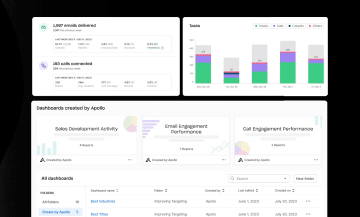
Email automation: Create multi-step outreach sequences, including emails, calls, and LinkedIn tasks.
Dialer: Make, receive, and record calls directly from the platform.
Lead scoring: Prioritize high-quality leads using a customizable scoring engine.
Analytics and reporting: Access pre-built and custom reports to track performance metrics.
Pricing
Free plan available
Basic: $49 per user per month (annual billing) / $59 monthly
Professional: $79 per user per month (annual) / $99 monthly
Organization: $119 per user per month (annual) / $149 monthly
What do users say about Apollo.io?
While users praise Apollo.io's ease of use, they also share frustration with the platform's support. Some users say the free contact limit is too restrictive, making it harder to maximize outreach efforts without upgrading to a paid plan.
3. Mailchimp: Best for email marketing automation
Mailchimp lets you create engaging email campaigns, automate follow-ups, and build landing pages, all from a user-friendly interface. With customizable templates and a drag-and-drop editor, you can quickly design emails without any coding skills. It's accessible, feature-rich at mid-tiers, and integrates with hundreds of tools.
That said, Mailchimp made significant changes to its free plan in early 2026, cutting contacts from 500 to 250 and monthly sends from 1,000 to 500, while also removing automation from the free tier entirely. If you're relying on the free plan for real lead nurturing, you'll likely need to upgrade sooner than expected.
Key features
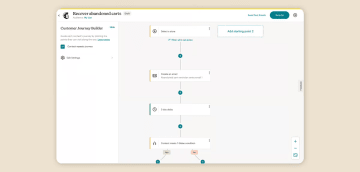
Marketing automation: Set up automated customer journeys and workflows based on triggers and behaviors.
Analytics and reporting: Track campaign performance with detailed metrics and insights.
Transactional emails: Send automated transactional messages like order confirmations.
Pricing
Mailchimp offers the following plans starting at 500 contacts. Note: the free plan is limited to 250 contacts and 500 monthly sends, with no automation included.
Free plan (250 contacts, 500 sends/month, no automation)
Essentials: $13 per month
Standard: $20 per month
Premium: $350 per month (up to 10,000 contacts)
What do users say about Mailchimp?
Users love Mailchimp's simple drag-and-drop editor and automation tools, saying they make getting started with email marketing easy. However, many users find the pricing steep as their email list grows, with limited support on the free plan.
4. OptinMonster: Best for on-site lead capture
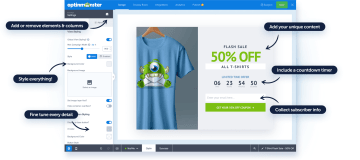
OptinMonster helps you convert website visitors into leads with on-site campaigns. It offers tools like pop-ups, slide-ins, floating bars, and even gamified elements like spin-to-win wheels. OptinMonster also integrates with major CRMs, email platforms, and eCommerce tools like Shopify and WooCommerce.
Key features
Exit-intent technology: Engages users about to leave the site to recover potential leads.
Pre-made templates: Access over 50 customizable templates for a quick setup.
Mobile optimization: Ensures campaigns are responsive for a better mobile user experience.
Lead verification: Filters out low-quality leads with TruLead™ technology.
Personalization: Customizes campaigns based on user data for increased engagement.
Pricing
Note that these are introductory prices (approximately 60% off). Renewal rates are significantly higher, roughly 2–2.5x the prices shown below. OptinMonster only accepts annual billing.
Basic: $7 per month (introductory)
Plus: $19 per month (introductory)
Pro: $29 per month (introductory)
Growth: $49 per month (introductory)
What do users say about OptinMonster?
Users appreciate the support team's hands-on help but note that running campaigns effectively takes some experimenting. They also share occasional frustrations with restarting campaigns due to buggy behavior.
5. LeadQuizzes: Best for interactive quizzes and surveys
LeadQuizzes helps you generate leads through quizzes and surveys with access to over 75 templates. The platform tracks quiz completions and drop-offs, giving you insights to tweak your campaigns and improve conversions. LeadQuizzes also integrates with CRMs and ad platforms like Meta.

Key features
Lead capture: Integrates customizable email sign-up forms directly into quizzes.
Multiple quiz types: Supports personality tests, assessments, and lead generation quizzes, catering to different marketing strategies.
Social sharing options: Easy sharing of quizzes via social media and email, increasing reach and potential leads.
Real-time notifications: Sends immediate notifications about quiz submissions, helping users stay updated on lead interactions.
Pricing
Startup: $13 per month
Standard: $49 per month
Pro: $99 per month
Premium: $249 per month
What do users say about LeadQuizzes?
Users find LeadQuizzes easy to use, with an intuitive interface and responsive support. However, some users feel limited by the platform's design, noting the lack of paragraph breaks and limited results page customization options.
6. HubSpot Marketing Hub: Best if you have a large budget
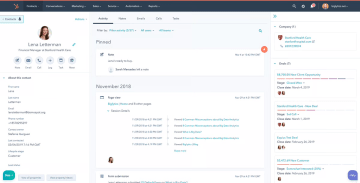
HubSpot's dynamic forms and email automation help you engage with leads at the right time, while native CRM integration keeps your team aligned across sales and marketing. The platform tracks every touchpoint, giving you a clear picture of how leads move through the funnel. While HubSpot has a free version, most advanced features, like A/B testing or multi-touch revenue tracking, are only available on higher-tier plans.
One important cost consideration: the Professional plan requires a one-time onboarding fee of approximately $3,000, and Enterprise requires around $6,000. Factor this into your total cost of ownership before committing.
Key features
Forms and pop-ups: Create customizable forms and pop-ups to capture visitor information across your website.
Lead flows: Implement engaging lead capture forms like slide-in boxes and drop-down banners to grab visitors' attention.
CRM integration: Automatically sync captured lead data with HubSpot's CRM for streamlined lead management.
Lead scoring: Assign scores to leads based on their interactions and behaviors to prioritize follow-ups.
Pricing
Free plan available (limited features)
Marketing Hub Starter: $20 per seat per month
Marketing Hub Professional: $890 per month (+ ~$3,000 one-time onboarding fee)
Marketing Hub Enterprise: $3,600 per month (+ ~$7,000 one-time onboarding fee)
What do users say about HubSpot?
Users like how HubSpot keeps everything in one place. They find lead tracking and campaign management helpful but note the platform can feel overwhelming for first-time users.
7. Pipedrive: Best for simple pipelines and lead management
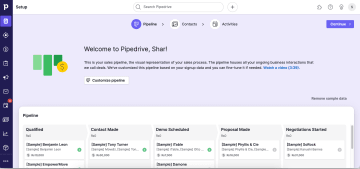
Pipedrive makes it easy to manage leads by organizing them in simple, customizable pipelines. You can drag and drop leads through different stages and use their Leads Inbox to keep things tidy until you're ready to follow up. With tools like chatbots, web forms, and smart contact data, you can engage website visitors and capture new leads.
Key features
Prospector: AI-powered tool to find potential leads from a large database of profiles.
Scheduler: Allows leads to book meetings directly with sales reps, integrating with team calendars.
Lead routing: Automatically assigns new leads to specific team members based on predefined rules.
Social media integration: Captures leads from platforms like Facebook Messenger, streamlining communication.
Pricing
Current plans include:
Lite: $14 per seat per month
Growth: $34 per seat per month
Power: $49 per seat per month
Ultimate: $64 per seat per month
What do users say about Pipedrive?
Users appreciate how simple Pipedrive is to use, saying it helps them stay organized without the hassle. However, they also point out issues like bugs in the email inbox and occasional confusion with bilingual interface elements. Other users find the platform not easy to navigate and limited in integration options.
8. Leadpages: Best for simple landing pages
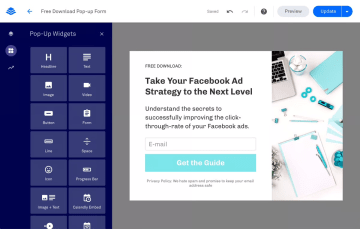
Leadpages makes building landing pages simple, even if you're not tech-savvy. You can use the drag-and-drop editor to create mobile-friendly pages with no coding required. It also offers pre-made templates, so you can launch campaigns faster. Leadpages is a solid choice for small businesses and solopreneurs who need a dedicated landing page tool without the complexity of a full marketing suite.
Key features
Mobile-responsive design: Ensures pages look great on all devices with automatic adjustments.
Lead generation tools: Capture visitor information using pop-ups, alert bars, and opt-in forms.
Analytics and reporting: Track page performance and visitor behavior with built-in analytics.
Leadmeter optimization tool: Receive real-time suggestions to improve page conversion potential.
Checkout functionality: Sell products directly with Stripe for payments.
Pricing
Standard: $49 per month
Pro: $99 per month
Conversion: $697 per month
What do users say about Leadpages?
Users highlight the smooth integrations, saying they set up their funnels in just a few hours. However, they note that the platform's pricing can be a bit steep for smaller businesses.
You've seen the tools. Up next, we'll break down the core features to look for, so you can pick what works best for your business.
Key features to look for in lead generation software
Whether it's automating outreach or qualifying B2B leads, here's what to look for when choosing a lead generation platform that fits your business.
Lead segmentation
Lead segmentation helps you reach the right people with the right message every time. If a lead is just browsing, send them the warm-up email. Already interested? Hit them with the good stuff. You can sort leads by:
Demographics: Age, location, or industry can influence how you shape your offers or outreach.
Behavior: Whether it's clicking your emails or exploring your site, their actions give you clues about what they want.
Form builders
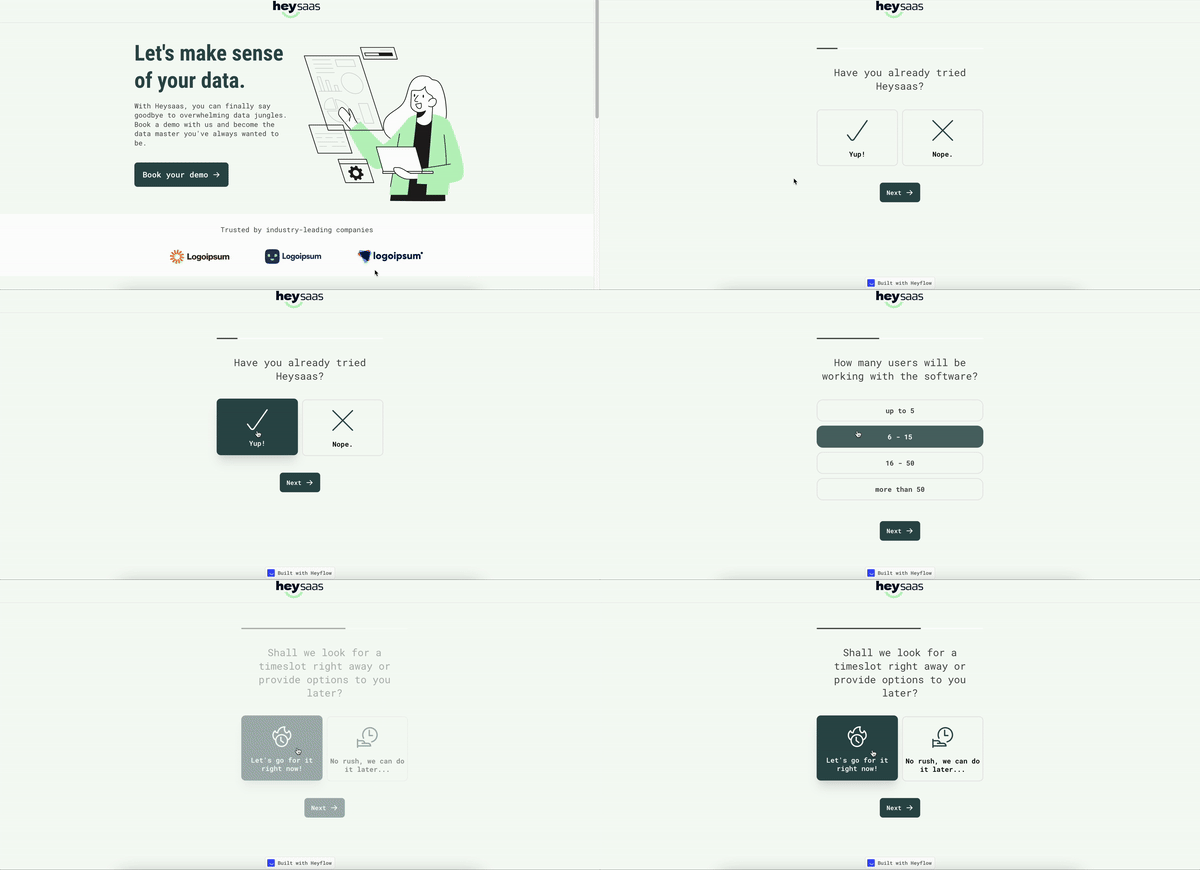
Form builders help you create quick, no-fuss forms that gather the right info without scaring off prospects. A good form builder should be flexible, customizable, and user-friendly, even if tech isn't your thing.
With Heyflow's online form builder, you can take it up a notch using conditional logic, meaning your forms adapt as users respond. Ask a question, and based on the answer, the form automatically leads them to the next relevant step. Just choose a template, customize it to fit your style, and you're ready. And because Heyflow's forms are mobile-friendly, you don't lose leads just because they're on their phones.
Email marketing
Email marketing helps you build relationships, stay top of mind, and nudge prospects toward conversion with personalized, timely messages. Think welcome emails, follow-ups, and drip campaigns that run on autopilot. With tools like Mailchimp, you can design eye-catching emails using drag-and-drop editors, making it easy even if you're not a designer. Features like audience segmentation and performance analytics help you fine-tune every message.
Did you know? You can connect Heyflow with Mailchimp, WhatsApp, and Zoom using Pabbly Connect or Zapier, making it easy to build fully automated lead nurturing workflows without writing a single line of code.
Analytics and reporting
Tracking your analytics is like reading your lead generation's report card: you need it to see where you're excelling and where you need extra credit. Are your leads coming from email campaigns or paid ads? Are they converting after one touchpoint or five? Look for dashboards that help you monitor lead sources, conversion rates, and campaign ROAS. Customizable reports are a huge win: they let you filter out noise and focus on what matters most for your specific goals.
Heyflow goes further with drop-off analytics per screen, so you can see exactly where users abandon your flow, not just overall conversion rate. Combined with device-type and UTM filtering, and a daytime heatmap showing performance by hour, you get the granularity to run real optimization cycles, not just gut-check decisions.
Want a sneak peek into how Heyflow tracks it all? Grab some popcorn and hit play below! 🍿
CRM integration
All your lead data should automatically sync into one tech stack, keeping every email, demo request, and form submission connected within your sales funnel. Your sales team stays on track with every interaction at their fingertips, knowing when to follow up without missing a beat. Automated lead routing ensures the right leads go to the right people, while reminders keep things moving. The best lead generation platforms integrate natively with tools like HubSpot, Salesforce, and Pipedrive so nothing falls through the cracks.
AI capabilities
AI has gone from nice-to-have to baseline expectation in lead generation software. The difference between tools is whether AI is bolted onto a static builder or built into every stage of the funnel lifecycle. Look for a platform that uses AI to remove real bottlenecks, not just to write a headline for you.
Heyflow builds AI into the entire workflow. With AI Flow Generation, you can create a complete, production-ready funnel from a single prompt, with tracking, conditional logic, and CRM integration already in place. AI Campaigns goes a step further: generate a full Meta campaign, including ads, audience, funnel, and server-side tracking, and push it directly to Meta Ads Manager in minutes. Once a flow is live, AI Edit on Prompt lets you adjust headlines, questions, or steps in plain language, while AI-powered Optimization surfaces conversion suggestions per screen based on real performance data. What sets this apart is the data behind it. Heyflow's AI isn't trained on generic web content. It draws on patterns from over 100,000 funnels and billions in ad spend, so its suggestions reflect what actually converts, not just what sounds plausible.
Mobile optimization
Your audience is already scrolling through emails, social feeds, and websites on their phones. If your forms don't load quickly or fit perfectly on small screens, they'll move on without a second thought.
With optimized flows that load fast on mobile, plus automatic image resizing for smooth performance, Heyflow makes sure your forms look sharp and load fast, every time. Whether your user is tapping through between meetings or casually browsing on the couch, your mobile forms and pages should load fast, adapt perfectly, and stay engaging.
How to choose the right lead generation software for your business
The right lead generation platform can make all the difference. You want something that fits your needs, budget, and goals. Here's what to consider when choosing a tool that actually boosts your lead generation efforts:
Know your goals: Are you after more sales? Bigger brand reach? A steady flow of qualified leads? Getting clear on this will help you zero in on tools that match your aims. A B2B company running outbound prospecting needs a very different tool than an e-commerce brand capturing leads from paid social.
Think about your budget, including renewals: Got a bigger budget? Premium tools like HubSpot might be a fit. On a leaner budget? Look at options like Heyflow that deliver strong results without the hefty price tag. And watch out for introductory pricing traps. Some tools (like OptinMonster) charge up to 2.5x more at renewal.
Go for easy-to-use tools: Don't let complex software slow you down. Look for platforms with intuitive dashboards and drag-and-drop features. That way, your team gets onboarded fast, with no hours of training or deep tech dives required.
Check integration options: Make sure your software plays nicely with your existing tools, like your CRM, email marketing platform, and analytics stack. The last thing you need is a data silo. Seamless integrations keep everything in sync and your workflow smooth.
Consider mobile performance: If a significant portion of your traffic comes from mobile (and it almost certainly does), your lead capture software needs to be built mobile-first, not just "mobile-friendly." Fast load times and responsive layouts directly impact conversion rates.
Look for solid support: Customer support is crucial. Go for a tool with responsive help, whether that's live chat, tutorials, or a community forum. When you're troubleshooting mid-campaign, quick answers save the day.
Conclusion: Find the right lead generation software for your business
Selecting the right lead generation software is no easy task, but getting it right can transform how you attract, engage, and convert more leads. Each business has different needs, so it's crucial to align your software choice with your goals, budget, and workflow.
If you have complex needs, a large team, and an enterprise-level budget, HubSpot's Marketing Hub or Apollo.io could be strong contenders.
For outbound-heavy B2B teams, Apollo's contact database and sequencing tools are hard to beat. For on-site conversion optimization, OptinMonster punches above its weight — just watch the renewal pricing.
But if you want a no-code builder that's user-friendly, budget-conscious, and mobile-optimized, and you want to build interactive lead funnels that actually convert, try Heyflow. Heyflow's integrations with CRMs and analytics tools keep your data organized, accessible, and actionable. Whether you're scaling up or just starting, Heyflow offers the flexibility to build, track, and optimize lead campaigns with ease.
Choose smart, build better, and let those leads flow.
Try Heyflow as your lead generation platform todayFAQs about lead generation software
What is the best lead generation software for small businesses?
For small businesses, the best lead generation software balances ease of use, affordability, and solid integrations. Heyflow is a strong choice for building interactive lead funnels and landing pages without needing a developer, with plans starting from $45/month and a free test available.
What features should I look for in lead generation software?
The core features that matter most are lead segmentation, a flexible form or funnel builder, email marketing, analytics and reporting, CRM integration, AI capabilities, and mobile optimization. Which ones to prioritize depends on your channel: teams running paid ads benefit most from server-side tracking, conditional logic, and lead quality gates like phone validation, while email-led teams lean harder on automation and segmentation. Heyflow covers the full stack for paid lead generation, including native Meta CAPI and TikTok Events API tracking that most no-code builders lack.
Can lead generation software integrate with my CRM?
Yes. The best platforms offer native integrations with CRMs like HubSpot, Salesforce, and Pipedrive, so lead data syncs automatically and nothing falls through the cracks. This keeps every form submission, demo request, and follow-up connected within your sales funnel and enables automated lead routing. Heyflow offers 50+ direct integrations plus Zapier access to thousands more apps, so your lead data flows straight into your existing tech stack.
Do I need technical skills to use lead generation software?
No. Most modern lead generation platforms are built as no-code tools with drag-and-drop editors, so you can launch forms, funnels, and landing pages without writing code. Heyflow, for example, lets marketing teams build and publish interactive funnels without developer support, and its AI Flow Generation can create a complete funnel from a single prompt. The main thing to check is onboarding effort: look for intuitive dashboards and templates so your team gets up to speed in hours, not weeks.
Recommended articles

How to Increase Your Meta Ads CVR With the Heyflow AI Funnel Builder Platform
A flat Meta Ads conversion rate is usually a post-click problem. See three ways to fix your funnel and tracking with Heyflow, from full AI automation to manual control.
Read more
How to Create an Advertorial Landing Page That Sells (With Examples)
Learn how to create an advertorial landing page that sells, with examples by vertical, built by Heyflow’s AI and connected to your funnel in a click.
Read more
MCP: The Easiest Way to Create a Sales Funnel With AI
Prompt a sales funnel through MCP and it's hosted the moment it's built, connected in a click. That's what makes it the easiest way to build one with AI.
Read more