
The 5 Best Webflow Form Builders 2026







Trusted by 3,000+ marketers






Adding a form to a Webflow site sounds simple until you start comparing options. Native Webflow forms, dedicated form builders, and interactive funnel tools all promise to collect submissions, but they're built for very different use cases. Choosing the wrong one for your specific goal can quietly limit your results without ever throwing an error. This comparison breaks down the most popular form builders available for Webflow, what each one is actually built for, where each one has limits, and which criteria matter most depending on what you're trying to achieve.
Key Facts
Webflow's native forms aren't built for paid traffic. No conditional logic, no multi-step flows, and a structural spam vulnerability that lets bots bypass reCAPTCHA entirely, making them a liability for any team running paid campaigns.
No form builder matches Heyflow for paid traffic on Webflow. Native server-side tracking across Meta, TikTok, and more, built-in A/B testing with statistical significance, and OTP phone validation are absent across every alternative reviewed.
The integration method matters as much as the features. iFrame-based embeds break mobile responsiveness, conflict with Webflow's CSS, and silently block tracking pixels from firing, directly impacting conversion rates and attribution accuracy.
What to Look for in a Webflow Form Builder
The best Webflow form builder depends entirely on what you're trying to accomplish. The criteria that matter for a simple contact form look very different from those that matter for a high-converting lead generation funnel.
If your goal is…
Simple data collection: a contact form, an event registration, or an internal request form. Basic fields, email notifications, and clean design are enough.
Survey or feedback collection: employee surveys, NPS forms, or research questionnaires. Conversational UX and response analytics matter most.
Lead generation with paid traffic: Conditional logic, multi-step flows, A/B testing, lead validation, and CRM integration become critical. You should therefore choose a tool that was purpose-built for conversion, like Heyflow.
Key Features of a Webflow Form Builder for Lead Generation
If you're running paid traffic to your Webflow site, look for a form builder with these features:
Conditional Logic: Dynamic paths based on user responses let you build funnels that create personalized paths for each visitor. Instead of a one-size-fits-all form, every user sees only what's relevant to them, translating into higher completion rates and more accurate data.
Multi-Step Flows: Breaking a long form into individual screens reduces perceived effort and improves mobile completion rates. Visitors are far more likely to finish a form they feel is manageable than one that confronts them with ten fields at once.
A/B testing and drop-off analytics: Built-in split testing with statistical significance, plus step-by-step drop-off analysis, lets you optimize across client accounts without external tools.
Lead validation (phone verification, OTP): OTP verification and phone number validation eliminate fake submissions, protecting both your reputation and your client's sales team.
Mobile-First Performance: A form that loads slowly or breaks on smaller screens is losing conversions before a single field is touched. Page speed above 90 is the benchmark worth targeting.
CRM integrations and native ad platform connections: Direct connections to tools like HubSpot, Salesforce, Meta Pixel, and Google Ads ensure leads are routed correctly and ad spend is optimized based on real conversion data, not just form submissions.
GDPR Compliance and Data Security: Agencies serving regulated industries need SOC 2, GDPR, and HIPAA compliance. A form builder that leaves compliance up to you is a liability.
One more thing worth checking before you commit to any tool: how it actually integrates with Webflow. The same form builder can behave very differently depending on how it loads on your site. Tools that embed via iFrame often cause styling conflicts, break on mobile, or lose tracking data. A tool that uses web component technology – like Heyflow – renders natively inside your Webflow page, keeps your CSS intact, and ensures that server-side conversion signals fire reliably on every submission, with no GTM setup or third-party relay required.
Try Heyflow for free5 Best Form Builders for Webflow Compared
Each tool below was evaluated against these conversion-relevant criteria: conditional logic, multi-step flows, A/B testing, lead validation, spam protection, Webflow integration method, and free tier limits. Here's how they stack up at a glance.
Feature | Webflow Native | Typeform | Jotform | Tally | Heyflow |
Conditional logic | ❌ | ✅ | ✅ | ✅ | ✅ Advanced + logic map |
Multi-step | ❌ | ✅ (one-at-a-time) | ✅ | ✅ | ✅ |
A/B testing | ❌ | ❌ | ❌ | ❌ | ✅ Per-step + statistical significance |
Lead validation / OTP | ❌ | ❌ | ⚠️ Via Twilio | ❌ | ✅ Native |
Partial submits | ❌ | ❌ | ⚠️ Manual only | ⚠️ Pro only (no CRM sync, no notifications) | ✅ |
Server-side tracking (CAPI) | ❌ | ❌ | ❌ | ❌ | ✅ Meta, TikTok, Bing, Taboola, Outbrain, all native server-side. |
Drop-off analytics | ❌ | ❌ | ❌ | ✅ Pro only | ✅ Per-step + UTM + device |
WhatsApp autoresponse to lead | ❌ | ❌ | ⚠️ Submission alerts to form owner only – not lead-directed messaging | ❌ | ✅ Native |
Custom SMTP | ❌ | ❌ | ✅ | ❌ | ✅ |
HIPAA compliance | ❌ | ❌ | ⚠️ Enterprise only | ❌ | ✅ All plans |
TrustedForm / Jornaya | ❌ | ❌ | ❌ | ❌ | ✅ |
Webflow integration | Native | Embed / iFrame | iFrame / Zapier | Embed | Web component embed |
Webflow Native Forms
Webflow's built-in forms offer seamless integration with your site's design and unlimited form submissions on paid plans. If you need a simple contact form on a low-traffic portfolio page with no paid ad spend, they get the job done without any extra tools.
But for lead generation scenarios involving paid traffic, native Webflow forms fall short fast. There's no conditional logic to personalize the experience, no multi-step capability to improve mobile completion rates, and no integrations beyond basic email notifications. There's also a structural spam vulnerability most guides overlook: Webflow forms use a predictable handler URL for form submissions. That means bots can bypass any frontend reCAPTCHA you add in the Designer by POSTing directly to the endpoint. No matter how many CAPTCHAs you configure, lead quality degrades because the protection never reaches the server side. For teams running paid campaigns, this silently inflates lead counts while deflating actual pipeline value.
Typeform
Typeform delivers a polished conversational UX that excels at creating surveys and feedback forms. Its brand recognition is strong, and the one-question-at-a-time format keeps user interaction feeling personal. Paid plans start at $29/month for 100 responses, while the free plan caps you at just 10 responses per month.
The challenge? That same one-at-a-time format adds unnecessary friction on conversion-focused landing pages. When visitors arrive from a paid ad, they expect to complete a form quickly, not click through a dozen individual screens. Typeform also lacks built-in A/B testing and lead validation features like phone verification, making it better suited for data collection than lead capture at scale.
Jotform
Jotform stands out with over 10,000 customizable templates, versatile form creation across industries, and built-in payment processing. It integrates with your Webflow website through iFrame embedding or Zapier.
The limitation is focus. Jotform is a generalist tool built for broad data collection, not marketing-specific conversion optimization. There's no built-in A/B testing, no lead scoring, and no phone validation. The iFrame integration method can also cause styling conflicts with Webflow's design system and slower load times, which directly impacts user engagement on mobile devices.
Tally
Tally offers unlimited forms and unlimited responses on its free plan, making it the strongest free form builder for Webflow users. It supports conditional logic, file uploads, and clean embed code integration. For startups, side projects, or teams testing form building concepts before committing budget, Tally is hard to beat on value.
Where it falls short is at scale. There's no phone verification or OTP for lead validation, limited pixel-perfect design control, no native CRM integrations for tools like HubSpot or Salesforce, and no A/B testing. For performance marketing teams running paid campaigns that demand advanced features and reliable lead quality, Tally's simplicity becomes a ceiling.
Heyflow
Heyflow is a no-code interactive funnel builder, purpose-built for lead generation and conversion rate optimization. Every feature is designed to move one metric: the rate at which visitors become qualified leads.
Here's what sets it apart:
✅ Advanced conditional logic with visual decision tree mapping: personalize every path based on user responses.
✅ Built-in A/B testing at every funnel step: test headlines, question order, and layouts with real data, not gut feel.
✅ Drag-and-drop builder with 50+ blocks: create professional forms and multi-step funnels without requiring extensive coding skills.
✅ Phone number validation with OTP: eliminate fake leads before they ever reach your CRM.
✅ Mobile-first design with page speed scores above 90: critical for paid ad Quality Score and keeping bounce rates low.
✅ Native server-side tracking for Meta and TikTok: Heyflow is the only funnel builder with native server-side CAPI across 5 ad platforms – Meta, TikTok, Bing/Microsoft Ads, Taboola, and Outbrain – with zero middleware, no Zapier, and no LeadsBridge required.
✅ Partial Submits: Heyflow captures lead data at the point of abandonment, even when a visitor doesn't reach the final submission screen, recovering leads that every other tool in this list would silently lose.
✅ Step-by-step drop-off analytics with device and UTM filtering: identify exactly where visitors leave and on which device.
✅ Native WhatsApp notifications and custom SMTP: route leads to WhatsApp instantly and send autoresponders from your own domain, no Zapier required.
✅ 50+ native integrations (focused on ad-tech, CRM, and marketing automation – not generic app connectors like document signers or survey tools): connect directly to Meta, Google, HubSpot, Salesforce, Calendly, Stripe, and more.
✅ AI-native builder: generate a complete, conversion-ready funnel from a single prompt, receive per-screen optimization suggestions based on real drop-off data, and refine live flows via natural language.
Heyflow uses web component technology instead of iFrames, which means zero styling conflicts, fully responsive behavior inside any container width, and reliable tracking across devices. Embedding Heyflow into your Webflow site takes two code snippets: one in the head, one in the body. You can embed inline or as a popup, with no site rebuild required.
How to Embed Forms in Your Webflow Site
Getting a third-party form or funnel onto your Webflow website comes down to three integration methods. Each involves trade-offs around design control, responsiveness, and tracking reliability. Choosing the right one depends on the tool you're using and how much control you need over the embedded experience.
Custom Code Element (Embed Code): Paste embed code directly into Webflow's Embed element or via Page Settings → Custom Code. This is the best method for tools like Heyflow that provide separate head and body snippets. Keep in mind the 10,000-character limit on Embed elements, and note that custom code only renders on the published site, not in the Designer preview.
Webflow Apps Marketplace: Some tools like Inputflow offer native Webflow form apps that work directly inside the Designer. This is ideal for teams wanting to style forms using Webflow's own design tools. The trade-off: functionality is limited to what Webflow natively supports.
iFrame: The fallback option when a tool lacks native embed support. It's the simplest to implement but causes styling conflicts, breaks responsive behavior on mobile, and prevents tracking scripts from firing reliably inside the frame.
Common embedding pitfalls include CSS conflicts between third-party forms and Webflow's design system, broken mobile responsiveness, and analytics scripts that silently fail inside iFrames.
Instead of loading inside an iFrame, a Heyflow funnel renders as a native element that adapts responsively to any container width without inheriting or conflicting with the parent site's CSS, keeping tracking intact across devices.
GDPR and Spam: Gaps Every Webflow Form Needs to Close
Any form collecting personal data from EU residents must meet specific GDPR requirements. Most form builders leave compliance up to you, so understanding the baseline is essential before choosing a tool.
Explicit opt-in consent: Pre-checked checkboxes are not compliant. Users must actively agree to data processing before submitting any form.
Data minimization: Only collect the customizable form fields you actually need. Every unnecessary field increases legal exposure.
Right to erasure: You must be able to delete a user's data on request, which means your form tool needs accessible data management.
Data Processing Agreements (DPA): Required with any third-party form tool processing EU user data. Check whether your provider offers one before integrating.
✅ Heyflow hosts and processes all data exclusively in Europe and holds SOC2 Type II, GDPR, HIPAA, and ISO 27001 certifications available on all plans, not just enterprise tiers. A Business Associate Agreement (BAA) is available from day one, making Heyflow one of the few form tools that doesn't gate compliance behind a premium tier.
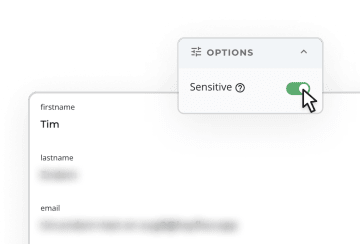
✅ For teams handling sensitive personal data, Heyflow's Sensitive Tag automatically deletes PII from Heyflow's servers after routing it to your CRM, meaning sensitive lead data never persists in a third-party system beyond the moment of transfer. No other tool in this comparison offers this natively.
✅ For US-based lead generation in regulated verticals like insurance, finance, or healthcare, Heyflow also integrates natively with TrustedForm and Jornaya, providing certified consent records and unique lead timestamps that protect against TCPA liability.

Spam protection deserves the same layered thinking. Webflow's native reCAPTCHA is bypassable at the endpoint level, and basic CAPTCHAs alone won't stop sophisticated bots. Effective strategies stack multiple defenses: honeypot fields (available in Jotform), Cloudflare Turnstile for invisible bot detection, and server-side filtering that catches submissions after they're sent. The most powerful layer is phone validation with OTP, which Heyflow offers natively. It forces real humans to verify their identity via SMS before a submission completes. This single mechanism solves two problems at once:
It blocks automated spam
It filters out fake leads, meaning every submission that reaches your CRM is from a verified, reachable person.
Conclusion: Heyflow is The Best Webflow Form Builder for Conversions
If you're running paid traffic to a Webflow site, a simple contact form isn't just underperforming. It's actively wasting your ad budget. Heyflow closes every conversion and lead quality gap covered in this guide: conditional logic personalizes each visitor's path, built-in A/B testing replaces guesswork with real data, and phone validation with OTP filters out fake leads before they ever touch your CRM. With 50+ native integrations for Meta, Google, HubSpot, and Salesforce, your funnel plugs directly into your existing performance campaigns stack.
Start Converting Your Webflow Traffic with HeyflowFAQ
Can I add conditional logic to Webflow forms?
No, Webflow's native forms don't support conditional logic. Third-party tools like Heyflow, Tally, and Inputflow add this capability through embedding or Webflow-native enhancement. Heyflow offers one of the most advanced conditional logic with visual decision tree mapping.
How do I stop spam on my Webflow forms?
Webflow's form endpoint is predictable, so bots bypass frontend CAPTCHAs by posting directly to the handler URL. Effective solutions require layered protection: server-side filtering, honeypot fields, and phone validation with OTP, which Heyflow offers natively.
What are the limitations of Webflow's native forms?
No conditional logic, no multi-step flows, file uploads only on Business plans, 50 lifetime form submissions on the free Starter plan, unreliable email notifications, and a predictable spam endpoint that bots easily exploit. For teams running paid campaigns, there is also a structural spam vulnerability: bots can bypass frontend reCAPTCHA by posting directly to Webflow's predictable form endpoint. For simple contact forms on low-traffic pages, native Webflow forms are sufficient. For lead generation with paid traffic, a dedicated funnel builder like Heyflow delivers significantly better results.
Which Webflow form builder is best for lead generation?
Heyflow. Unlike standard form tools, it combines built-in A/B testing, OTP phone validation, native Meta CAPI and TikTok Events API, and direct CRM integrations, all embedded via web component technology that keeps tracking intact on Webflow. It is the most feature-complete option for conversion-focused lead generation on paid traffic landing pages.
Do Webflow forms need to be GDPR compliant?
Yes, if you collect any personal data from EU residents. Requirements include explicit opt-in consent, data minimization, right to erasure, and a Data Processing Agreement with any third-party form processor. Heyflow hosts and processes all data exclusively in Europe and holds SOC2, GDPR, HIPAA, and ISO 27001 certifications on all plans, making it one of the few form tools that covers compliance requirements out of the box.
Recommended articles

How to Increase Your Meta Ads CVR With the Heyflow AI Funnel Builder Platform
A flat Meta Ads conversion rate is usually a post-click problem. See three ways to fix your funnel and tracking with Heyflow, from full AI automation to manual control.
Read more
How to Create an Advertorial Landing Page That Sells (With Examples)
Learn how to create an advertorial landing page that sells, with examples by vertical, built by Heyflow’s AI and connected to your funnel in a click.
Read more
MCP: The Easiest Way to Create a Sales Funnel With AI
Prompt a sales funnel through MCP and it's hosted the moment it's built, connected in a click. That's what makes it the easiest way to build one with AI.
Read more