
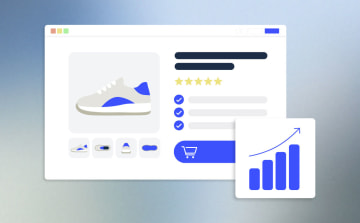
How to Create Converting PDPs: The 8-Element Checklist







Trusted by 3,000+ marketers


You're paying for every click to your product pages, but most of those visitors leave without buying. The fixes are well known: put the price above the fold, show social proof in the first screen, make the buy button impossible to miss. Yet the element with the biggest impact is the one many product pages still skip: a guided path that helps shoppers find the right product. This guide condenses PDP best practices into one 8-element checklist, explains why each element matters for conversion, and shows how to add the missing ones to your product detail page with Heyflow.
Key takeaways
A converting PDP answers three questions in the first mobile screen: what is this, what does it cost, and can I trust it. Price, buy button, and social proof belong there.
Interactivity has the biggest impact: according to Heyflow's e-commerce data, quiz funnels convert 3x better than sending traffic straight to product pages.
The colder your paid traffic, the more your product page has to do: trust-building and qualification can't happen in the ad, only after the click.
Heyflow adds the missing elements without rebuilding your store: quizzes and finders that send shoppers to the right product, native A/B testing, and server-side tracking for Meta and TikTok, all included in Heyflow's e-commerce plan, Prime.
8 elements every converting product page needs
Use the checklist below as a quick audit of your own product page: open it on your phone and check which elements it covers and which it lacks.
Element | What counts | Why it matters for conversion |
|---|---|---|
Price above the fold | Price visible in the first mobile screen | Visitors who can't see the price assume it's hidden for a reason and bounce |
Primary CTA above the fold | Add to Cart / Buy button in the first screen | Every scroll between arrival and buy button is an exit opportunity |
Social proof in the first screen | Rating, review count, or testimonial visible immediately | Third-party validation reduces risk before the visitor invests attention |
Interactive element | Quiz, configurator, AR try-on, or finder | Guides self-selection and pre-qualifies the buyer |
Video or in-use media | Product shown in use on the PDP | Demonstrates fit, scale, and real-world outcome faster than text |
Trust signals near the CTA | Shipping, returns, guarantee, or payment icons next to the buy button | Removes the last objections at the exact moment of decision |
Mobile page speed | Fast rendered load on mobile | Every extra second of loading costs visitors, and with paid traffic you pay for each one who leaves |
Personalization or guided path | Recommended products, bundles, or "complete the look" suggestions | Narrows choice and matches the visitor to the right variant |
Why does each element matter? The average online store converts fewer than 3 in 100 visitors: Dynamic Yield's benchmark across 400+ brands puts the global average at 2.66% (Shopify). On such a small base, every improvement counts: going from 2.5% to 3.5% means 40% more revenue from the same traffic.
The element with the biggest impact is interactivity. According to Heyflow's e-commerce data, quiz funnels convert 3x better than sending traffic straight to product pages. Guidance works because too much choice paralyzes, as the well-known jam study by Iyengar and Lepper shows: when shoppers could choose from 6 flavors, 30% bought; with 24 flavors, only 3% did.
What a converting PDP gets right
Product pages that tick the checklist share four patterns.
Price, CTA, and proof stacked in one mobile screen. The strongest product pages put the price, the buy button, and third-party proof (a rating, a review count, or a press endorsement) where the visitor first lands, so the buyer gets every answer they need without a single scroll.
Interactive finders that pre-qualify the buyer. A skincare quiz, a shade finder, or an interactive product finder turns a visitor who would have to self-select from dozens of variants into a guided buyer with a recommendation. This is the guided-selling pattern that turns browsers into buyers.
Media that shows the product in use. Product photos show what something looks like; video shows fit, scale, and outcome faster than any paragraph.
Trust signals directly under the buy button. Trial periods, warranties, free shipping, and guarantees belong right where the decision happens, so the last objections are answered at the moment of purchase.
Why cold paid traffic raises the stakes
When you scale ad spend, the audiences you reach get colder: more people who don't know your brand yet. That trust-building and qualification can't happen in the ad; it has to happen after the click, on the page. A PDP that hides the price, buries the reviews, and leaves the visitor to pick alone from a long variant list is asking a cold visitor to do all the work. That's why the interactive element deserves priority: it has the biggest impact, and it helps cold visitors the most.
How to build a converting PDP with Heyflow
Heyflow, a funnel builder platform, builds exactly the elements most product pages are missing, either as a standalone PDP-style funnel or as a flow embedded on your existing product page via web-component embedding (not iframes), so nothing in your store needs to be rebuilt.
Heyflow AI is trained on 150,000+ funnels and landing pages, $2B+ in tracked ad spend, and 50M+ responses, and more than 3,000 customers use Heyflow. Results from e-commerce brands are documented on Heyflow's e-commerce page: Wonderskin's quiz funnel reached a 17% conversion rate, 3x the rate of its static PDP, and Maelys increased its average order value 10x with smart product bundles.
1. Add the interactive element most PDPs lack
Conditional logic lets a flow react to every answer and show only the questions and products that fit, and the Logic Map gives you a visual overview of every path. Calculations build bundle prices, personalized offers, or size and quantity recommendations directly in the flow. Heyflow AI generates both multi-step flows and standalone pages from a single prompt, and Design Import matches your brand from a screenshot or a URL: the generated flow arrives with tracking, logic, and design already wired in. This is how you ship the shade finder, fit quiz, or product finder that most product pages are missing.

The flow can sit inline on your product page or open as a popup, so it doesn't push the price or buy button down. When the quiz ends, redirects and URL parameters take the shopper straight to the recommended product page, with their answers attached. With the Klaviyo integration, part of Prime's eCommerce Suite alongside Shopify, Stripe, and Solidgate, every answer (skin type, goal, size) also flows into Klaviyo and can trigger personalized email flows the moment the shopper submits.
2. Keep the buy moment fast and trusted
Every Heyflow flow is mobile-first with a PageSpeed score above 90 by default, so the flow itself loads fast on mobile, where most paid traffic lands. Payment blocks support Stripe, Solidgate, Apple Pay, and Google Pay. You can place trust messaging (free shipping, returns, guarantees) directly under the button in the flow, where it removes the last objections at the moment of decision.
3. Measure and improve
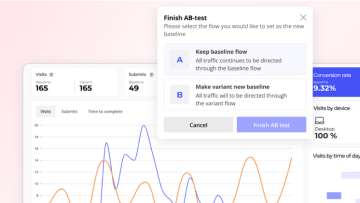
Native A/B testing with statistical significance calculation is included in the Prime plan, with drop-off analytics per screen and device-type and UTM filtering. Heyflow AI reads your funnel data, suggests what to change, and pairs every suggestion with an A/B test, while industry benchmarks show how your funnel compares to others in e-commerce. Partial submits capture data as visitors type, even when they abandon.
4. Send clean signal to your ad platforms
Browser pixels alone miss a large share of conversions: Heyflow puts the gap at 30–40%. Native server-side tracking closes it and covers the Meta Conversions API, TikTok Events API, OpenAI Ads, Taboola, and Outbrain, all included in the Prime plan: no Zapier, LeadsBridge, or Stape workarounds. Microsoft Ads is tracked via Universal Event Tracking, also included in Prime, and Google Ads and LinkedIn are tracked client-side at Heyflow. With the Meta Conversions API active, hashed PII field mapping improves Event Match Quality on Meta, so the conversions your improved PDP generates reach the ad platform's algorithm instead of being lost to browser and iOS restrictions.
Conclusion: Converting PDPs start with the basics and win with a guided path
Most PDP best practices are well known: price and CTA in the first screen, proof up front, trust signals under the button. Get those right first, then add the element that makes the real difference: a guided path that helps shoppers find the right product. With Heyflow, a marketing team can add that guided path, plus the testing and tracking to prove it works, without writing a line of code or waiting on a developer.
Book a free demoFrequently Asked Questions
What makes a product detail page convert?
A converting PDP answers three questions in the first mobile screen (what is this, what does it cost, and can I trust it), then guides the visitor to the right variant instead of leaving them to self-select. With online stores converting around 2–3% of their visitors on average, every element on the 8-element checklist can make a visible difference.
Should the price be above the fold on mobile?
Yes. Visitors who can't see the price in the first mobile screen often assume it's hidden for a reason and leave. Placing the price, the buy button, and social proof together in the first screen answers the most important questions before the visitor has to scroll.
Can I add an interactive funnel to my existing product page?
Yes. Heyflow flows embed as a web component or as a popup on Shopify, Webflow, WordPress, and other platforms, not as an iframe, so the quiz or finder sits directly on your existing PDP with no rebuild and no developer dependency.
Does Heyflow integrate with Shopify and Klaviyo?
Yes. Heyflow's e-commerce plan, Prime, includes an eCommerce Suite with Shopify, Klaviyo, Stripe, and Solidgate. Quiz answers can flow into Klaviyo to trigger personalized email flows, and redirects send shoppers straight to the recommended product.
How much does Heyflow cost?
For e-commerce brands, the Prime plan costs $259/month with annual billing ($369 billed monthly) and includes native A/B testing, the Meta and TikTok Conversions APIs, and payments. Lead-gen plans start at $29/month for Starter with annual billing ($39 billed monthly), with Growth at $99/month and Scale at $299/month (annual billing). Every self-serve plan includes a 14-day free trial with no credit card required.
Recommended articles
The 4 Best Product Recommendation Quiz Builders for Shopify 2026
Looking for the best product recommendation quiz builder for Shopify? Compare 4 top tools on tracking, A/B testing, AI features and pricing.
Read more
How to plan and build a web-to-app funnel
A step-by-step guide to web-to-app funnels for subscription apps: how to plan the offer, build the quiz and paywall, hand buyers off to the app, and send the purchase back to Meta and TikTok.
Read more
ROI and pricing calculators for lead generation: how to build one that qualifies leads
A pricing or ROI calculator is a qualification flow disguised as a utility. Here is how to design its inputs, branches, gate and output so sales gets leads it can use.
Read more