
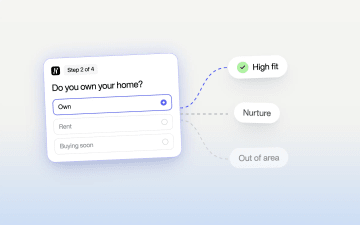
Qualify Leads Before They Submit: Stop Feeding Meta Junk







Trusted by 3,000+ marketers






To qualify leads before they submit, ask two to four one-tap intent questions inside a multi-step form, branch each answer path to its own ending, and fire your Meta optimization event only on the endings that mean "fit". Lead scoring after the form protects your sales team's time, but on paid social the submit is also the signal Meta learns from. If every submit fires the same Lead event, Meta has no reason to favor buyers over browsers.
Key Takeaways
Move qualification into the form: hard disqualifiers and intent questions with closed answers, contact details last.
Fire Lead on every completion and a separate QualifiedLead event on fit endings, from the pixel and the Conversions API with a shared event ID.
Switch optimization to QualifiedLead only when each ad set produces enough of it to exit the learning phase at your budget.
Judge the change on cost per qualified lead and lead-to-SQL rate, not raw CPL.
Why are my Facebook leads not converting when CPL looks good?
Facebook leads stop converting when the form makes the Lead event cheap to trigger and every respondent fires it, buyers and browsers alike. Ads Manager says the Leads campaign is beating target: cost per lead is down, volume is up, and the ad set left the learning phase weeks ago. At the weekly pipeline review the picture flips. Contact rate is poor, half the numbers go to voicemail, and the people who answer say they were "just looking". The sales team has quietly stopped working the Meta bucket.
Creative and targeting can be to blame, and so can slow follow-up. There is also a mechanical cause that gets less attention: your funnel sends Meta the same conversion signal for a tire-kicker as for a buyer.
A qualified lead is someone whose answers show they fit what you sell and intend to buy soon, and whom your sales team would actually want to call. Nimble's guide on qualifying website leads argues for moving qualification before the form submit so sales doesn't chase people who aren't ready. On paid social there is a second reason: qualification becomes the input the ad platform learns from.
Why is post-submit qualification too late on paid social?
Post-submit qualification is too late because the event Meta optimizes toward has already fired by the time your CRM scores the lead. In a typical setup, the pixel and Conversions API send a Lead event on submit, and your lead ad sets optimize toward that event. Meta's delivery learns from the events you send, and it can't see what happens in your CRM unless you pass that outcome back.
A low-friction form (name, email, phone, submit) attracts casual browsers alongside real buyers. If both groups fire the same event, an undifferentiated Lead gives the system little reason to favor buyers. The CRM-side pattern is familiar: CPL looks healthy while the share of leads sales can close shrinks.
Good qualification advice already pushes the work earlier. Nimble argues that "the smartest qualification happens before a lead ever reaches your CRM", and recommends intent questions in the form, routing by answers, and capturing the source of each visit for enrichment. Intent also shows in behavior: a visitor who reads several pricing pages before submitting is hotter than one who bounces from a single blog post into the form.
That approach protects the sales team's time. It doesn't change what the form submit tells the ad platform. A cleaner CRM and smarter routing change nothing on Meta if every path still fires the same Lead event. Qualification has to decide which event fires, not only where the record goes.
Your action: open Events Manager, find the event your Meta lead ad sets optimize toward, and write down exactly what triggers it. If the answer is "any form submit", you've found the leak.
Will qualifying leads in the form hurt volume and the learning phase?
Adding questions can lower form completion and raise raw CPL, and optimizing for a qualified-only event cuts optimization volume, so you phase the change in rather than switching at once. Before you narrow the event, check whether each ad set would still generate enough of it to exit the learning phase and deliver steadily at your budget. Read Meta's current learning phase guidance for today's exit conditions rather than relying on a number from an older campaign.
The change has four parts:
Keep completion healthy with progressive disclosure: one easy question per step, single-tap answers, contact details last. Each step is a small commitment, so the form feels short even with six steps.
Track two outcomes separately. Keep your existing Lead event firing on every completion and add a separate event that fires only when conditional branching lands someone on a fit ending. You keep full volume visibility and start collecting the cleaner signal right away.
Switch optimization when the data supports it. Once qualified-event volume per ad set looks sufficient under Meta's guidance, test optimizing toward it. If it doesn't, keep optimizing on Lead with the qualifying form in place, or consolidate ad sets so fewer of them split the volume.
Judge the outcome on cost per qualified lead and downstream pipeline, in a controlled test before you roll the change across the account.
A $25 lead that sales never closes is worth less than a $60 lead that books a meeting, because the cheap lead produces no pipeline. Raw CPL is the metric that made the tire-kicker problem look like success.
Your action: pull last month's Lead count per ad set, estimate what share would have passed your qualification rules, and compare that number against Meta's current learning-phase guidance. The comparison tells you whether optimizing on a qualified event is realistic now or should wait for phase two.
How do you define a qualified lead for a form?
Define a qualified lead as a short list of conditions that predict a deal, each rewritten as a multiple-choice question a prospect can answer with one tap. Get one hour with two or three of the sales reps who work Meta leads and bring their closed-won and closed-lost notes. Split what comes out into two lists:
Hard disqualifiers: conditions where sales will never close the deal, such as outside the service area, a renter for a solar install, a company of one for a product sold to teams, or a budget below your minimum job size.
Soft signals: conditions that change priority or routing but don't rule anyone out, such as timeline, role in the decision, current provider or use case.
Keep each list short. If the hard list runs past three or four items, you're probably encoding sales preferences rather than real disqualifiers, and you'll filter out people who would have bought. Every disqualifier shrinks the qualified pool, which shrinks optimization volume and pushes the account back toward the learning-phase problem. Start with the smallest set of hard rules sales agrees on and tighten later with data.
Write each rule as a question with closed answers: "Do you own your home?" with Yes, No and Buying soon; "How many people will use this?" with ranges. If a rule can't become a question a stranger answers honestly in two seconds, it belongs in post-submit lead scoring, not in the form.
Your action: leave the sales session with a one-page doc that lists each hard disqualifier and soft signal with its exact question and answer options. Get the sales lead to sign it off, because that becomes the definition you report against.
Which lead qualification questions reveal intent without killing completion?
The best lead qualification questions are ones a buyer answers instantly and a browser answers revealingly. A moving company's form shows the pattern: "When do you plan to move?" with Just researching, Within 30 days, 1–3 months and Urgent. One question separates browsers from buyers, and nobody feels interrogated.
Intent type | Example question | What it tells you |
|---|---|---|
Timeline | "When do you want this done?" | Urgency and sales priority |
Budget range | "Roughly what are you planning to spend?" | Fit against minimum job size |
Role or decision power | "Who makes the final call?" | Whether sales reaches a decision-maker |
Use case | "What are you mainly looking for?" | Routing to the right product or rep |
Personal or business | "Is this for you or your company?" | Separates B2C browsers from B2B buyers |
Then make it specific to the vertical.
Solar installer, filtering out renters: Q1 "What's your average monthly electric bill?" (Under $100, $100–200, $200+), Q2 "Do you own your home?" (Own, Rent, Buying in the next few months), Q3 zip code. Rent goes to a renter-friendly ending with community solar information or a referral. Own plus a high bill plus a zip inside the service area goes to the qualified path. Low-bill owners go to nurture.
Insurance quote form, filtering by coverage timing: Q1 "What kind of coverage are you shopping for?", Q2 "When does your current policy renew?" (Within 30 days, 1–3 months, 3+ months, I don't have coverage). Renewal within 30 days or no current coverage routes to an immediate agent callback; three months or more routes to a reminder sequence timed to the renewal date.
B2B SaaS demo form, filtering by team size: Q1 "What are you hoping to fix?", Q2 "How many people would use it?" (1, 2–10, 11–50, 51+), Q3 "What's your role in choosing a tool?" A solo user goes to self-serve signup, two to ten to a product tour plus nurture, and 11 or more with a decision-maker or evaluator role to calendar booking.
Four rules keep completion intact:
Use closed options. Open text fields slow people down on a phone, and you can't branch on free text.
Write answers people can pick without feeling judged. "I'm just researching" is an honest option; a choice that reads like a trap gets skipped or lied about.
Put the easiest, most self-interested question first. "What's your monthly bill?" works as an opener because the person wants to know what they'd save.
Ask for contact details last, after the form has shown value such as an estimate range, a matched plan or a booking slot.
This is zero-party data: the prospect tells you directly what they want and when, and the answers flow into the CRM alongside the contact record.
Your action: pick your vertical's three highest-signal questions and draft answer options for each, every option under six words so it fits on a mobile answer card.
How do you build a lead qualification form for paid social?
Build it as a multi-step form with one or two questions per step, with conditional branching deciding what each person sees next. In Heyflow, the funnel platform for paid traffic, the steps are:
Create one step per question from your bank, with single-select answer cards so a tap advances the form.
Order steps from easiest to most personal: use case or bill size first, then the hard disqualifiers, then timeline and role, then contact details.
Add conditional logic after each hard disqualifier. A renter skips the roof and bill-detail questions and goes straight to the renter ending; a solo user skips the team questions and lands on self-serve.
Add hidden fields that read UTM parameters from the landing URL (utm_source, utm_medium, utm_campaign, utm_content) plus the landing page URL, so every record carries its source.
Place the contact step last and ask for the minimum sales needs to act: first name, email and phone, with consent copy that matches how you'll contact them.
Build a separate ending for each outcome: high fit, mid fit, low fit and disqualified. The events attach to those endings.
Design for the phone, since that's where most Meta traffic lands: full-width answer cards with large tap targets, auto-advance on single-select, and a progress indicator that moves visibly with each tap. Check load time on a real device over cellular before launch.
The standard pushback is that more steps mean more drop-off. Perceived effort matters more than step count. A single page with eight visible fields looks like work before anyone types a letter, while a multi-step form that shows one tappable question at a time asks for one small decision at a time. Measure per-step drop-off after launch rather than assuming either way.
Long static forms can hold the same questions but show all of them at once and usually can't branch cleanly. Meta instant forms keep people inside the app and prefill contact details, which reduces friction and with it the intent signal. They also capture the lead on Meta's side, so your site pixel can't fire an outcome-based event; any qualification signal has to come back through a CRM integration. A website funnel gives you control over both the questions and the events.
Your action: build the form in a test environment, run through every branch on your own phone, and confirm each path reaches the ending you expect.
Where should each answer path end?
Every answer path should end on a final step that does something useful for the prospect and sets a specific CRM state for you, because a dead end wastes the click you paid for.
Ending | Who lands here | What they see | What happens in the CRM |
|---|---|---|---|
High fit | Passes hard rules, short timeline, decision-maker | Calendar booking or "an advisor will call in X minutes" | Created as sales-ready, assigned to a rep |
Mid fit | Passes hard rules, longer timeline or unclear role | Confirmation plus a useful resource | Created with nurture status and enrolled in a sequence |
Low fit | Fails a soft threshold (small budget, solo user) | Self-serve option or educational content | Created with low priority, or as a marketing contact only |
Out of area or disqualified | Fails a hard rule | Polite explanation and, where possible, a referral | Optional: logged for reporting, excluded from sales queues |
Sales sees only the top row by default, which is what earns back their trust in the Meta bucket.
Map the fields deliberately. Each qualifying answer should land in its own CRM property, not in a notes field, so reps can filter by timeline and you can report by answer. Include the hidden UTM fields and an outcome property holding the ending name; that one property makes every downstream report possible.
Heyflow sends responses through native CRM integrations, including HubSpot, Salesforce and Pipedrive, and through webhooks. Partial submits merge answers per session into those integrations, so a lead who drops off before the last step still arrives as one record. Treat privacy and data residency as real requirements, especially for insurance and financial services: Heyflow hosts data in the EU and is certified for SOC 2 Type II and ISO 27001.
Your action: write the field mapping as a two-column table (form field, CRM property) and have your CRM admin create any missing properties before launch.
How do you send Meta a qualified-lead signal?
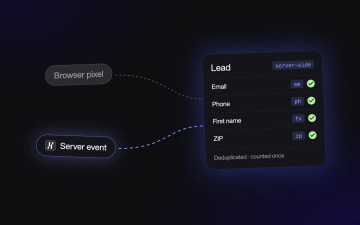
Fire a standard Lead event on every ending and a custom QualifiedLead event on fit endings, from both the browser pixel and the Conversions API. Your form knows which ending each person reached, so you can tell Meta which completions matter.
Ending | Standard event | Custom event | Purpose |
|---|---|---|---|
High fit | Lead | QualifiedLead | Optimization candidate |
Mid fit | Lead | QualifiedLead (optional, by sales agreement) | Widens the qualified pool if volume is thin |
Low fit | Lead | None | Volume visibility only |
Out of area | Lead or none | None | Decide once and keep it consistent for reporting |
Fire events on the endings, not on the contact-step submit, because the ending is where the outcome is known.
Send each event from the browser pixel and from the server through the Conversions API, with the same event_name and a shared event_id so Meta can deduplicate them.
Include hashed customer information parameters (email, phone) and the fbp and fbc values in server events to improve match quality.
Send test submissions and check in Events Manager that both events arrive, deduplicated, at the volumes you expect.
Make QualifiedLead usable as a performance goal, either by selecting the custom event where Ads Manager allows it or by creating a custom conversion on it.
In Heyflow you set this up in the form itself. Each ending's button can fire its own event, browser and server side, with a shared event ID so Meta deduplicates them. Map email and phone to Meta's customer information parameters for match quality, and attach a value per ending if lead tiers are worth different amounts. The same events can go server-side to TikTok and Microsoft Ads if you buy traffic there.
Go further when you can and send CRM stage changes back to Meta. A lead that reaches "appointment set" or "quote accepted" can fire a server event days after the click. Meta's conversion leads optimization, which relies on this kind of CRM feedback, is built around instant forms, so check current eligibility before you assume it applies to website forms. Even when you can't optimize on those events, they show which ads produce pipeline.
You get fewer optimization events, each carrying more information about what a buyer looks like. That is worth it only if volume can sustain learning. Changing an ad set's optimization event counts as a significant edit and puts it back into learning, so run the qualified-event version as a new ad set or campaign alongside the existing one instead of editing a live winner.
You can also attach a value parameter to QualifiedLead that reflects expected deal size by branch, such as a 51+ seat team worth more than an 11–50 team. Confirm that your account can optimize on value before you build around it. The value data improves your reporting either way, even if Meta never bids on it.
Your action: implement the dual events this sprint, verify deduplication in Events Manager, and let QualifiedLead collect data for at least a week before you optimize on it.
How do you check that a qualified lead is reachable?
Validate phone numbers and email addresses before the ending is reached, so QualifiedLead fires only for people your sales team can actually call. A buyer who types a wrong number is still a dead lead. Heyflow checks phone numbers at carrier level, can confirm them with an SMS passcode, and validates email addresses inside the form.
For the setup, see the guides on phone validation and OTP verification and on how to stop fake leads.
How do you measure cost per qualified lead?
Divide spend by the number of QualifiedLead events, or by CRM records with a qualified outcome, and report it above raw CPL. Change the scoreboard before you change the campaigns:
Cost per qualified lead: spend divided by QualifiedLead count, or by CRM records with a qualified outcome.
Qualified-lead rate: qualified outcomes divided by all completions, by ad set and creative.
Lead-to-SQL rate: the share of qualified leads sales accepts, pulled from the CRM.
Per-step drop-off: where people leave the form, step by step.
Heyflow's Response Summary shows the answer split per question in one view, so you can see what share of completions land on each ending without exporting anything.
Lead qualification velocity is the metric sales feels: time from submit to first contact for high-fit leads. Routing high-fit leads straight to a calendar or an instant rep alert should shorten it.
Run A/B tests instead of debating. Test question order first (disqualifier on step two versus step four), then answer wording on your highest-drop-off step, then step count. Change one variable per test and judge on cost per qualified lead. A variant that lifts completion while lowering the qualified rate is a loss.
Post-submit scoring still has a job in second place. A typical scoring model adds points for a business email, a pricing-page visit and the traffic source, then treats leads above a threshold as sales-ready. Use it as a light layer on top of the in-form outcome: answer-based fit decides the route, and behavioral points reorder reps' queues within it, so the Meta signal and the CRM agree.
Your action: build one dashboard with spend, Lead, QualifiedLead, cost per qualified lead and lead-to-SQL rate by ad set, and share it with the sales lead before the test starts.
A four-week test plan
Week 1: hold the sales session, finalize hard disqualifiers and soft signals, and build the funnel with branching, hidden fields and four endings. QA every branch on mobile.
Week 1: implement Lead on all endings and QualifiedLead on fit endings, from pixel and Conversions API with shared event IDs. Verify deduplication and counts in Events Manager.
Week 2: point an existing, stable ad set at the new form while keeping optimization on Lead. Compare its cost per qualified lead and lead-to-SQL rate against your old form over the same period.
Weeks 2 to 3: check QualifiedLead volume per ad set against Meta's learning-phase guidance. If it clears the bar at your budget, launch a duplicate ad set optimized on QualifiedLead. If not, consolidate ad sets or count mid-fit leads as qualified, then reassess.
Weeks 3 to 4: run one A/B test on the step with the highest drop-off and judge it on cost per qualified lead.
End of week 4: review results with sales using the agreed definition, decide on rollout by cost per qualified lead and SQL rate, and record the decision rule so the next test starts from it.
Frequently asked questions
What is a qualified lead?
A qualified lead is someone whose answers show they fit what you sell and intend to buy soon, and whom your sales team wants to call. In a form, that means passing your hard disqualifiers and landing on a fit ending.
Should I optimize Meta ads for qualified leads instead of all leads?
Only when each ad set produces enough qualified events to exit the learning phase at your budget. Until then, keep optimizing on Lead and collect a QualifiedLead event alongside it.
How many qualification questions should a lead form have?
Two to four qualifying questions usually separate buyers from browsers, plus contact details at the end. Keep hard disqualifiers to three or four at most.
Do qualification questions lower the conversion rate?
They can lower completion slightly, which is why you ask one tappable question per step and judge the result on cost per qualified lead instead of completion rate.
Can Meta instant forms qualify leads?
Instant forms can include questions, but the lead is captured on Meta's side, so your site pixel can't fire an outcome-based event. Any qualification signal has to come back through a CRM integration.
Recommended articles
Meta Conversions API for Lead Forms: Fix Missing Conversions
If your CRM shows more leads than Events Manager, Meta is optimizing on half the picture. This guide walks through setting up the Conversions API for lead forms: which step fires the Lead event, how to map form fields for match quality, and how to deduplicate pixel and server events.
Read more
Verify Real Leads With OTP Phone Verification
Verify real leads with OTP phone verification to stop fake submissions, improve contact rates, and send cleaner signals to ad platforms. Heyflow combines carrier validation and SMS OTP natively. Free trial available.
Read more
Funnel Platform vs Landing Page Builder for Paid Traffic
A landing page builder ships focused single pages, a funnel builder runs checkout sequences, and a multi-step form qualifies visitors on one URL. This comparison shows which destination fits your offer and traffic, how to run the page and the funnel on one platform with one tracking setup, and how to test the choice on cost per qualified lead.
Read more