
How to Increase Your Meta Ads CVR With the Heyflow AI Funnel Builder Platform







Trusted by 3,000+ marketers






Your cost per click keeps climbing, you have tested every creative angle twice, and your Meta Ads conversion rate still will not move. That plateau feels like a targeting problem, but it usually lives one step later, in what happens after the click. This guide covers three ways to rebuild the post-click funnel and its tracking. What separates them is scope: how much the system generates for you, from the full campaign down to the blocks. Speed and control follow from that choice.
Key Takeaways
Fix the funnel, not just the ad: the post-click experience is the Meta Ads CVR lever you fully control, unlike CPMs or Meta's algorithm.
The real axis is generation scope: AI Campaigns generates the ad and the funnel; Heyflow AI generates the funnel; the manual builder leaves every screen to you. Speed and control follow from that choice.
Signal loss quietly caps your results: By common industry estimates, pixel-only tracking captures only about 60% to 80% of real conversions, hiding wins from Meta's algorithm.
Heyflow ties every path to native tracking: AI Campaigns, Heyflow AI, and the manual funnel builder all include native, server-side Meta Conversions API tracking from the first click, part of server-side coverage that extends to TikTok and more.
Why Meta Ads CVR Is Getting Harder to Improve
Your Meta Ads conversion rate is the percentage of people who click your ad and go on to complete your target action, whether that is a form submission, a booked call, or a purchase. Rising ad costs make a flat Meta Ads conversion rate worse every quarter, since the same CVR buys fewer leads as CPMs climb. Three forces explain why the post-click funnel, not the ad itself, has become one of the highest-leverage levers most advertisers still control directly:
CPMs keep rising, CVR does not: if your conversion rate stays flat while cost per thousand impressions climbs, every lead costs more every quarter, with nothing in the ad account itself to blame.
Signal loss hides your real performance: Apple's App Tracking Transparency and Safari's Intelligent Tracking Prevention, which caps script-set cookies at 7 days and in some cases 24 hours, mean pixel-only tracking captures only 60% to 80% of your real conversions, by common industry estimates. The rest never reaches Meta's optimization engine, so the algorithm ends up deciding who sees your ads with an incomplete picture.
Incomplete signal stalls delivery: Meta's algorithm generally needs around 50 conversions per ad set per week to exit the learning phase. When pixel-only tracking hides up to 40% of your actual conversions, ad sets can stay stuck in that unstable, expensive stage even though the campaign is performing.
There is a fourth factor, and it sits in the reporting rather than the funnel: the attribution window. Meta's default counts 7-day click, 1-day engaged-view, and 1-day view, and since March 2026 the click-through part counts link clicks only. That window decides which conversions get credited to your ad. Set it shorter than your real sales cycle and it undercounts late conversions, making a funnel that performs look flat.
So most advice on raising Meta Ads conversion rate stops too early. Creative, audience, and offer tweaks are real ground, but they skip the layer that matters most: who builds your funnel and how your tracking reaches Meta.
That gap widens as you scale. Bigger spend means colder audiences who do not know your brand yet. By the time someone lands on your funnel, the click has already happened, and that is where your CVR is won or lost.
Increase Your Meta Ads CVRThree Ways to Rebuild the Post-Click Experience with Heyflow
Heyflow is a funnel builder platform for performance marketers, built around exactly this problem: turning post-click traffic into qualified leads, with native ad tracking underneath. It gives you three ways to do it, and the one that fits depends on how much you want generated for you: the whole campaign, just the funnel, or nothing but the blocks.
All three paths rest on the same tracking foundation, so data quality is never the variable. You are choosing on scope, speed, and control.
Option 1: Heyflow AI Campaigns Generates the Ad, Funnel, and Tracking in One Prompt
You write one prompt. AI Campaigns builds the whole Meta campaign around it: ad copy variations, image and video creatives, and a conversion-optimized funnel. It all ships to Meta Ads Manager in one click, with tracking already wired in.
The speed gap is hard to ignore. Building a Meta campaign the usual way eats 40+ hours and pulls in several specialists. AI Campaigns does it in minutes.
What about the costs? AI Campaigns starts at $49 a month. The traditional stack of design tools, a landing page builder, automation, and the people to run all of it lands somewhere between $400 and $2,000+ a month.
Who is it for? Teams without a designer or developer on hand, and anyone who wants to test numerous variants fast: solo marketers, small agencies, lean in-house teams. On publish, the Meta Conversions API, the pixel, and your UTM parameters all configure themselves. There is no Google Tag Manager to open and no technical setup between your prompt and a live campaign.
Option 2: Heyflow AI Generates a Conversion-Optimized Funnel From a Prompt
Heyflow AI builds a complete, production-ready funnel from a single prompt. Tracking, conditional logic, and design all come configured, so you never have to wire up a bare template.
This path suits teams that already run their own ad creative and targeting, inside Heyflow or outside it, but want the funnel itself to stop being the bottleneck. It sits between the two other paths in scope, not just in speed. AI Campaigns generates the ad, the funnel, and the tracking in one pass. Heyflow AI generates the funnel and leaves creative and targeting in your hands. So it runs faster than building from scratch, and it still gives you room to steer the details.
The suggestions hold up because of what the model learned from. Heyflow AI is trained on more than 150,000 funnels and landing pages, over $2 billion in ad spend, and more than 50 million responses, so it leans on what has actually converted rather than generic best practices. Once the funnel exists, Edit on Prompt lets you refine it in plain language. You change a headline, restructure a step, or adjust the flow, and you never open the visual editor to do it.
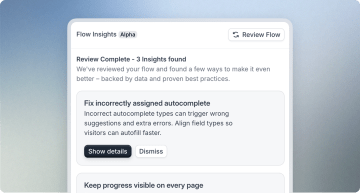
It helps to think of Heyflow AI less as a tool that executes what you delegate and more as a conversion rate strategist working alongside you. Ask it to analyze a funnel, and it returns CVR suggestions for each screen, covering design, copy, and flow.
Option 3: Build It Yourself With the Heyflow Funnel Builder
Some teams want to place every block themselves. The Heyflow funnel builder gives you exactly that. You work with more than 40 drag-and-drop blocks and over 2,000 style variables in Expert Mode, so you can match a brand down to the pixel. Custom CSS sits there if you want it, though most teams never need it.
Advanced Conditional Logic and the Logic Map take on complex, multi-criteria qualification. You build quiz-style routing where the next question depends on several earlier answers at once.
None of this is unique to building by hand. The same blocks, logic, and style controls power an AI-generated funnel too, and you can open either one in the builder and keep editing. What this path adds is full manual control from the first screen. It suits teams whose brand system or qualification logic is too specific for AI to anticipate and anyone who just wants to shape every screen themselves. It stays no-code the whole way, so you are only turning a dial on how deep you go. You never land back at needing engineers.
Lead-quality gates apply across every path, not just this one. Twilio phone network validation and SMS one-time password verification filter out junk submissions, so once your volume climbs, the extra leads stay real and reachable.
The Common Thread: Native Meta Conversions API Tracking Across All Three Paths
Whichever path you choose, Meta Conversions API is native and configures automatically. The build-speed choice and the tracking setup are separate, so you never have to trade one for the other.
That matters because of the signal-loss math from earlier. Pixel-only tracking misses 20% to 40% of real conversions, and Meta's algorithm needs a steady weekly volume of signal to optimize well. Server-side events recover conversions the pixel misses, and sending hashed customer data with each event improves Event Match Quality. Both give Meta's algorithm a more complete picture, which supports lower cost per lead over time. It also gives Meta's own diagnostics more to work with: the conversion rate ranking in Ads Manager compares your ad's expected conversion rate with ads competing for the same audience, and that estimate can only draw on conversions that actually reach Meta.
Most "increase your Meta CVR" advice stops at creative, audience, and offer tactics, and treats tracking, if it mentions it at all, as a troubleshooting checkbox rather than a strategic lever. This native, server-side setup covers Meta and TikTok, as well as Microsoft Ads, Taboola, and Outbrain. Google Ads and LinkedIn tracking at Heyflow run client-side.
Inside the Funnel: The CVR Levers Every Heyflow Path Shares
Whichever of the three paths built your funnel, the optimization work afterward happens in the same place. Advanced conditional logic and lead-quality gates already came up above, but they are only the start. These are the levers Heyflow gives you for raising the conversion rate on a live funnel:
Drop-off analytics show you where CVR leaks. Heyflow tracks drop-off per screen, so you see the exact step where visitors leave instead of guessing from a single end-of-funnel number. Filter by device type and UTM parameters, and you can tell whether the leak is the funnel itself or one specific audience, for example mobile traffic from one Meta ad set.
Native A/B testing turns fixes into evidence. Every step is testable: headlines, button copy, step order, or an entire screen. Heyflow runs the test and reports statistical significance, so you keep the variant that actually converts better rather than the one that looked better.
Heyflow AI works as a standing CVR reviewer. The per-screen analysis from Option 2 is not a one-time setup step. Ask it to analyze a live funnel whenever performance dips, and it returns concrete suggestions on design, copy, and flow for each screen.
Variables, personalization, and real-time calculations raise relevance. Pull answers from earlier steps or URL parameters into later screens, and show calculated results such as prices, scores, or savings as the visitor types. The more each screen reflects the visitor's own inputs, the more likely they are to finish.
Partial submits recover what abandoners leave behind. When someone quits mid-funnel, the answers typed up to that point are still captured. That is remarketing material and a diagnostic at once: fields with heavy partial submits are usually the fields costing you conversions.
Slow pages cost completions. Heyflow funnels render mobile-first and ship with PageSpeed scores of 90 and above, and on paid traffic every second of load time costs completion rate.
Industry benchmarks set the bar before launch. Heyflow compares your funnel's setup against industry benchmarks, so you know before spending whether your conversion expectations are realistic for your vertical, or whether the offer, not the funnel, is the constraint.
These levers work the same in every funnel, whichever path you built it with. The path decides who builds the first version; the levers decide how fast the funnel improves afterward.
Which Heyflow Path Fits Your Team?
Budget is a secondary factor next to scope and control, and the paths are not one-way streets either: many teams start with an AI-generated funnel and refine it later through Edit on Prompt or the drag-and-drop builder. The table below breaks down which path fits which team.
Path | Best for | Speed to launch | What is generated |
|---|---|---|---|
AI Campaigns | Teams with no dedicated designer or developer, or anyone testing many campaign variants fast | About 5 clicks to configure, one click to publish | Ad copy, creatives, funnel, and tracking, published to Meta Ads Manager in one click |
Heyflow AI (funnel generation) | Teams that already run their own ad creative and targeting but want the funnel built faster | One prompt, then edit on prompt refinements | A complete, production-ready funnel with tracking, conditional logic, and design configured |
Manual funnel builder | Teams with a specific brand system or complex qualification logic that needs full, hands-on control | Hands-on, no fixed timeline | Every screen built block by block, with Advanced Conditional Logic and 2,000+ style variables |
The results compound. Book More Showings, a real estate lead generation agency, increased conversion rates by 150% and cut cost per qualified lead by 57% after switching to Heyflow, a pattern that translates to any high lead-value vertical, including insurance, solar, and legal.
More broadly, Heyflow customers who replace static forms with interactive funnels typically see conversion rate increases of 80% to 100%, for example, from 3% to 6%.
Conclusion: Turning Your Meta Ads Conversion Rate Into a Growth Lever with Heyflow
Meta Ads conversion rate gains increasingly come from what happens after the click and from the tracking infrastructure behind it, with creative alone contributing less. AI Campaigns, Heyflow AI, and the manual funnel builder solve that post-click problem at three levels of generation scope, from the full campaign to every screen by hand, and all three run on the same native Meta Conversions API tracking from the first click. The path you pick depends on how much control your offer needs; none of the three is technically superior. Whichever you choose, closing the signal gap is where your next CVR gain is waiting.
Try Heyflow for freeFAQ
How does Meta Conversions API improve conversion-rate tracking for lead-generation advertisers?
Meta Conversions API sends conversion data directly from the server to Meta, bypassing the browser restrictions that block or shorten the life of pixel-only tracking. Because pixel-only setups capture only 60% to 80% of real conversions, CAPI recovers signal Meta's algorithm would otherwise miss, improving Event Match Quality and campaign optimization. At Heyflow, this server-side setup is native for Meta and TikTok (plus Microsoft Ads, Taboola, and Outbrain); Google Ads and LinkedIn tracking run client-side.
Which Heyflow AI option should agencies running multiple Meta campaigns choose?
Agencies juggling many client accounts usually get the most value from AI Campaigns, since it generates ad copy, creatives, funnel, and tracking together and scales fast without adding headcount. When an agency already owns creative and targeting and just needs the funnel solved, Heyflow AI funnel generation is the better fit, since it focuses purely on producing and refining a conversion-optimized flow from a prompt.
Do marketing teams need developer resources to set up Heyflow's AI Campaigns for Meta ads?
No. AI Campaigns is a no-code workflow: a single prompt generates the ad copy, creatives, and funnel, and publishing to Meta Ads Manager configures Meta Conversions API, the pixel, and UTM parameters automatically. You can review and adjust the campaign's audience, budget, and destination settings before publishing, no developer required. That replaces the traditional setup, where a developer typically wires up Google Tag Manager and CAPI by hand, a process that usually adds hours or days before a campaign can go live.
Can a team start with an AI-generated funnel and customize it manually later?
Yes. A funnel generated through AI Campaigns or Heyflow AI lives in the same builder as one you build by hand, so you can refine it afterward with Heyflow AI's Edit on Prompt, which restructures a step or rewrites a headline from a plain-language instruction, or open the drag-and-drop builder for full manual control over any screen. Nothing about starting with AI locks you out of hands-on editing later.
How much can Meta Ads CVR realistically improve after switching to Heyflow?
Heyflow customers who replace static forms with interactive funnels typically see conversion rate increases of 80% to 100%, for example from 3% to 6%. Results vary by vertical and deal value: Book More Showings, a real estate lead generation agency, increased conversion rates by 150% after switching. Treat these as directional ranges: your starting funnel, offer, and audience all affect the outcome.
Recommended articles

How to Create an Advertorial Landing Page That Sells (With Examples)
Learn how to create an advertorial landing page that sells, with examples by vertical, built by Heyflow’s AI and connected to your funnel in a click.
Read more
MCP: The Easiest Way to Create a Sales Funnel With AI
Prompt a sales funnel through MCP and it's hosted the moment it's built, connected in a click. That's what makes it the easiest way to build one with AI.
Read more
Heyflow MCP vs Typeform MCP vs Jotform MCP Compared
A feature-by-feature comparison of Heyflow MCP, Typeform MCP, and Jotform MCP, and which one connects to your ad platforms and CRM.
Read more