

Lead Validation: Process, Techniques & Best Practices







Trusted by 3,000+ marketers






Lead validation is the gap between collecting leads and collecting usable leads — and most teams don't close it until revenue is already leaking. This guide breaks down what lead validation actually involves in 2026, from real-time data checks to B2B scoring criteria and evolving consent and compliance requirements under TCPA, GDPR, and US state-level regulations. You'll walk away with a step-by-step process, proven techniques, and best practices you can implement today.
Key takeaways
Bad data costs businesses an average of $12.9M per year. Lead validation prevents this by catching errors at the point of entry.
Effective lead validation covers email, phone, and address accuracy, plus duplicate detection, format checks, and compliance screening.
Real-time validation (done during form submission) outperforms batch validation by stopping bad data before it enters your CRM.
Heyflow is a lead validation platform with built-in address autocomplete, phone network validation, SMS OTP verification, and email validation — all active at the moment a lead submits their details.
What is lead validation?
Lead validation is the process of verifying that every lead entering your pipeline is complete, accurate, properly formatted, and genuine before it reaches your sales team. It sits between lead generation and lead qualification, ensuring the raw data you collect is actually usable.
While lead generation focuses on volume and lead qualification determines sales-readiness (MQL vs. SQL), lead validation answers a more fundamental question: Is this lead real, and is the information correct?
A robust lead validation process checks for:
Completeness: Are all required fields filled in (name, email, phone, address)?
Accuracy: Is the email deliverable? Does the phone number connect to a real network? Is the address valid?
Format consistency: Are phone numbers in the correct international format? Are postal codes valid for the given region?
Uniqueness: Is this a duplicate of an existing record in your CRM?
Authenticity: Is this a real person, or a bot submission with throwaway data?
Without this layer, your CRM fills with decayed and unusable records and your sales team wastes hours chasing leads that were never real to begin with.
Validate your leads with HeyflowLead validation vs. lead qualification vs. lead verification
These three terms are often used interchangeably, but they serve distinct purposes in the funnel. Understanding the difference helps you build the right processes at each stage.
Term | What it means | When it happens |
Lead validation | Checking that contact data is real, complete, and correctly formatted | At point of data entry or immediately after |
Lead verification | Confirming a lead's identity, often via OTP or email confirmation | During or just after form submission |
Lead qualification | Assessing whether a lead fits your ICP and is ready to buy (MQL/SQL) | After validation, before handing off to sales |
All three matter, but validation comes first. No amount of qualification can rescue a lead built on a fake phone number or a mistyped email address.
Why lead validation matters for your sales funnel
Understanding what lead validation is and how it works is only half the picture. The real question is why it deserves a place in your operational stack, and what happens when you skip it.
The cost of bad data
Bad data doesn't just cause minor inconveniences: it compounds across every stage of the funnel. Gartner research estimates that poor data quality costs organizations an average of $12.9 million per year in wasted outreach, misrouted leads, and lost deals. Meanwhile, industry analysis from Cognism shows that B2B contact data decays by up to 30% annually — with email addresses decaying at 23–30% per year and phone numbers changing at roughly 18% per year — as people move jobs, switch numbers, and update email addresses.
When invalid data enters your pipeline, the downstream effects are significant:
Wasted sales capacity: Reps spend time calling disconnected numbers, emailing bounced addresses, and researching leads that were never real prospects.
Distorted campaign metrics: Inflated lead counts mask the true cost per qualified lead, making it impossible to optimize ad spend accurately.
Lower conversion rates: If 15–20% of your leads contain bad data, your funnel conversion rate drops proportionally, even if your sales process is excellent.
CRM pollution: Duplicate and inaccurate records degrade segmentation, personalization, and reporting over time.
Impact on the sales funnel
Clean, validated data is the prerequisite for every stage of the sales process. From the moment a lead submits their information, every subsequent interaction depends on the quality of that initial data entry. A structured lead validation process delivers measurable improvements across the funnel:
Better sales efficiency: Valid contact information means reps reach real prospects on the first attempt, reducing follow-up cycles and increasing the likelihood of conversions.
Higher marketing ROI: When you filter out invalid leads before they enter your CRM, your true cost-per-lead and cost-per-acquisition metrics become reliable — enabling smarter budget allocation.
Improved user experience: Real-time validation features like autocomplete and format checks reduce friction during form filling, leading to higher completion rates.
Reduced operational costs: Clean data minimizes the expenses associated with manual data correction, failed outreach, and returned mail.
Sales and marketing alignment
One of the most underappreciated benefits of lead validation is how it aligns sales and marketing teams. When both teams agree on validation criteria — what constitutes a "real" lead before it gets passed to sales — the finger-pointing stops. Marketing can confidently report on validated lead volume, and sales trusts that the leads they receive are worth pursuing.
This shared definition of lead quality creates a feedback loop: sales reports back on which validated leads convert, marketing adjusts targeting and form design accordingly, and overall pipeline quality improves over time.
The lead validation process: a step-by-step breakdown
Effective lead validation is a structured process applied consistently across every data capture point. Here's how it works in practice:
Data capture and initial screening: At the moment a lead submits a form, apply format validation rules: Is the email address syntactically correct? Does the phone number contain the right number of digits for the indicated country? Does the address resolve to a real location? This first pass catches the most common errors before they enter your system.
Apply validation rules by data type: Different fields require different checks. Email addresses should be validated for format and, where possible, checked against known disposable email providers. Phone numbers should be validated against carrier network data to confirm the number is active and reachable. Addresses should be autocompleted and confirmed against a verified database.
Identity verification (where required): For high-value lead flows, add a verification layer such as SMS OTP (one-time password). This confirms that the person submitting the form actually controls the phone number they provided — eliminating fake submissions at the source.
Scoring and prioritization: Once a lead is validated, apply scoring criteria to assess fit and intent. In B2B contexts, this typically involves demographic factors (job title, seniority level) and firmographic factors (company size, industry, revenue). Behavioral signals — pages visited, content downloaded, time spent — add further precision. Leads that meet all criteria are flagged as high priority for immediate sales follow-up.
Routing validated leads to sales: Validated and scored leads are automatically routed to the appropriate sales representative or CRM queue, with all verified data intact. This removes manual handoff steps and reduces the risk of leads going cold while waiting in an inbox.
Lead validation techniques
The right mix of validation techniques depends on your industry, lead volume, and the channels you use for acquisition. These are the most effective methods in practice:
Email and phone number validation: Email validation checks whether an address is syntactically correct, connected to an active mail server, and likely to deliver. Advanced email validation also flags disposable email services (like Mailinator or Guerrilla Mail) and role-based addresses (like info@ or sales@) that rarely convert.
OTP (one-time password) verification: OTP verification is the strongest form of phone validation. By requiring users to enter a code sent via SMS, you confirm not just that the number is real, but that the person filling out the form actually controls it. This dramatically reduces junk leads and bot submissions.
Address validation and autocomplete: Address validation uses geocoding databases to confirm that a submitted address exists and is correctly formatted. When combined with autocomplete — where users select from suggested addresses as they type — you eliminate typos, incomplete entries, and formatting inconsistencies before they ever reach your database.
Duplicate detection: Duplicate leads inflate your pipeline numbers and waste sales capacity. Duplicate detection compares incoming submissions against existing CRM records, flagging or merging matches based on email, phone number, or name + company combinations.
Consent and compliance validation: For regulated verticals, validating the lead data isn't enough — you also need to validate that consent was properly captured and documented. Under TCPA and evolving US consent standards, marketers increasingly need per-partner, per-campaign proof of opt-in. Native integrations with TrustedForm and Jornaya (Verisk LeadiD) deliver independent certificates recording when, where, and how consent was given. For compliance-sensitive industries like insurance, financial services, and healthcare — where a single unverifiable consent can trigger costly litigation — this layer of validation is no longer optional. Combined with data-minimization practices (such as deleting sensitive PII from the form builder's own servers once it has been passed to your CRM), consent and compliance validation closes the last gap between a valid lead and a legally defensible one.
Why accurate data matters across industries
Lead validation isn't a niche concern — it's critical wherever businesses collect contact information to drive revenue. The specific validation requirements vary by industry, but the principle is universal: bad data wastes money and erodes trust.
Home improvement services: Precise, validated addresses enable contractors to provide accurate estimates, plan efficient service routes, and avoid wasted site visits to non-existent locations.
Solar and renewable energy: Address validation helps assess service eligibility (roof type, sun exposure, utility coverage) and ensures resource allocation is optimized across territories.
Insurance and financial services: High lead values (often hundreds of euros per qualified lead) mean even a small percentage of invalid data translates to significant revenue loss. Compliance validation is especially critical here.
Social recruiting: Agencies like Leantree use interactive funnels to pre-screen candidates and validate location data, ensuring applicants are matched to location-specific roles before they reach the hiring manager.
Legal tech: Claims processing (flight compensation, consumer rights) requires verified contact data and documented consent to proceed — making validation a legal necessity, not just a quality improvement.
Any business where the lead value is high enough that a few percentage points of conversion improvement translate into meaningful revenue should treat lead validation as a core operational process, not an afterthought.
How Heyflow helps you validate leads in real time
Heyflow is built as a lead validation platform from the ground up. Every validation technique described above is available natively, working in real time at the point of data entry.
Address & Maps Block
Heyflow's Address & Maps Block streamlines address collection with two integrated features:
Autocomplete addresses: As users begin typing, a dropdown with autocomplete suggestions appears, powered by Google Maps. This speeds up the input process, eliminates typos, and ensures addresses are complete and correctly formatted from the start.
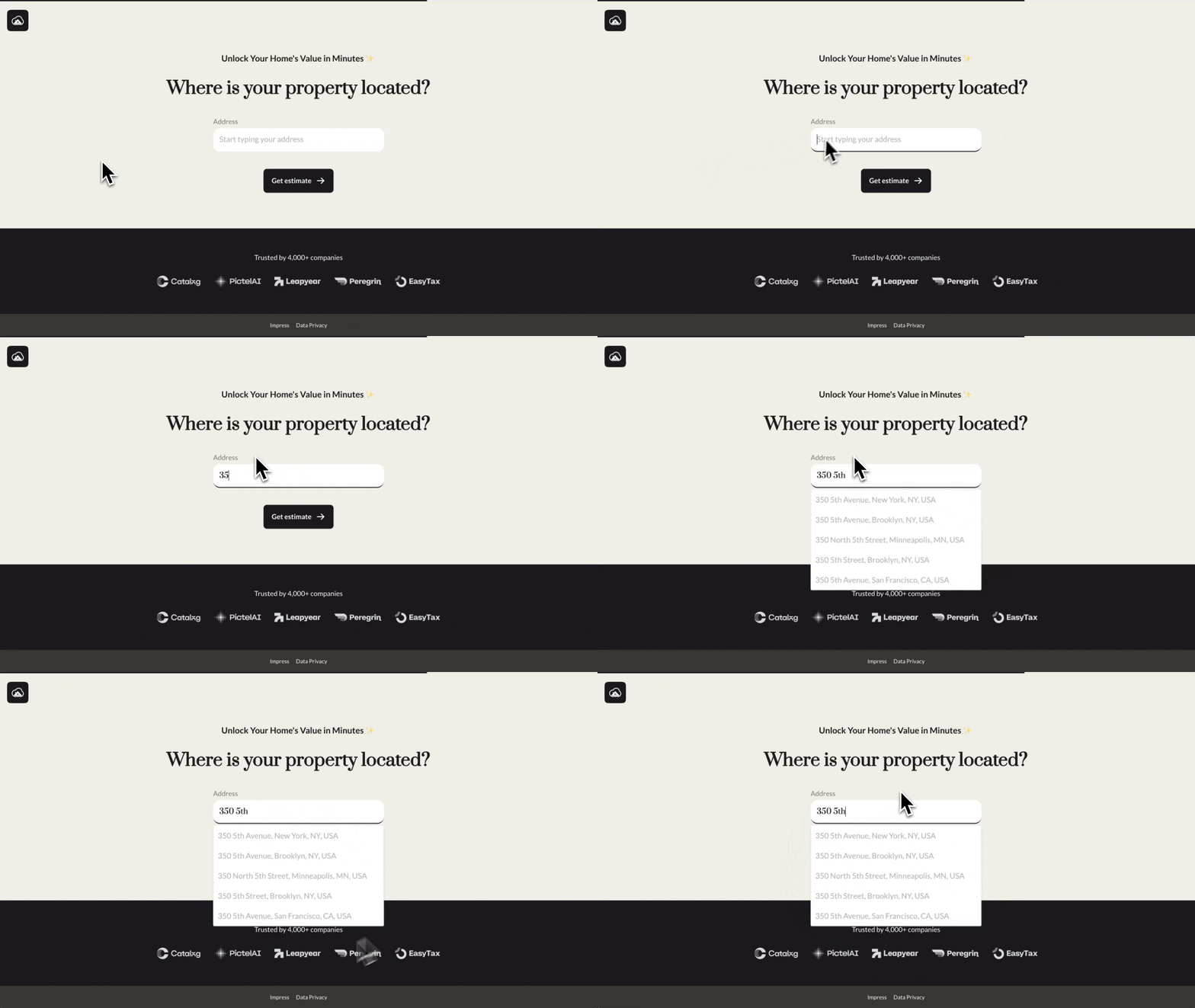
Google Map display: Once a valid address is selected, it can be displayed on an embedded Google Map. This gives users visual confirmation of their input, catching errors that text-based validation alone might miss. The result is fewer abandoned forms, cleaner address data, and more reliable service delivery for location-dependent businesses.
Email + Phone number network validation and OTP verification
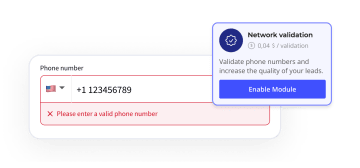
Heyflow's email validation prevents typos, flags throwaway email addresses, and confirms deliverability before the form is submitted. This ensures your email outreach actually reaches real inboxes instead of bouncing. Heyflow's phone validation works on two levels. Network validation checks that the submitted number is connected to an active carrier — users can only proceed once a valid number is entered. Built-in SMS verification (OTP) goes further, requiring users to confirm a one-time passcode sent to their phone. This proves the person controls the number they provided, eliminating junk leads and bot submissions at the source.
Partial submissions
Even with every validation and friction-reduction technique in place, some users won't reach the final step. Heyflow's native partial submissions capture the data users have already entered before they abandon — so validated email addresses, phone numbers, and other fields are recovered automatically and can be routed to a nurture sequence, retargeting audience, or sales follow-up. Combined with drop-off analytics per screen, you also see exactly where friction is occurring, turning abandoned forms into actionable insight.
Browser-native autofill support
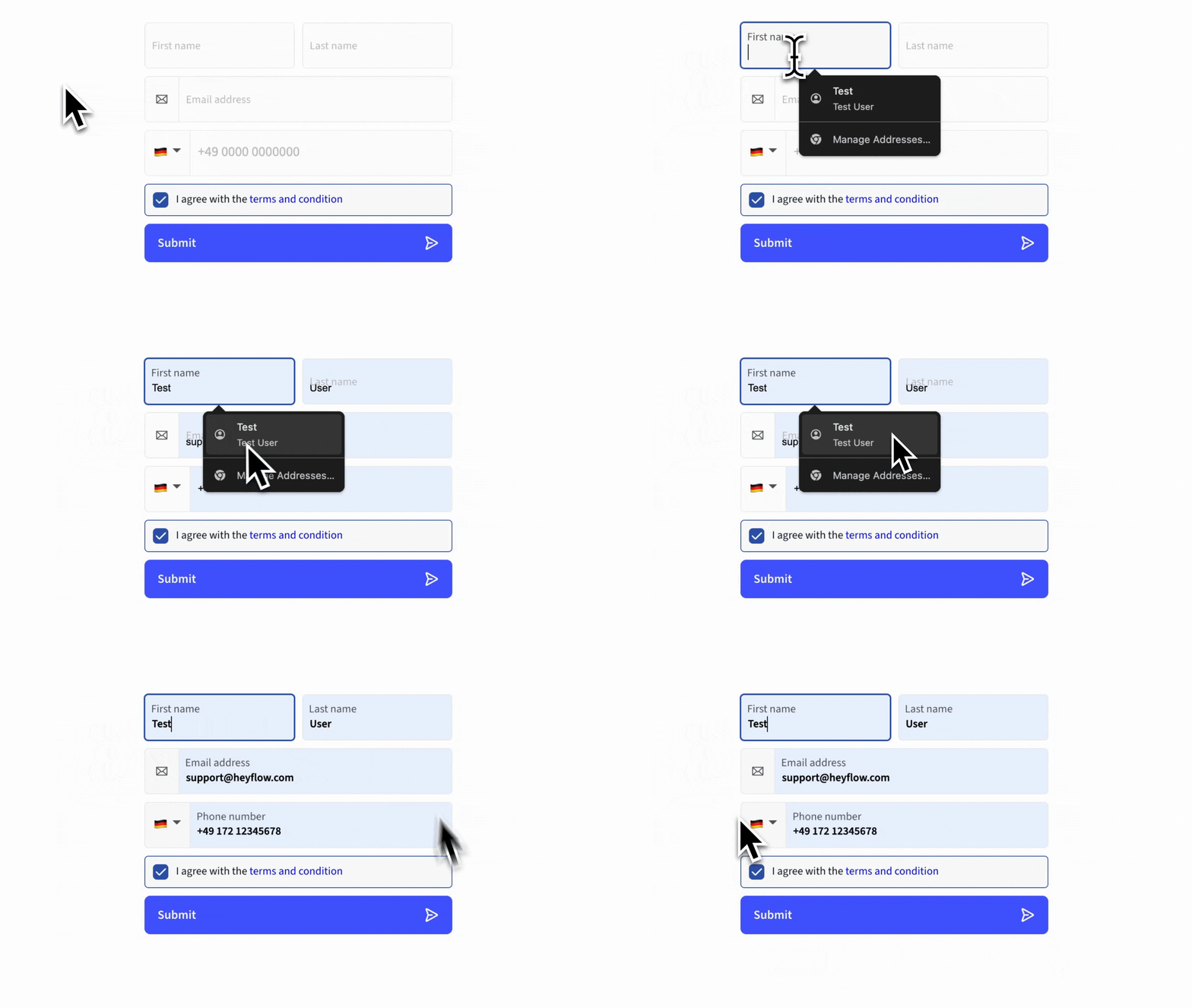
Beyond addresses, every Heyflow input field is built to work seamlessly with browser-native autofill. When users land on a form, their browser can populate name, email, phone, and city fields with a single click, using the details they've already saved to their device. Heyflow's fields use the correct semantic markup and autocomplete attributes, so autofill works reliably across Chrome, Safari, Firefox, and mobile browsers. The effect is the same outcome marketers want from validation: less typing, fewer user errors, higher completion rates, and cleaner data — without adding a single friction point.
Conditional logic for qualification at the point of entry
Heyflow's advanced conditional logic lets you build B2B lead validation criteria directly into your funnels. Based on a user's responses — job title, company size, budget range, project timeline — you can route them down different paths, ask follow-up questions, or disqualify non-fitting leads before they ever reach your CRM. This means validation and qualification happen simultaneously, in a single interactive experience.
Feeding validated conversions back to ad platforms
A validated lead is only valuable if your ad platforms know about it. Heyflow offers native server-side tracking for Meta Conversions API and TikTok Events API — no Zapier, no GTM, no Stape required. Field Mapping for Enhanced Match Quality (EMQ) automatically hashes and sends validated PII (email, phone, name, city) to Meta and TikTok so your audience matching, lookalikes, and attribution are built on real buyers instead of bounced submissions.
The result: ad algorithms optimize toward validated conversions, CPLs drop, and campaign reporting finally reflects what's actually converting.
Compliance and security integrations
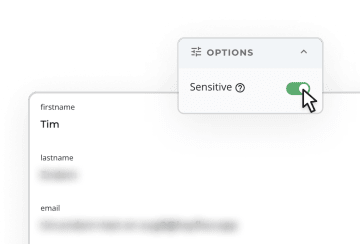
For industries where consent documentation is legally required, Heyflow integrates with TrustedForm and Jornaya to provide independent lead certification. And for highly sensitive data — health information, financial details, legal claims — Heyflow's Sensitive Tag automatically deletes the marked fields from Heyflow's servers after submission, so sensitive PII is transmitted to your CRM or destination system but never stored with us. It's a capability no other lead funnel platform offers natively.
Combined with Heyflow's SOC 2 Type II, ISO 27001, GDPR, and HIPAA compliance across all plans — not locked behind an enterprise tier — you get enterprise-grade security and audit-ready consent records out of the box.
Try Heyflow for freeConclusion
Lead validation is the difference between a pipeline full of real opportunities and one polluted with dead-end data. By validating leads in real time — checking email deliverability, phone network status, address accuracy, and consent documentation at the point of entry — you protect your sales team's time, improve your marketing ROAS, and build a foundation of trustworthy data that compounds in value over time.
Heyflow gives you the complete lead validation toolkit in a single platform: the Address & Maps Block, phone network validation, built-in OTP verification, email validation, partial submissions, browser-native autofill, advanced conditional logic, native server-side tracking for Meta and TikTok, and compliance integrations with TrustedForm and Jornaya — all backed by SOC 2 Type II, ISO 27001, GDPR, and HIPAA across all plans, plus the Sensitive Tag for automatic PII deletion.
Don't let bad data erode your conversion rates. Start your free Heyflow trial today and see the difference validated leads make.
FAQ
What is the difference between lead validation and lead qualification?
Lead validation checks that contact data is real, complete, and correctly formatted — it's about data quality. Lead qualification assesses whether a validated lead fits your ideal customer profile and is ready to engage with sales — it's about fit and intent. Validation happens first; qualification follows. A lead cannot be meaningfully qualified if the underlying data is inaccurate.
How do you validate leads in real time?
Real-time lead validation happens at the point of form submission using automated tools: format and syntax checks flag errors instantly, address autocomplete resolves entries against a verified database, phone network validation confirms numbers are active, and SMS OTP verification confirms the submitter controls the number. The key is embedding these checks into the form or funnel itself, so validation is invisible to the user but happens before any data reaches your CRM.
What are lead validation services?
Lead validation services are tools or platforms that automate the process of verifying lead data quality. They range from standalone email verification tools to comprehensive funnel platforms like Heyflow that combine address validation, phone network checks, OTP verification, and compliance integrations in a single workflow. The most effective lead validation services operate in real time, at the point of capture, rather than cleaning data in batches after submission.
Why is lead validation especially important for B2B lead generation?
In B2B contexts, the cost of pursuing a bad lead is high — sales cycles are long, outreach is resource-intensive, and each wasted contact attempt has a real opportunity cost. B2B lead validation also involves more complex criteria than B2C, including firmographic and behavioral fit alongside basic data accuracy. Establishing shared validation criteria between marketing and sales teams is one of the most effective ways to improve pipeline quality and reduce friction between the two functions.
How do I ensure the leads I collect have accurate email and phone details?
The most reliable approach is to validate at the point of entry using a combination of format checks, network validation, and identity verification. For email, validate syntax and domain in real time and flag known disposable address providers. For phone numbers, use network validation to confirm the number is active, and add SMS OTP verification for high-value flows. Building these checks into your form or funnel — rather than relying on post-submission cleaning — is the only approach that consistently prevents bad data from entering your pipeline.
Recommended articles

Typeform vs. Jotform: Which Form Builder Is Right for You? (2026)
Typeform or Jotform? Which form builder fits your team? Compare features, pricing, and compliance.
Read more
The 5 Best AI Form Builders in 2026
Looking for the best AI form builder for paid ads? Compare Heyflow, Claude, Lovable, involve.me, and Fillout and find out which one actually drives ROAS.
Read more
How to Build a Lead-Routing Intake Form for Brokerages
Build a lead-routing intake form for real estate brokerages that captures, qualifies, and auto-assigns leads to the right agent by geography, budget, and timeline.
Read more