
Meta Conversions API for Lead Forms: Fix Missing Conversions







Trusted by 3,000+ marketers






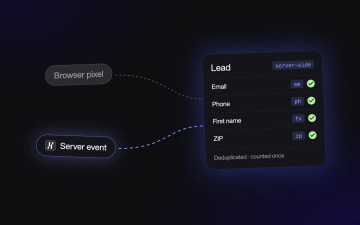
Meta undercounts form leads when the Lead event reaches it only through the browser pixel. The fix is the Meta Conversions API (CAPI) sending a validated Lead event from the server, with your form fields mapped for match quality and a shared event ID so the browser and server copies count once. Until then, your return on ad spend (ROAS) looks worse than reality and cost per lead (CPL) creeps up, because the algorithm optimizes on the partial data you send it.
Key Takeaways
Missing conversions distort ROAS and starve Meta's optimization of the signal it needs to find more people who convert.
CAPI sends events from a server, so those events are less exposed to browser-side loss than pixel-only tracking.
For lead gen, the event's position in the funnel and the fields sent with it matter as much as the connection itself.
Field mapping for match quality and pixel/server deduplication are easy to get wrong, and both decide whether Meta counts each lead once and matches it to a real person.
Validating leads with phone checks, email checks or SMS one-time passcode (OTP) verification before the conversion fires keeps junk leads out of the signal.
What the Meta Conversions API is (and what it doesn't fix on its own)
The Meta Conversions API (CAPI, formerly the Facebook Conversions API) is server-side tracking: conversion events go from a server to Meta instead of relying only on the Meta Pixel in the visitor's browser. Technically it's an Application Programming Interface (API). Your server posts an event (Lead, Purchase, or a custom event) with customer identifiers attached, and Meta tries to match it to a Facebook or Instagram user.
It exists because pixel-only tracking leaks. Ad blockers can stop the pixel from loading, and browser privacy settings can limit the cookies it depends on. How much browser signal survives varies by device and browser, which is why iOS conversion tracking comes up so often in these discussions. Lead-gen journeys that span days or weeks make attribution harder still. A server event doesn't depend on a cookie surviving in the browser, so it can reach Meta when the pixel's copy doesn't.
CAPI is a transport layer. It moves whatever you hand it. It doesn't decide which funnel step counts as a lead, which form fields travel with the event, whether the browser and server copies get deduplicated, or whether the person who submitted is real. Those four decisions shape what Meta learns about who converts, and they live in your funnel.
If CAPI already shows as connected through a partner integration, a Shopify app, a plugin or a server-side Google Tag Manager (GTM) container, keep it. The useful question for your Meta ads conversion tracking is what that setup sends. A one-click or partner setup can make some of these decisions for you and may give you limited room to change them. Open Events Manager and check which events arrive, which parameters come with them and whether deduplication is working. Then make your changes at the funnel level.
Meta's one-click Conversions API, announced in April 2026 and rolling out to eligible Pixel users, mirrors your Pixel events. It doesn't let you choose which step fires the event, map form fields for match quality or attach a lead value, and that control is where form conversions get won or lost.
Before you start: what to have in place
You need admin access to Meta Business Manager and Events Manager, on the dataset (the pixel plus its server source) your campaigns optimize against. Decide your lead event per funnel before touching settings: the standard Lead event on the final validated submit, plus any custom event you want on a qualifying step. List the form fields you collect, typically email, phone, first and last name, and ZIP code, because those fields feed match quality. Confirm your consent setup fits the states you advertise in. Then pull a baseline: leads in your CRM over the last 30 days next to Lead events in Events Manager for the same window. That gap is the number of conversions your Facebook ads are missing, and it's your starting point. Keep the Meta conversion API documentation open while you work.
The common setup choices are a WordPress plugin, a server-side GTM container, or relaying events through Zapier or Make.com. Put the server event where the form data lives. Every hop between the submit and Meta is another place for fields to drop and another system you maintain, which is why the setup below runs inside the funnel.
How to set up Meta Conversions API tracking that catches every form conversion
The connection is step one. These five decisions are where conversions get lost, and each one is a setting you control per funnel when server-side tracking is native to the funnel tool.
1. Pick the conversion step deliberately
Fire Lead on the validated final submit, never on page load or a button click. A button click counts people who tapped and then abandoned on a failed validation, and a page-load event counts visitors who never filled anything in. Take a six-step solar quiz: roof type, monthly bill, ownership, ZIP code, name, phone. Lead fires only after the phone step validates. If you also want earlier signal, add a custom event such as "QualifiedHomeowner" after the ownership question and keep it out of your optimization goal until you've watched its volume for a week.
2. Map form fields for match quality
Event Match Quality (EMQ) is Meta's per-event grade of how well your customer identifiers match users. It rises with the identifiers you send and how cleanly you format them. In the funnel's Meta tracking settings, you map each field to its customer information parameter: "Email field → em, Phone field → ph, First name → fn, Last name → ln, ZIP → zp." Normalize before hashing: lowercase and trim emails, and send phone numbers digits-only with the country code (1 for US numbers). Add an external ID if your CRM assigns one.
3. Run browser and server together, deduplicated
Keep the pixel. Browser events carry signals such as the _fbp cookie and the click ID from the ad URL, and server events survive where the browser drops out. Running both only works if Meta can tell they describe the same conversion. Both copies need the same event name and a shared event ID (eventID on the pixel, event_id on the server). Meta's deduplication guide has the exact parameters. Without that shared ID, Meta can't reliably tell the two copies apart, which risks double-counting your leads.
4. Gate the lead before the event fires
Meta optimizes toward whoever fires your Lead event. If a fake number or a bot fires it, you've told the algorithm to find more of them, and your CPL will look great right up until sales calls the list. Put phone validation on the phone step, SMS OTP verification on high-value funnels, and email validation on the email field, then let Lead fire only after those checks pass. Every lead that fails a check is one fewer junk signal training your ads toward the wrong people.
5. Track partial submits and drop-off
Step-level drop-off analytics show where people abandon. If a large share of visitors leave at the phone step, you have a form problem that no tracking setting will fix. Partial submits capture the email of someone who left before the end, so sales can follow up. Decide whether that partial deserves a secondary event to Meta. Usually it shouldn't be Lead, since it hasn't passed your validation gate.
Combined, it looks like this: a home-services funnel fires a custom event when the user picks a service and ZIP code, fires Lead only after the phone number passes phone validation, sends em, ph, fn and zp with that Lead from the server, shares the event ID with the pixel copy, and stores partial submits for sales without telling Meta they're leads.
A full example, start to finish: an insurance quote funnel
You run Meta traffic to a multi-step auto insurance quote form. Your CRM shows noticeably more leads than Events Manager reports as Lead events, EMQ on Lead is graded low, and CPL has drifted up for two months. Here's the sequence.
Export CRM leads for the last 30 days and compare them, day by day, with Lead events in Events Manager.
Open the Lead event in Events Manager and check the connection method. If it shows browser only, every iOS user who opted out of tracking and every visitor running an ad blocker is invisible to Meta.
Enable server-side Meta tracking on the funnel and select the same dataset your campaigns optimize against.
Set Lead to fire on the final submit step (the one after vehicle, driver and coverage questions), removing any click-based trigger.
Map the email field to em, the phone field to ph, first and last name to fn and ln, and ZIP to zp.
Open Test Events in Events Manager, submit the funnel yourself, and confirm you see one Lead marked as received from both browser and server, deduplicated.
Add carrier-level phone validation to the phone step so Lead fires only for reachable numbers.
Watch the CRM-to-Events Manager comparison daily for two weeks.
What changes: counts in Events Manager align more closely with your CRM because server events cover the conversions the pixel missed. EMQ improves because Meta now receives four or five identifiers per Lead instead of whatever the browser happened to carry. Leads with disconnected numbers stop reaching Meta, so the algorithm stops learning from them.
Two refinements. If a campaign runs on a small daily budget and struggles to exit the learning phase, add a custom event on the qualifying step (say, "has current policy" answered yes) and test optimizing toward it on that campaign only. You trade some precision for volume, so keep your main campaigns on Lead. Then A/B test a shorter variant against the control, cutting the coverage questions down to one. Hold the tracking setup identical across both variants: same event, same step logic, same field mapping. If you change tracking and the form at once, you can't tell whether the CPL shift came from the form or from the measurement.
This is the usual fix when Facebook ads aren't tracking conversions on form funnels. The connection was fine. The event fired from the browser alone, with thin data, on unvalidated leads.
Second example: an ecommerce quiz funnel feeding a product page
Lead gen isn't the only case. A skincare brand on Shopify sends a slice of paid traffic to a product-recommendation quiz, while the rest still lands on the existing product detail page (PDP). The PDP is the baseline: you compare the quiz against it on the same campaigns.
The event choices differ from lead gen:
Fire a custom event, "QuizComplete", when the user reaches the results step.
Fire Lead when the user enters an email to save their routine, mapping email to em.
Let the user add the recommended products to the Shopify cart straight from the quiz.
Leave Purchase to the store side, through Shopify's own Meta integration.
Two systems now send events about the same person: the quiz funnel and Shopify. If they identify that person differently, Meta can't connect "completed the quiz and gave an email" with "bought three days later." Pass the same identifiers on both sides. The email captured in the quiz should be the email used at checkout where possible, and the click ID from the original ad should carry through. Also make sure only one system sends each event: if both the quiz and Shopify fire AddToCart, they need a shared event ID, or you pick one owner. Most double-counting in ecommerce setups traces back to two tools both believing they own the same event.
A short variant for multi-platform advertisers: the same quiz also runs on TikTok and Microsoft Advertising traffic. Turn on server-side events for those platforms in the same funnel, with the same step logic, instead of rebuilding a separate container per platform. QuizComplete means the same thing everywhere, which makes your cross-channel reporting comparable.
What comes with Heyflow
Heyflow is the funnel platform for paid traffic, and the tracking layer sits inside the funnel you build. You get native server-side tracking to Meta CAPI, TikTok, Microsoft (Bing), Taboola, Outbrain and OpenAI Ads without middleware, while Google Ads and LinkedIn run client-side. You control which step fires which event and map form fields to each platform's parameters for match quality. You put lead-quality gates in front of the event (carrier-level phone validation, SMS OTP, email validation) and merge partial submits into your integrations. You run native A/B testing with statistical significance on the whole funnel and read step-level drop-off analytics. For regulated verticals there's SOC 2 Type II, ISO 27001, HIPAA, EU hosting and Sensitive Tag. When Meta changes the Conversions API, Heyflow updates the integration, so nobody on your team rebuilds a container. Meta CAPI is part of the Scale plan with the Insights bundle, or Prime.
How to measure whether the fix worked
Measure the gap you baselined. Each week, divide Lead events in Events Manager by new leads in your CRM for the same funnel and date range. Before the fix, that ratio is usually well below one. After the fix it should move toward one, but never land exactly on it, because consent declines and some unmatched events stay invisible to Meta by design. Check EMQ on the Lead event directly in Events Manager, since it shows which identifiers Meta receives and how often. Then watch CPL in Ads Manager next to cost per qualified lead from your CRM. Ads Manager CPL may rise slightly after you add validation gates, because you've stopped counting junk. Cost per qualified lead is the number that should fall, and it's the one your client or CFO cares about.
How to feed closed deals back to Meta
The form submit tells Meta who filled in a form. It doesn't tell Meta who bought. If your sales cycle runs days or weeks, send a later-stage event once the CRM marks a lead as qualified or closed, for example a custom "QualifiedLead" event or Purchase with a value. Use the same identifiers you sent at submit (hashed email, hashed phone and external ID) so Meta can tie the outcome back to the original click. Some CRMs, Kommo and HubSpot among them, have their own Meta connections for pipeline stages. Webhooks from your funnel into the CRM keep the identifiers consistent between both systems. Once you have enough closed events, test a campaign that optimizes toward the qualified event instead of raw Lead.
How to test funnel changes without breaking your tracking
Change one layer at a time. When you A/B test a funnel, both variants should fire the same events on the equivalent step with the same field mapping, so the only difference between arms is what the user sees. Run the test long enough to reach significance on your primary conversion, not just on clicks. If you need to change tracking (say, moving Lead from step five to step six), treat it as its own change with its own before-and-after window, and annotate the date in your reporting. Heyflow's Agent Optimize reviews your funnel data, explains what to fix and can launch the fix as a native A/B test, which keeps the "we changed five things and CPL dropped" problem out of your reporting.
How to report ROAS when Meta and your CRM disagree
They will never match exactly, so report both and explain the gap. Meta attributes conversions inside its attribution window using its own matching, and your CRM counts every lead regardless of source. Show Meta-reported ROAS for in-platform optimization decisions (which ad set to scale, which creative to kill). Show CRM-based ROAS, using closed revenue divided by spend per campaign and UTM-tagged at the click, for budget decisions. When server-side tracking, field mapping and deduplication are in place, the two numbers move together even if they don't match, and that's what lets you trust Meta's numbers for daily calls. If they diverge sharply in one week, check deduplication and event triggers before you blame the creative.
Examples by vertical
Vertical | Example | What it achieves |
|---|---|---|
Insurance | Lead fires after phone validation on a quote form; em, ph, zp mapped | Meta learns from reachable prospects, and CRM counts align more closely with Events Manager |
Solar | Custom event on homeowner confirmation, Lead on validated phone | Low-budget campaigns get earlier signal without diluting the main Lead goal |
Telehealth | Lead on intake completion, health answers kept out of the event payload | Match quality from contact fields while sensitive data stays out of ad platforms |
Home services | Lead after service type, ZIP and SMS OTP | Fewer fake bookings reach Meta's optimization signal |
Legal | Lead on case-review submit, qualified event sent back from the CRM | Campaigns can optimize toward cases that sign instead of raw inquiries |
Ecommerce | QuizComplete custom event, Lead on email capture, Purchase from Shopify | Two systems report one customer journey without double-counting |
Common issues
Why are Lead events doubled after I enabled server-side tracking?
The browser and server copies don't share an event ID, or the event names differ (for example "Lead" on the pixel and "lead_submit" on the server). Make both copies use the identical standard event name, pass the same event ID on both, and verify in Test Events that one submit produces one deduplicated Lead.
Why does EMQ stay low even though server events arrive?
Usually the server event carries only an IP address and user agent because form fields aren't mapped, or phone numbers arrive without the country code. Map every identifier you collect to its parameter, normalize phone to digits with the country code, and add an external ID. If the phone field is optional, test making it required on the final step.
Why did CPL drop while sales says the leads are junk?
Lead is firing too early or on unvalidated submits, so Meta found cheaper people who fill in forms with fake details. Move Lead to the validated final step, add carrier-level phone validation or SMS OTP, and start sending a qualified event from the CRM so the algorithm has something better to chase.
Your next step: pull last month's CRM lead count for your highest-spend Meta funnel, put it next to Lead events in Events Manager, and open Test Events to see whether your Lead arrives from the server, with which fields, and deduplicated. That ten-minute check tells you which of the five decisions above to fix first.
Try Heyflow for freeFAQ
What is the Meta Conversions API?
The Meta Conversions API is a server-side connection that sends conversion events from your server to Meta with hashed customer identifiers attached. It complements the Meta Pixel by recovering events the browser loses to ad blockers, cookie limits and iOS privacy settings. For form funnels, the value depends on which step fires the event and which fields you send with it.
Do I still need the Meta Pixel if I use the Conversions API?
Yes, run both. The pixel captures browser-side signals such as the _fbp cookie and the click ID, and the server event survives when the browser blocks the pixel. Meta recommends the redundant setup, provided both copies share the same event name and event ID so Meta deduplicates them into one conversion instead of counting two.
Why is Facebook not tracking my conversions?
Most often the event fires from the browser only, so ad blockers and iOS tracking restrictions hide part of your conversions. Other causes include Lead firing on the wrong step, a redirect that skips the thank-you page carrying the pixel, or deduplication discarding events. Compare CRM leads with Events Manager daily, then check the connection method on the Lead event.
How does iOS affect Meta ads conversion tracking?
iOS privacy changes limit what the browser pixel and the Facebook app can observe about users who opt out of tracking, so pixel-only setups undercount iOS conversions. Server events with hashed email and phone give Meta another way to match those users. The fix for iOS conversion tracking is better identifiers sent from the server, alongside the pixel.
What is a good Event Match Quality score?
A good EMQ is one that improves after you add identifiers, because Meta grades it per event and there's no single target number worth chasing. Check which parameters Events Manager says it receives on your Lead event. If email and phone are missing or formatted incorrectly, fix those first. Adding name, ZIP and an external ID helps after that.
Is a WordPress plugin enough, or do I need server-side GTM?
A plugin can send basic events, and server-side GTM gives you more control at the cost of hosting and maintaining a container. For form and quiz funnels, the deciding factor is where the form data lives. Sending the server event from the funnel itself removes the hops where fields drop and leaves no separate container to maintain.
Which Heyflow plan includes Meta CAPI?
Meta CAPI in Heyflow is part of the Scale plan with the Insights bundle, or the Prime plan. Both include server-side tracking with field mapping, per-step event control and native A/B testing. Lead-quality gates such as phone validation and SMS OTP sit in the same funnel, so the event fires only after validation passes.
Can I send closed deals back to Meta through the Conversions API?
Yes. Send a later-stage event, such as a qualified-lead custom event or Purchase with a value, from your CRM using the same hashed identifiers you sent at form submit. Meta then links the outcome to the original ad click. Once you have enough of these events, test optimizing a campaign toward them instead of raw leads.
Recommended articles
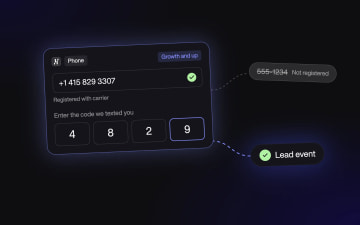
How to Stop Fake Leads From Meta Lead Ads Before Your CRM
Fake leads cost you twice: once when sales dials a dead number, and again when Meta learns to find more people like them. This guide shows how to stop them at the point of capture with phone validation, SMS OTP and qualifying questions, so only verified leads reach your CRM and your ad set.
Read more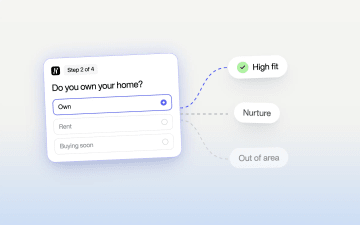
Qualify Leads Before They Submit: Stop Feeding Meta Junk
Cheap leads that sales never closes usually trace back to one setting: every form submit fires the same Lead event. Learn how to ask a few intent questions inside the form, route each answer to its own ending, and send Meta a separate event for the leads worth paying for.
Read more
Verify Real Leads With OTP Phone Verification
Verify real leads with OTP phone verification to stop fake submissions, improve contact rates, and send cleaner signals to ad platforms. Heyflow combines carrier validation and SMS OTP natively. Free trial available.
Read more