
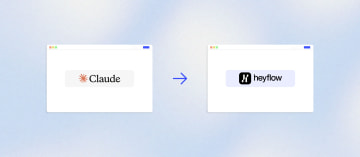
How to Migrate Your Funnel or Form from Claude to Heyflow







Trusted by 3,000+ marketers


Claude Design built you a clean landing page or form in minutes, and now you're staring at a file with nowhere to send it. No hosting, no tracking, no CRM connection, no idea what happens when real ad traffic hits it. Migrating that page into Heyflow is less about rebuilding and more about giving it the infrastructure it never had. Here's how to do it without losing the design you already approved.
Key takeaways
Claude Design outputs production-ready front-end code but ships with zero backend: no tracking, no CRM delivery, no validation, no partial capture.
A HIPAA-ready Claude plan covers your AI workspace, not the landing page collecting health data from an ad, those are separate compliance obligations.
Heyflow imports Claude Design exports as editable pages in one click, and its MCP connection lets Claude keep building and publishing funnels directly into your account.
Heyflow adds the missing layer, server-side tracking for six ad platforms, 50+ native CRM integrations, SMS OTP validation, and per-screen drop-off analytics.
What you actually have when Claude finishes building
You prompted Claude, it produced a landing page or a multi-step form, and it looks genuinely good. Claude Design generates production-ready HTML, CSS, and JavaScript from a description, it can read a design system so the output stays on brand, and it lets you revise through conversation instead of a ticket queue. For prototyping, pitching, and internal alignment, which is what Anthropic built it for, that is a strong offer.
The problem starts the moment you point paid traffic at it. What Claude hands you is a file. What a campaign needs is infrastructure. Those are different things, and the gap is bigger than most marketers realize before their first week of spend.
What a paid-traffic funnel needs | What raw Claude output ships with |
Public hosting on your own domain with SSL | An artifact on claude.ai or a file you still have to deploy somewhere |
Server-side conversion tracking | Nothing. Claude Design does not generate a backend |
Lead delivery into a CRM | Nothing native. Usually a form endpoint pointed at an inbox |
Per-screen drop-off analytics | Nothing |
A/B testing with significance calculation | Nothing |
Phone, email, and address validation | Nothing |
Partial capture on abandonment | Nothing. A 70% complete session is simply gone |
A BAA covering the page collecting the data | Out of scope. An AI vendor's HIPAA-ready plan covers the AI workspace, not your landing page |
That last row is the one that catches healthcare and insurance teams hardest. A HIPAA-ready AI subscription governs how your prompts and conversations are handled. It says nothing about the static page you deployed to a hosting provider that is now collecting health information from a Meta ad. Those are separate data flows with separate obligations.
The common field pattern we see looks like this: a static host, a hardcoded pixel in the head, a form endpoint firing into an inbox, a Zapier chain for notifications, and GA4 pageviews standing in for conversion data. Every piece works in isolation. Together they produce a funnel the ad algorithm cannot learn from, a sales team that cannot reach half the leads, and a marketer who cannot explain why CPL is climbing.
Three ways to move a Claude-built funnel into Heyflow
You can move a Claude-built funnel into Heyflow in three ways: prompt the page directly inside Heyflow, import it 1:1 from Claude Design as a ZIP or HTML file, or push it from Claude into Heyflow through the Heyflow MCP connection. In all three cases it lands as a hosted Heyflow page, connected in one click to your funnels, tracking, custom domain, and analytics. It is not a code block you embed and then cannot edit again.
That last point matters more than it sounds. The prevailing assumption in marketer communities is that moving AI-generated output into a marketing platform means converting React to static markup and pasting it in as a dead block. The Heyflow HTML and ZIP import is optimized for Claude Design exports and the import stays editable. You keep working on it like any other Heyflow page.
Path one: prompt it again inside Heyflow
Best when the Claude page was a rough draft, a first pass, or something you were never fully happy with. Describe the funnel in Heyflow and Heyflow AI generates a performance-ready flow with tracking and logic intact, not a generic template. Run Design Import alongside it: point it at your website URL or drop in a screenshot of the Claude page, and the AI matches your brand automatically.
Brand Hub makes this materially better. It is a research agent that reads your website and builds the brand context the AI writes from, your audience, their pains, their objections, your proof points, and your visual identity. The output reads like your brand rather than like a prompt.
Path two: import the Claude Design export as ZIP or HTML
Best when the design is approved, signed off, and you do not want to relitigate it. Export standalone HTML from Claude Design, import the file or ZIP into Heyflow, and it lands as a Heyflow Page you can keep editing. This is the fastest route to visual parity and the one agencies reach for when a client has already said yes to the look.
Path three: push it from Claude through MCP
Best when you want to stay in Claude long-term. Connect Heyflow as a custom connector in Claude once, at mcp.heyflow.com, and it persists across conversations. From there Claude can create, build, and publish Heyflow funnels and Heyflow Pages, including Claude Design and static HTML import, directly into your account. The Heyflow MCP Server has been live since May 2026 and is included in every plan.
One honest caveat on scope: tracking pixels, CAPI tokens, and CRM connections are configured per funnel inside the Heyflow app, not through MCP. Budget roughly twenty minutes per funnel for that configuration. The build is fast; the wiring is a separate, deliberate step.
Which path, in one line each
Situation | Path |
The Claude page was a draft and you want better conversion structure | Prompt in Heyflow |
The design is approved and you need visual parity fast | Claude Design ZIP or HTML import |
You live in Claude and want the agent to keep operating the funnel | Push via MCP |
One structural decision to make before you import, not after: is this a page or a funnel? Advertorials, listicles, and pre-sell pages belong in Heyflow Pages. Multi-step qualification, eligibility logic, and lead capture belong in a funnel. A Page can open a funnel as a pop-up, which is the standard architecture for paid traffic and usually the single biggest structural upgrade a Claude page receives.
Where this matters most: the formats that sit in front of your funnel
Claude is particularly good at producing long-form editorial layouts, and that is exactly the format that warms cold paid traffic. Advertorials, listicles, pre-sell pages, and eligibility checks are where Claude output and Heyflow Pages meet most naturally.
Heyflow Pages launched in September 2026 and is available on all plans. The Pages agents research your briefing and choose the format with the highest conversion chance, building from hook, story, proof, and call to action rather than from a blank template. A sticky bar block keeps the CTA in view, and the page can open your funnel as a pop-up so the warm-up and the capture live in the same asset.
This also explains why the server-side tracking list matters here specifically. Advertorial and listicle traffic runs heavily on native advertising platforms, and Taboola and Outbrain are both in Heyflow's native server-side set. A Claude page hosted statically sends those platforms nothing usable.
One accuracy note so you can plan: native A/B testing currently runs on funnels. A/B testing for Pages is announced but not live yet.
Wiring the funnel for performance after it lands
This is the 90% that no forum thread covers and the reason the migration pays for itself.
Conversion tracking, stated precisely
Heyflow supports native server-side conversion tracking for exactly six platforms: Meta Conversions API, TikTok Events API, OpenAI Ads, Bing/Microsoft Ads, Taboola, and Outbrain. Google Ads and LinkedIn tracking in Heyflow is client-side (pixel), not server-side, not CAPI.
Say that out loud to your team before you plan the migration, because a vague "we'll have server-side tracking" promise is how attribution projects go wrong. The six above fire server-side. Google Ads and LinkedIn fire from the browser.
Why it matters for a page that previously had only a hardcoded pixel: browser-only setups lose a meaningful share of conversion signal to tracking prevention, ad blockers, and mobile privacy controls, with vendor estimates clustering in the 25% to 40% range. Treat that as directional and verify it against your own Events Manager. What is not directional is Meta's own rule: only matched events can be used for attribution and delivery optimization. An event that does not match is not a weak signal, it is no signal.
Two implementation details worth getting right on day one. Server-side and browser events must share identical event_name and event_id parameters or you will double-count. And check Event Match Quality at day three and day fourteen rather than day one, because matching needs volume before the score means anything.
Lead delivery and lead quality
Heyflow has 50+ native integrations including HubSpot, Salesforce, Pipedrive, Zoho, HighLevel, ActiveCampaign, Google Sheets, Airtable, and Monday.com, plus Zapier with 3,000+ apps, Make, webhooks, and a public API. In most migrations the CRM connection actually gets better, because a native integration replaces a Zapier hop and speed-to-lead drops from minutes to seconds. Automated response emails over custom SMTP, WhatsApp, and Slack notifications replace the notification chain entirely.
Quality is the other half. Heyflow offers both native phone network validation and SMS OTP verification, and it is the only funnel builder with both natively. Add email validation, TrustedForm, and Jornaya/Verisk for consent certification in US lead gen. A Claude-built form has none of this, which means your media budget is buying mistyped numbers at full CPL.
Turn on partial submits on day one. Data is captured as users type, so a session that abandons on screen four still produces a usable record. It is also the only feature that retroactively tells you what the old page was losing.
Beyond that, you get advanced conditional logic with AND/OR rules, a visual logic map, variables, and real-time calculations for lead scores, ROI, and savings estimates. Claude-built pages ask everyone everything. Branching removes irrelevant questions and lifts completion.
Making it convert better than it did as code
Fidelity is the floor, not the goal. If the migrated funnel performs exactly like the Claude page did, the migration was wasted effort. Heyflow's core promise is doubling the conversion rate, at least an 80% increase, for example from 3% to 6%. Across the customer base the average conversion increase is 24%.
The uplift comes from four things you could not do before.
Drop-off analytics per screen. Split by device type, filtered by UTM, tracked as CVR over time, and compared against industry benchmarks. On a page originally designed in a desktop canvas, the mobile versus desktop gap is almost always the largest single finding. Read the drop-off chart before you change anything, then fix the worst screen first.
Multi-step structure. Claude almost always outputs one long page with one long form. Splitting that into a multi-step funnel is the highest-leverage change available, and the migration is the cheapest moment to make it.
Native A/B testing with statistical significance calculation. Not "re-prompt Claude and hope." Run a 50/50 split for seven to fourteen days before full cutover, keep your UTM structure byte-identical so the pre and post baseline stays comparable, and let the significance calculation decide.
The Optimize Agent. It evaluates funnel performance, explains what to change and why, then either edits the funnel itself or starts an A/B test with the change. You get a proposed fix with evidence attached rather than an opinion.
Published results from this pattern: Book More Showings increased lead conversion by 150% and cut cost per lead by 57%. Windmill Microlending more than doubled credit applications. Heyflow's AI is trained on 150,000+ real funnels and $2B+ in tracked ad spend, which is the thing no general-purpose model has. Any AI can generate a landing page, funnel, or quiz in minutes. None of them have seen what actually converts, because they have read the internet, not your industry's post-click performance.
One expectation to set with stakeholders before you start: if you move from optimizing on form submissions to optimizing on qualified leads, raw CPL often rises before cost per qualified lead falls. Brief leadership on that in advance or the migration gets killed in week two.
Claude keeps operating the funnel after the move
Here is the part that makes this migration different from every other one. You do not have to give up the workflow you like.
Be clear about the dual role, because pretending otherwise would be spin. Outside the MCP context, Claude is a competitor for the funnel-building job. Once you dock Claude to Heyflow instead of building raw, it becomes the operating interface for Heyflow. Both are true at the same time. The AI stays the interface; Heyflow becomes the infrastructure.
Through the Heyflow MCP Server, Claude can create, build, and publish funnels and Pages, retrieve analytics and responses including conversion rates and per-screen drop-offs with benchmark comparisons, create, start, and stop A/B tests, research a brand from its website, and search the help center. Connect it once as a custom connector and it stays connected across conversations.
Two capabilities worth singling out. Meta MCP pass-through pulls your Meta ad spend into the same conversation, so blended CPL and ROAS are calculated in chat alongside Heyflow's own funnel data. For an agency running client reporting, that is a QBR deck generated in the tool you already work in. Scheduled agent reviews let your AI review your funnels weekly, surface the biggest leaks, and propose fixes, each paired with a native A/B test before it meets your paid traffic. Your agent brings the cadence; Heyflow brings the proof.
For teams managing many funnels or variants, the Heyflow CLI lets you build and edit funnels through LLMs programmatically rather than one page at a time. That is the difference between migrating one Claude page and standardizing thirty client accounts.
MCP is complementary to Heyflow AI, not a replacement for it. Heyflow AI with Flow Generation, Edit on Prompt, Design Import, Brand Hub, and the Optimize Agent runs inside Heyflow. MCP is the external surface for whichever AI you prefer, Claude, ChatGPT, or Cursor. Bring your own AI. Heyflow brings the conversions.
The limitation, stated plainly: with a signed HIPAA agreement, responses are not available via MCP and sensitive fields are redacted. If you are in healthcare, plan for your agent to work with analytics rather than with response data.
One terminology note while we are here. Claude Code is a coding tool built primarily for developers. If your Claude Design work ends in a Claude Code handoff, that is where a marketing project typically stalls, because it becomes a developer deployment task rather than a campaign task. The Heyflow import path exists to skip that handoff entirely.
Compliance and the total cost of a "free" AI build
Heyflow is SOC 2 Type II certified and ISO 27001 certified, offers HIPAA compliance with a signed BAA from the Scale plan with no Enterprise contract required, and is GDPR-compliant with EU hosting available. For insurance, finance, healthcare, and solar teams in the EU and DACH, that is the difference between a funnel legal approves and a funnel legal shuts down.
On cost, the entry price comparison is misleading. A Claude subscription looks cheaper than a funnel platform until you itemize what you then have to buy or build around it: hosting with a domain and SSL, developer hours to implement pixels and Conversions API, more developer hours for CRM and webhook integration, a third-party A/B testing tool, an analytics tool, phone and email validation services, ongoing maintenance when something breaks, and a consent and compliance review. Run those numbers for one funnel over twelve months with your own labor rates. The TCO flips quickly, and the assembled stack still does not give you partial submits, SMS OTP, per-screen drop-off analytics, industry benchmarking, or a BAA covering the page itself.
Heyflow also handles the unglamorous infrastructure: hosting with PageSpeed 90+ by default, web component embedding into existing sites, and custom domains with SSL. 2,500+ brands in over 60 countries run on it, 3M+ leads generated, 92% customer satisfaction, with ratings of 4.7/5 on Capterra, 4.5/5 on G2, and 4.5/5 on OMR Reviews.
If you have a Claude page sitting in a tab right now with no home, try Heyflow and import it.
FAQ
Do I have to rebuild my Claude page from scratch in Heyflow?
No. A Claude Design export can be imported into Heyflow as a ZIP or HTML file and remains fully editable, so it is not pasted in as a static code block you can never touch again. If you would rather start cleaner, Design Import can match your brand from a screenshot or a URL and Flow Generation can rebuild the funnel from a prompt with tracking and logic intact.
Does Heyflow send conversions to Google Ads server-side?
No. Google Ads and LinkedIn tracking in Heyflow is client-side (pixel). Native server-side tracking is available for six platforms: Meta Conversions API, TikTok Events API, OpenAI Ads, Bing/Microsoft Ads, Taboola, and Outbrain. Plan your attribution setup around that split rather than assuming CAPI everywhere.
What happens to the leads my Claude form already collected?
They stay wherever the old form posted them, whether that was an inbox, a spreadsheet, or a CRM. The migration does not touch historical data. Forward delivery is re-established through Heyflow's 50+ native integrations, Zapier, Make, webhooks, or the public API, and in most cases it becomes a native connection rather than an automation hop, which cuts speed-to-lead to seconds.
Can I keep using Claude after I migrate, or do I have to switch to a visual builder?
You can keep using Claude. Connect Heyflow as a custom connector at mcp.heyflow.com once and it persists across conversations, letting Claude build and publish funnels and Pages, pull conversion rates and per-screen drop-off data, and create, start, and stop A/B tests. Pixels, CAPI tokens, and CRM connections are configured per funnel inside the Heyflow app rather than through MCP.
Is a Claude-built landing page HIPAA-compliant if my Claude plan is HIPAA-ready?
No, and this is the most common and most expensive misunderstanding in healthcare marketing. An AI vendor's HIPAA-ready configuration governs the AI workspace, not the landing page you deployed to a static host that is collecting health information from an ad. Heyflow offers HIPAA compliance with a signed BAA from the Scale plan, which covers the data collection layer itself. Note that with a signed HIPAA agreement, responses are not available via MCP and sensitive fields are redacted.
How long does the migration actually take and do I need a developer?
No developer is required. The import or rebuild itself is fast, often under an hour for a single page, and the real time cost is configuration: roughly twenty minutes per funnel to wire pixels, CAPI tokens, CRM connections, and validation. Migrate between creative cycles rather than mid-flight, keep your UTM structure byte-identical so you can compare before and after, and run a 50/50 traffic split for seven to fourteen days before full cutover. Get started with Heyflow and run the import before your next campaign launch.
Recommended articles
The 5 Best AI Quiz Funnel Builders for Mortgage Lead Generation
Compare the 5 best AI quiz funnel builders for mortgage lead generation: AI features, lead qualification, tracking, compliance, and pricing.
Read more
Best AI Quiz Funnel Builders for CRM Software
Static demo forms can't qualify leads. Compare the 4 best AI quiz funnel builders for CRM software on AI depth, integrations, and pricing.
Read more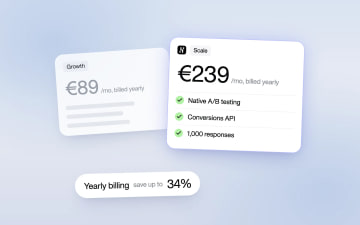
Heyflow Pricing Explained: Plans, Features and Limits
Heyflow plans start at €19 a month billed yearly and are priced by responses. This guide covers what each plan includes, what counts as a response, what happens at the limit, and a break-even method to check whether a higher plan pays for itself.
Read more