

How to Migrate Your Funnel or Form from GoHighLevel to Heyflow







Trusted by 3,000+ marketers


You built your funnel in GoHighLevel because it came bundled with the CRM, and now it converts just well enough that nobody wants to touch it. There is no export button that moves it to Heyflow, but there is a faster, AI-assisted path that rebuilds the funnel from scratch, keeps HighLevel as your CRM, and fixes the tracking gaps you probably did not know existed.
Key takeaways
There is no direct import between HighLevel and Heyflow; the working path is an AI-assisted rebuild through the Heyflow MCP server.
Heyflow's native HighLevel integration lets the rebuilt funnel keep feeding your existing pipelines, tags, and workflows without touching historical contacts.
Heyflow sends server-side events for Meta, TikTok, Bing, Taboola, and Outbrain natively, but Google Ads and LinkedIn remain client-side pixel tracking.
Heyflow replaces only the funnel layer, pairing AI-assisted rebuilds with partial submits, phone validation, and per-screen analytics HighLevel's builder lacks.
Can you import a GoHighLevel funnel into Heyflow directly?
No. There is no export-import bridge between HighLevel and Heyflow, and any guide that promises one is wrong. HighLevel funnels live inside the platform as a sequence of pages under Sites > Funnels, each with its own URL path, its own injected tracking scripts, and form logic that is configured inside the builder rather than stored as a portable file.
The working path is an AI-assisted rebuild through the Heyflow MCP server. You point Claude, ChatGPT, or Cursor at your existing HighLevel funnel, the AI analyzes its structure, and it generates a prompt that builds a comparable funnel directly inside Heyflow. The build takes hours, not weeks, and the output ships live with tracking, lead validation, and compliance already wired in.
That is the honest version. It is also the better version, because a pixel-identical copy of your HighLevel funnel reproduces the conversion rate you are trying to escape.
You are not leaving HighLevel. You are upgrading the funnel layer.
This is the reframe that makes the whole project low-risk. HighLevel is an all-in-one CRM and marketing platform: pipelines, workflows, telephony, calendars, memberships, payments. The funnel builder is one module among many. Heyflow is specialized in conversion, where the funnel is the product.
Heyflow has a native HighLevel integration, so the migrated funnel keeps pushing leads straight into your existing HighLevel pipelines, with the same tags, triggering the same workflows. Historical contacts never move. Nothing gets exported or deleted. The architecture after migration is simple: ads to the Heyflow funnel for capture, validation, and scoring, then into HighLevel as the CRM and automation engine.
Practically, this changes the approval threshold. You are not asking anyone to sign off on a platform replacement. You are adding a conversion layer to the front of a stack that stays intact, and you can pilot it on one funnel while every other funnel runs untouched.
Phase 0: audit the HighLevel funnel before you touch anything
This takes 30 to 60 minutes and it is the input to everything that follows. Document, from inside HighLevel:
Structure and content. Every step and its URL path, every form field and the CRM field it maps to, every conditional logic rule (open the form or survey in the builder and check the Conditional Logic panel, because this is not self-documenting and it is the thing people forget).
Tracking. Every script sitting in Head and Body Tracking Code, at funnel level and at page level. Note which pixels fire where and which events they define. If you run a third-party Conversions API connector from the App Marketplace, or a Facebook Conversions API action inside a HighLevel workflow, write down the exact event names so you do not end up firing two definitions of "Lead."
Performance baseline. Current conversion rate from the funnel's STATS tab, traffic volume, cost per lead, and the percentage of leads your sales team rejects as unreachable. You cannot prove a lift without a before.
Dependencies. Which HighLevel workflows the funnel triggers, the custom domain, SSL, and whether a split test is currently running. If one is, note that HighLevel's split testing requires a connected custom domain and that all external traffic must point at the primary funnel URL for randomization to work properly. Teams who built ad-set-specific destination URLs often discover at this point that their existing tests were never valid.
Phase 1: rebuild with the Heyflow MCP server
The Heyflow MCP server is a Model Context Protocol connection that lets Claude, ChatGPT, or Cursor build and edit funnels directly inside Heyflow. For a migration, the sequence is:
One. Connect MCP to your AI assistant of choice. Two. Give it the live HighLevel funnel URL plus your Phase 0 audit. Three. Let it analyze structure, copy, fields, logic, and intent. Four. It produces a prompt that builds the comparable funnel in Heyflow, live, with tracking and lead validation already attached.
The positioning is deliberate: bring your own AI, Heyflow brings the conversions. And because MCP reads Heyflow's analytics as well as writing to the builder, the same assistant that rebuilt the funnel can later query conversion rates, per-screen drop-offs, and benchmark comparisons. The interface you build with is the interface you optimize with.
If you would rather stay inside Heyflow, Heyflow AI covers the same ground differently. Flow Generation turns a text prompt into a performance-ready funnel with tracking and logic intact rather than a generic template, Edit on Prompt handles changes in natural language, and Design Import matches your brand from a screenshot or a URL. It is trained on 150,000+ real funnels and $2B+ in tracked ad spend, which is why the output arrives configured rather than blank. MCP and Heyflow AI are complementary, not alternatives.
One note on AI parity: HighLevel ships Funnel & Website AI, its own AI-powered page creation and editing experience. The difference is not whether AI exists, it is what the AI is trained on and what the funnel ships with when the AI is done.
Phase 2: rebuild to parity, then go past it
Accepting the MCP output unchanged is the most common way to waste a migration. A migration is also the only moment when restructuring the funnel is already approved, so use it. Split a twelve-field form into a multi-step flow. Move the phone field after the point of commitment. Add a qualifying screen so the Lead event fires on people worth optimizing toward.
The upgrade inventory, ordered roughly by expected impact:
Capability | What it changes after migration |
Drop-off analytics per screen | Device-type filtering (mobile vs desktop), UTM filtering, CVR over time, industry benchmarking. You stop knowing that the funnel underperforms and start knowing which screen bleeds and for whom. |
Native A/B testing with statistical significance | HighLevel's split testing is free on every plan but supports one control against one variation and has no documented significance calculation. Declaring a winner at 54/46 after a week is superstition with a dashboard. |
Partial submits | Data captured as users type, even on abandonment. This alone can approach a doubled conversion rate, because it separates "didn't want it" from "couldn't complete it." |
Phone network validation (Twilio, native) + SMS OTP | Only Heyflow has both natively. Fake numbers stop reaching sales and stop teaching Meta to find more people like that. |
Email validation, TrustedForm, Jornaya/Verisk | Consent proof and lead quality for TCPA-exposed verticals like insurance and solar. |
Advanced conditional logic, logic map, variables, real-time calculations | AND/OR rule composition, lead scoring, ROI and quote calculators running inside the funnel. |
Speed-to-lead | Automated response emails via custom SMTP, native WhatsApp and Slack notifications, without a Zapier hop adding minutes of latency. |
Design control | 2,000+ style variables, 1,000+ Google Fonts, mobile-first, PageSpeed 90+ by default. Systemic branding instead of per-page custom CSS. |
If you want the reasoning behind the restructuring decisions rather than just the feature list, the multi-step form breakdown and the funnel design guide cover why field order and screen sequencing move conversion rates more than copy does.
Phase 3: reconnect tracking (this is the real project)
MCP collapses the build to hours. The genuine work is event mapping and verification. Most migration guides give 80% of their wordcount to design and 20% to tracking, which is exactly backwards.
What Heyflow sends server-side, and what it does not
Heyflow offers native server-side tracking for exactly six platforms: Meta Conversions API, TikTok Events API, OpenAI Ads, Bing/Microsoft Ads, Taboola, and Outbrain.
Google Ads and LinkedIn tracking at Heyflow is client-side (pixel), not server-side and not CAPI. If Google Ads is your primary channel, plan accordingly. Stating this plainly matters more than it looks, because a reader who discovers it after migrating feels misled.
Platform | Heyflow tracking method |
Meta | Native server-side (Conversions API) |
TikTok | Native server-side (Events API) |
OpenAI Ads | Native server-side |
Bing / Microsoft Ads | Native server-side |
Taboola | Native server-side |
Outbrain | Native server-side |
Google Ads | Client-side pixel |
Client-side pixel |
Why this is the main reason to move the funnel layer
HighLevel's funnel builder exposes pixel and script injection. Its Conversions API support is implemented as a workflow action, where you add the Facebook Conversion API action to a workflow, supply an access token and pixel ID, and select an event. That fires on a CRM state change, downstream of the funnel.
That is genuinely useful, and worth keeping. HighLevel's own guidance frames it as helping Meta learn which form submissions became useful leads after they entered the CRM. But it is a different job from delivering the top-of-funnel Lead event server-side at the moment of submission, with browser-captured identity parameters and deterministic deduplication.
The reason that distinction matters is in Meta's own documentation: server events are linked to a dataset ID and processed like pixel events, so they feed targeting optimization and not just reporting. Richer identity on the event means a higher match rate, which means better algorithmic learning, which is why Meta itself describes the Conversions API as a lever on cost per result.
The sophisticated setup runs both layers. Heyflow sends the Lead event server-side at submission with full identity parameters. HighLevel workflows send Qualified and Won events later from the CRM. You get clean top-of-funnel signal and clean lifecycle feedback, without a third-party connector subscription sitting between them.
The verification checklist before you send traffic
Build the tracking before anyone argues about a headline. Then: submit a test lead on a staging URL and confirm the event appears in Meta Events Manager. Confirm it appears once, not twice, because running pixel and CAPI simultaneously without a consistent event ID double-counts and the duplicates are indistinguishable from real conversions. Confirm UTM parameters persist across every screen and land in the CRM record, not just in the URL. Set your drop-off baseline in week one.
Phase 4: wire Heyflow back into HighLevel
Map Heyflow fields to your HighLevel custom fields, verify tags and source attribution survive the handoff, and confirm the workflows that used to fire from the HighLevel form still fire from the Heyflow submission. This is also the moment the duplicate-contact problem disappears: HighLevel's known failure mode of a two-step funnel creating duplicate contacts when step two uses a different form without sticky contact enabled stops existing, because a Heyflow multi-step flow is one session and one submission. That matters beyond CRM hygiene, since duplicates fed to Meta as separate Lead events teach the algorithm to find duplicate-generating traffic.
If HighLevel is not the only system in your stack, Heyflow has 50+ native integrations and automations, including HubSpot, Salesforce, Pipedrive, Zoho, ActiveCampaign, Google Sheets, Airtable, and Monday.com, plus Zapier with 3,000+ apps, Make, webhooks, and a public API.
For deployment, embed the funnel as a web component rather than an iframe in Webflow, WordPress, Wix, Squarespace, Unbounce, or Instapage, or host it on a custom domain with SSL. The web component matters for page speed and for mobile rendering, which is where most paid social traffic lives.
Phase 5: run both funnels in parallel, then cut over
Never cut over mid-flight on a scaling campaign, and never pause campaigns to migrate. Split live traffic 50/50 between the HighLevel funnel and the Heyflow funnel. Decide on statistical significance, not on the day-four trend. As a sample-size floor, plan for several hundred unique visitors per variant before a funnel-page result is readable at typical opt-in rates.
When the evidence is in, redirect fully. Keep the HighLevel funnel published but unlinked for 30 days with 301 redirects in place. It costs nothing and it removes rollback risk entirely. Leave the CRM and workflows untouched permanently.
Migrating multiple client funnels as an agency
HighLevel's center of gravity is agencies running many sub-accounts, so the migration question is usually "can I do this fifteen times?" rather than "can I do this once?"
Start with one client: the highest-spend, worst-performing funnel. Highest upside, clearest proof, lowest political risk. Build the brand setup once, then apply it per client using Design Import to match each client's brand from a screenshot or URL instead of re-solving branding from scratch. Use MCP for the repeatable build, give each client their own custom domain with SSL, and keep every client's HighLevel sub-account exactly as it is.
The economics are worth being explicit about with the client. A measurable conversion-rate lift on a retainer account is a billable service, not overhead you absorb. Agencies running HighLevel on an unlimited sub-account plan with usage rebilled to clients already operate a multi-tool stack, so adding a specialized conversion layer is a familiar motion. The agency lead gen playbook and the agency solution overview cover how to structure that as a productized offer. You can try Heyflow on a single client funnel before you commit to a rollout.
Compliance: parity, with one regional edge
Compliance is not the reason to move the funnel layer, and claiming otherwise would be wrong. HighLevel undergoes annual SOC 2 Type II assessments, holds an ISO/IEC 27001:2022 certificate, and supports Business Associate Agreements for healthcare clients, per its security and compliance documentation.
Heyflow's stack is parity reassurance: SOC 2 Type II, ISO 27001, HIPAA with a signed BAA from the Scale plan (no Enterprise contract required), and GDPR compliance with EU hosting available. You lose nothing on compliance by moving the funnel layer, and DACH teams whose DPO asks for EU data residency and an AVV get a direct answer.
One technical point that is widely mishandled in US healthcare lead gen: design your events so no protected health information enters an ad platform payload. Conditional logic can run eligibility screening inside the funnel without that data ever leaving as a conversion parameter.
What the migration is actually worth
Heyflow customers see a 24% average conversion increase, and the core promise is a doubling of conversion rate, meaning at least an 80% increase, for example 3% to 6%. Across 3,000+ customers, 150,000+ funnels, 3M+ generated leads, and $2B+ in tracked ad spend, the pattern holds because the gains compound from four independent sources rather than one.
Modeled on €50,000 monthly spend at a €50 CPL, which is 1,000 leads, a 24% conversion lift at the same spend produces 1,240 leads and an effective CPL of roughly €40. Improved Event Match Quality from server-side delivery compounds on top of that, though it is directional rather than something you can forecast precisely in advance.
Partial submits often move the number further than anything else. On 10,000 monthly sessions converting at 3%, capturing identifiable data from abandoned sessions and recovering even a modest share of them can push effective conversion from 3% toward 5 to 6%. Phone validation removes both the wasted sales contact attempts on unreachable numbers and the signal contamination that teaches Meta to find more of the same, and the second effect is usually larger and almost always unmeasured.
Set your baseline in Phase 0, measure against it with per-screen analytics, and let significance call the winner. After the migration, the funnel is not the same funnel. It is a better one, and you should be able to prove it with a number.
Get started with Heyflow on one funnel and run it against your existing HighLevel build.
FAQ
Can I export my GoHighLevel funnel and import it into Heyflow?
No. HighLevel funnels cannot be imported into Heyflow directly, because there is no export-import bridge between the two platforms. The practical route is an AI-assisted rebuild using the Heyflow MCP server, where Claude, ChatGPT, or Cursor analyzes your live HighLevel funnel and generates a prompt that builds the equivalent funnel in Heyflow with tracking and validation already attached.
Do I have to cancel my HighLevel subscription?
No, and you probably should not. Heyflow has a native HighLevel integration, so the migrated funnel keeps pushing leads into your existing HighLevel pipelines with the same tags, triggering the same workflows. Historical contacts stay in HighLevel and never move. Heyflow becomes the conversion layer in front of HighLevel as the CRM.
Does Heyflow support Google Ads Conversions API?
No. Google Ads and LinkedIn tracking at Heyflow is client-side (pixel), not server-side and not CAPI. Native server-side tracking exists for exactly six platforms: Meta Conversions API, TikTok Events API, OpenAI Ads, Bing/Microsoft Ads, Taboola, and Outbrain.
We already use HighLevel's Facebook Conversions API workflow action. Is that the same thing?
Not quite. HighLevel's Conversions API action fires from inside a workflow on a CRM state change, which makes it strong for sending lifecycle events like Qualified or Won back to Meta. Heyflow sends the Lead event server-side at the moment of submission with browser-captured identity parameters and deduplication. The best setup runs both: Heyflow for top-of-funnel signal, HighLevel workflows for downstream lifecycle feedback.
How long does the migration take, and do I have to pause campaigns?
The MCP-assisted build takes hours rather than weeks. The real time sink is tracking verification and QA, not construction. Campaigns never pause: build the Heyflow funnel in parallel, split live traffic 50/50 against the HighLevel funnel, and cut over only when the result is statistically significant. Keep the old funnel published but unlinked for 30 days so rollback stays trivial.
Is Heyflow HIPAA compliant for healthcare lead gen?
Yes, with a signed BAA from the Scale plan, no Enterprise contract required. Heyflow is also SOC 2 Type II and ISO 27001 certified and GDPR compliant with EU hosting available. One implementation note: design your conversion events so no protected health information is ever sent in an ad platform payload.
Can I migrate multiple client funnels at once as an agency?
Yes, but sequence it. Pilot one client first, ideally the highest-spend and worst-performing funnel, so you have a proof case before a wider rollout. Build the brand setup once and apply it per client using Design Import from a screenshot or URL, use MCP for repeatable rebuilds, and give each client their own custom domain with SSL. Every client's HighLevel sub-account stays exactly as it is.
Recommended articles
The 5 Best AI Quiz Funnel Builders for Mortgage Lead Generation
Compare the 5 best AI quiz funnel builders for mortgage lead generation: AI features, lead qualification, tracking, compliance, and pricing.
Read more
Best AI Quiz Funnel Builders for CRM Software
Static demo forms can't qualify leads. Compare the 4 best AI quiz funnel builders for CRM software on AI depth, integrations, and pricing.
Read more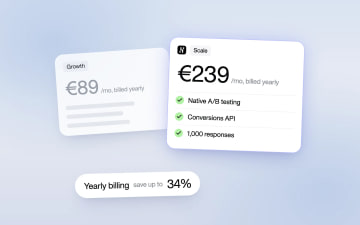
Heyflow Pricing Explained: Plans, Features and Limits
Heyflow plans start at €19 a month billed yearly and are priced by responses. This guide covers what each plan includes, what counts as a response, what happens at the limit, and a break-even method to check whether a higher plan pays for itself.
Read more