

How validated Phone Numbers Increase Lead Quality







Trusted by 3,000+ marketers






Are you tired of chasing leads only to discover their phone numbers are wrong or inactive? You’re not alone. Research shows 38% of processed leads are invalid, and over 30% of these invalid leads are due to phone numbers. That means a significant chunk of your marketing budget and your sales team’s time could be wasted on unreachable leads.[1]
The Relevancy of Phone Numbers in Lead Gen
In lead generation, a phone number is more than just a form field — it’s a direct line to your potential customer. While emails can go unopened, a phone number enables quick, personal outreach that builds trust and converts interest into action faster.
But when phone data is wrong, it’s not just inconvenient — it’s expensive. Inaccurate numbers slow down prospecting, create compliance risks, and waste marketing spend. Every invalid lead has already cost money to acquire, and once it’s in your CRM, it keeps draining time and resources.
The difference accurate validation makes is clear. It could lead to a 65% increase in live connect rates after validating phone registrations.[2]
By verifying phone numbers at the point of entry, you prevent wasted effort before it starts — ensuring your marketing budget fuels genuine connections and your team focuses only on real, reachable leads.
3 Ways to Validate your Phone Numbers
There’s more than one way to validate a phone number, and the right method depends on what you’re trying to achieve. Whether you care most about lead volume, data quality, or verified ownership, there’s a solution that fits.
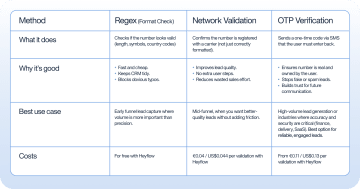
Here’s how the three main approaches compare:
1. Regex Validation (Format Check)
The Regex Validation (Regular Expression) is the simplest way to make sure a number “looks right.” It checks the length, symbols, and country codes to block obvious typos and random entries. It’s fast, free, and keeps your CRM clean. Ideal for top-of-funnel lead gen, where the goal is to attract a large number of new leads rather than quality.

2. Network Validation (Carrier Check)
Network validation goes a step further by checking if the number is actually registered with a carrier via an API call. It enhances lead quality without adding extra steps for users, which means less wasted effort for your sales team. However, you still don’t know if someone entered a number that isn’t theirs. It’s a solid, cheaper option for mid-funnel leads who already know your brand and are actively considering your product, offering better lead quality without creating too much friction.

3. OTP Validation (SMS Check)
OTP verification is the most robust measure to enhance lead quality. It sends a one-time code via SMS that the user must enter back, confirming the number is real and belongs to them. This stops fake or spam leads and builds trust for future communication. OTP maximizes lead quality, but it adds an extra layer of friction for users, which could harm your lead volume and conversion rates, and is more costly. It’s ideal for when you have a high lead volume and need to enhance quality, or anytime you need reliable, engaged leads.

Here's an overview of the three methods:
SMS OTP before the lead reaches your CRM
Network validation tells you a number exists. It doesn't tell you that the person who typed it owns it. If you pay per lead or your sales team calls within minutes, that gap costs money. SMS OTP closes it: the respondent gets a one-time code by text and enters it in the form. Put the OTP step before the screen that submits the lead, and the number that lands in your CRM is one its owner has confirmed on their own phone.
In Heyflow, phone network validation and SMS OTP are both built in, so there's no Twilio account or API key to set up, and both come with the Conversion bundle from the Growth plan. Our guide to OTP phone verification walks through the setup.
Which form builders verify phone numbers by SMS
Plenty of form and funnel builders can send an SMS code. What differs is whether the feature is built in or runs on a Twilio account you set up and pay for yourself. As of November 2026:
Tool | SMS code verification | What you need |
|---|---|---|
Heyflow | Built in, plus a carrier-level check of the number | Conversion bundle, from the Growth plan |
Jotform | SMS Confirmation widget (Twilio) or D7 Verification widget | Your own Twilio or D7 account |
involve.me | Through its Twilio integration | A plan above Pro, plus your own Twilio account |
Onepage | Code by SMS or WhatsApp | Top tier of the Forms & Funnels add-on |
Typeform | Not available | n/a |
Fillout | Not available | n/a |
Phone validation tools if you build the form yourself
The methods above map to different kinds of tools. Format checks usually come from Google's open-source libphonenumber library, often through intl-tel-input, a front-end plugin that adds a country picker and validates the number as it's typed. Carrier checks need a lookup API, such as Twilio Lookup, Numverify or Abstract API, that queries the network and bills per lookup. OTP needs an SMS provider plus your own code to send and check each one. A form builder with all of this built in saves that integration work and keeps the checks next to your tracking and CRM hand-off.
Consent proof: the fourth layer
Format checks, carrier lookups and SMS codes all check the number or the person holding the phone. None of them shows what the person agreed to. If you call leads, text them or pass them to buyers, you also need a consent record. In the US, the TCPA requires prior express written consent for marketing calls and texts made with an autodialer or a prerecorded voice. In Germany, § 7 UWG requires prior express consent for advertising calls to consumers, and § 7a UWG requires you to document that consent and keep the proof for five years.
Store the exact consent text you showed, with its version, a timestamp, the funnel URL and the step where consent was given, with every lead. If you sell or share leads, the text has to name the recipients. A confirmed SMS code proves the person had the phone; it doesn't prove what they consented to. TrustedForm and Jornaya certificates are standard in US lead buying and add a session record on top. Heyflow integrates Jornaya on all plans and TrustedForm on the Scale plan (Security bundle).
Route on the lookup result instead of rejecting leads
A carrier lookup tells you what kind of line a number is. Use that to decide what happens next, not to throw leads away. A landline is not a fraud signal, and many small businesses use VoIP numbers.
Lookup result | Routing | Why |
|---|---|---|
Mobile, active | SMS and call queue, no extra step | Your best case, no added friction |
Landline | Call queue only, skip the SMS | Texts won't arrive, but a person can still answer |
VoIP | Trigger the SMS code or lower the lead score | Legitimate but less certain; confirm control before sales spends time on it |
Not assigned or invalid | Inline prompt to re-enter the number | Often a typo, so give the person a second chance |
Run the lookup when the user taps Next on the phone step and load the next screen while the answer comes back. Set a timeout: if the lookup service is slow or down, accept the lead, flag it as unchecked and verify it later, so a provider outage never blocks a real prospect.
Where the SMS code belongs in the flow
Put the SMS code after the qualifying questions and right before the result the person came for, such as a quote, a savings estimate or a booking confirmation. On step one it feels like a gate, because the user hasn't invested anything yet. Frame it as delivery rather than security, and test “Where should we send your quote?” against “Verify your identity”. Show the number they entered, a single code field and a clear button.
Trigger the code conditionally rather than for everyone. Good triggers are:
a VoIP result or a risk signal from the carrier lookup
a high-value answer combination, such as a large project
a traffic source with a high complaint rate
any lead you pass on at a premium price
Clean mobile numbers from low-risk sources can skip the step. Add a resend option after a short countdown and a “change number” link next to the code field, because most codes that never arrive were sent to a mistyped number.
How to tell your phone validation is working
Judge the setup by cost per reached lead, not CPL: media spend divided by the leads your sales team actually reached by phone. A small drop in submissions together with more reachable leads is a win. Track completion for the phone step and the code step separately, the share of leads flagged as invalid, landline or VoIP, and complaint rates from lead buyers, split by traffic source. Fire your server-side conversion event only after validation and the SMS code have passed, so ad platforms learn from reachable numbers.
Recommendation
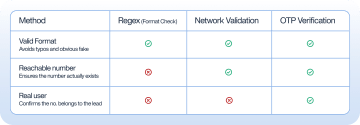
Choosing the right phone number validation method can dramatically impact the quality of your leads and the efficiency of your sales process. A simple format check makes sure numbers are entered correctly, keeping your CRM clean. Network validation goes further, confirming the number is active and reachable. And OTP verification? That’s the ultimate check, proving the number belongs to a real user.
Want a tool that makes it all effortless? Heyflow offers all three methods so you can start optimizing your lead quality today.
Recommended articles

Heyflow is now SOC2 Type II certified
Heyflow has achieved SOC 2 Type II compliance, audited by Prescient Assurance. Discover how this rigorous certification for Security and Confidentiality provides B2B customers with enterprise-grade data protection, speeds up procurement, and strengthens trust.
Read more
Heyflow Summit 2025: Where Funnel Innovation Meets AI
Discover how AI is reshaping lead generation at Heyflow Summit 2025 on October 2 in Berlin or via LinkedIn Live. Hear from marketing leaders like Meta’s Jonathan Nimrodi and Xevio’s Nadim Kuttab, join a panel with OMR’s Philipp Westermeyer and Project A’s Florian Heinemann, and be the first to experience Heyflow 2.0, the next-generation AI funnel builder.
Read more
Funnel Builder Pricing is Stuck in the Past. Here's How We're Modernizing Ours
Heyflow’s new pricing puts your growth first – cheaper to start, modular to fit your needs, and built around real outcomes like leads and conversions.
Read more