
ROI and pricing calculators for lead generation: how to build one that qualifies leads







Trusted by 3,000+ marketers


A pricing or ROI calculator generates qualified leads when every input doubles as a lead-scoring field and the estimate is what the visitor gets in exchange for their answers. Arithmetic accuracy matters less than four design decisions: step order, branching, where the contact gate sits, and how the answers reach your CRM and ad platforms.
Key takeaways
Design calculator inputs backward from the sales call: keep only questions that move the estimate or the qualification.
Match the calculator to the buyer's question: a quote calculator for "what will it cost?", an ROI calculator for "is it worth it?".
Use conditional branching so each buyer type sees a short, relevant path, and use the branch answer for routing.
Start with a partial gate (range on screen, breakdown by email) and show ranges with stated assumptions, never a point estimate.
Map every answer to its own CRM property and fire the ad conversion only for qualified results.
Why calculators convert when contact forms don't
Calculators convert because they reverse the order of value: the visitor gets the number first and pays with answers, instead of handing over contact details and waiting. A "Contact sales" form asks for name, work email, company and phone before the visitor learns anything about price. A buyer who wants a ballpark before booking a call may see that as a bad trade and look for a vendor who shows a number. Your form-abandonment and pricing-page exit data can tell you how much of that is happening on your site.
A calculator gives the visitor the number they want to take to their boss. In exchange, they supply scope, company size, timeline and budget band. This is zero-party data collection at its most willing, because each answer visibly changes the output they are waiting for.
Self-serve cost configurators from cloud and software vendors are a useful analogy. In those tools, you pick the inputs and watch the estimate move. A website pricing calculator borrows that self-serve pattern even when your price is far less standardized than metered infrastructure, and buyers who have used such tools expect to configure a price themselves.
The second mechanism is micro-commitments. A first question like "What are you building?" costs nothing to answer. Each small answer raises the visitor's investment in seeing the result. By the time the contact request appears near the end, the visitor has already done most of the work.
A calculator is a contact form with extra steps, and the design pays off only when every step before the gate carries qualification value. A plain contact form wins in two situations:
Low-volume enterprise deals, where every lead gets a custom scoping call anyway.
Sales-ready traffic, such as partner referrals and visitors who have already had a demo and don't need qualifying.
Hypothesis: send half your traffic to a variant that replaces the primary pricing-page CTA, "Contact sales", with a calculator entry point. Expect more sales-accepted leads per pricing-page visitor. Measure by CRM lead source over at least one full sales cycle.
Pricing calculator vs ROI calculator: match the funnel stage
Choose by the question the buyer is trying to answer: a quote or tier calculator for "what will this cost?", an ROI calculator for "is this worth it?". An ROI calculator built for a buyer still asking about cost produces savings claims nobody believes, and a quote calculator built for a buyer who must justify spend hands them a price with no case attached.
Pricing and quote calculators fit variable-scope offers: agencies, freelancers, contractors, implementation services, and SaaS with seat or usage tiers. ROI calculators fit products sold on outcome, where the person on your site has to convince a team or a budget owner who will never visit your page.
Buyer question | Calculator type | Typical inputs | Output | Sales handoff |
|---|---|---|---|---|
"What will this project cost?" | Quote calculator | Project type, scope counts, features, timeline | Price range with stated assumptions | Scoping call with scope already captured |
"Which plan fits us?" | Seat or tier calculator | Team size, usage volume, required features | Recommended tier and monthly range | Sales-assist or self-serve checkout, by tier |
"Is this worth it?" | ROI calculator | Current volume, current cost, hours spent, target improvement | Payback period and annual impact range | Business-case review with champion and economic buyer |
"What does it cost, and when does it pay back?" | Hybrid | Scope inputs plus baseline metrics | Price range next to payback range | Proposal call framed around return |
If you're evaluating an ROI calculator builder, the hard part is the baseline inputs. Visitors guess at their current costs, so let them pick ranges and show which assumptions drive the result.
Expect fewer completions from an ROI calculator, because its inputs take more thought. Whether those completers are worth more is a question your pipeline data answers, not a rule. If your buyers are price-shopping, a quote calculator is the right call even when your product sells on outcome.
Hypothesis: change the calculator shown to bottom-funnel comparison traffic from quote to ROI. Expect a lower completion rate but more opportunities created per completion, measured by calculator variant in your CRM.
Design the inputs backward from the sales call
Start from the facts that decide whether a lead deserves a call, not from the pricing spreadsheet. Calculators built from the spreadsheet list every cost driver as a field and end up with an accurate number and a lead record sales can't use.
Ask your sales lead which three to five facts decide whether a lead deserves a call. Common answers: company size, use case, timeline, budget band, decision role.
For each fact, find a question the visitor wants to answer because it changes their estimate.
Drop any input that moves neither the estimate nor the qualification.
Order the remaining questions from easiest to most sensitive.
Sales needs to know | Calculator question | Why the visitor answers | CRM property |
|---|---|---|---|
Use case and fit | "What are you building?" (visual cards) | Sets the estimate baseline | calc_use_case (picklist) |
Deal size | "How many pages?" or "How many seats?" | Directly moves the price | calc_scope (number) |
Complexity | "Which features do you need?" | Each one adds to the estimate | calc_features (multi-select) |
Timeline | "When do you need it live?" | Rush timelines change price | calc_timeline (picklist) |
Budget band | "What range are you planning for?" | Result can show options in range | calc_budget_band (picklist) |
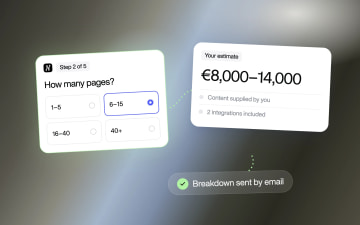
Here's a worked example from agency website estimators, which typically ask for page count, user roles and functionalities before they show an estimate. Each is a scope input that doubles as qualification data. Page count sizes the deal. User roles tell sales whether the build involves accounts and permissions, which means an application rather than a brochure website. Functionalities can surface integrations, which often affect scope.
The same method works outside agencies. A solar installer's savings calculator asks for the monthly electricity bill and roof type: both move the savings estimate, and both tell sales whether the house is worth a site visit. A telehealth intake can turn height and weight into a BMI, and that number decides which program the visitor sees and whether a clinician needs to review the case.
Apply progressive disclosure: one or two questions per step. Open with a low-stakes single-select question on visual cards, which is the first micro-commitment. Push budget and contact details to the end, after the visitor has invested effort. Whichever interactive calculator builder you use, confirm it can hold that order and map each answer to its own field.
A budget question sometimes does hurt completion. If your scope inputs already predict budget, skip the question and derive a budget tier from the estimate. Ask directly only when scope fails to predict spend, for example when small projects come from buyers with large budgets.
Hypothesis: move the budget question from step two to the final pre-gate step. Expect a higher completion rate with no drop in budget-band fill rate, measured by step-level funnel events and CRM property completeness.
Conditional branching: one calculator, many buyers
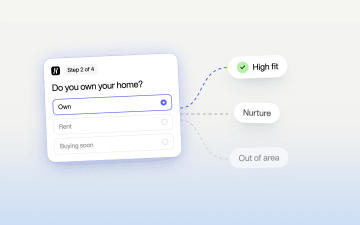
Conditional branching routes each visitor on their early answers, so every buyer type sees only the questions that change their estimate. A brochure-site prospect answering questions about payment gateways is a branching failure: each irrelevant question tells the visitor the final number won't reflect their project, and it adds noise to the lead record sales reads.
Once someone picks "eCommerce", ask about product count, payment providers and inventory integration. A brochure-site visitor skips all of that and gets asked about page count and content migration. Both see a shorter flow than one combined form would give them.
The same logic works for buyer type. Say you sell software to service providers, freelancers and agency teams alike. The freelancer path skips seat counts and approval workflows and lands on a self-serve tier. The agency path asks about team size, client count and white-label needs, then routes to sales. The branch answer becomes a routing field, which raises lead qualification velocity: the right rep sees the right lead without manual triage.
The objection you'll hear from stakeholders is that more steps mean more drop-off. Total step count matters less than perceived effort. A long static form shows the whole load up front, and visitors bounce at first sight. A card-based UI shows one decision at a time, and branching keeps each card relevant. Watch instead for a single heavy step, such as a feature checklist with dozens of options, and split it by category.
Branching has a real cost. Every path needs its own pricing logic, QA and upkeep. If two paths differ by one question, use one path with a conditional question. Reserve full branches for buyer types that need different estimates or different sales owners.
In Heyflow, branches are no-code conditional logic on answers, so a growth marketer can add or change a path without a developer ticket. The estimate is calculated inside the funnel as the visitor answers: real-time formulas update the number on screen, formula-based routing sends a visitor to a different path depending on the result, and variables put the number into the results screen and the CRM record. Formulas and calculations are part of the Conversion bundle, from the Growth plan.
Hypothesis: add a branch after project type that removes eCommerce questions for brochure-site visitors. Expect higher completion on the brochure path, measured by step-level drop-off segmented by first answer.
The gate decision: show the number first or ask for the email first
For most B2B services and tiered SaaS, start with a partial gate: show a range on screen and send the detailed breakdown by email. Put the contact gate after the full result and the email field becomes optional in practice; put it before the result with nothing shown and you invite fake addresses from people who only want the number. Gate position sets your lead volume and your lead quality, and it decides whether the visitor trusts the estimate at all.
Pattern | Shown before contact | Expected lead volume | Lead quality signal | Trust risk | Fits when |
|---|---|---|---|---|---|
Ungated | Full estimate on screen, optional "email me the breakdown" | Lowest contact capture | Strong among those who opt in | Low | Top-funnel or SEO traffic, standardized pricing |
Partial gate | Range on screen; detailed breakdown sent by email | Moderate | Valid emails more likely, since the email delivers something | Moderate | Most B2B services and tiered SaaS |
Full gate | Nothing until contact details arrive ("get your personalized quote") | Highest raw submissions | Weakest; includes throwaway emails | High | Estimate needs human review, high-ticket deals, thin traffic |
Treat the volume and quality columns as directional expectations to test, not results. The tension lives in the copy. A "no commitment" promise on the start screen sets an expectation. If a required email field then blocks the result, the flow breaks its promise at the moment trust matters most.
The partial gate handles fake emails better than validation rules alone, because when the email delivers the detailed breakdown, a fake address gets the visitor nothing. Add format validation and a disposable-domain check, and ask for a work email when your scoring depends on company domain.
The full gate is the right call when your estimate is a placeholder until a human reviews scope. Ungated is right when the calculator's job is to earn trust and links rather than capture leads.
Test element | Plan |
|---|---|
Hypothesis | Moving from full gate to partial gate raises sales-accepted leads per calculator start, because valid-email rate rises more than raw submissions fall |
Control | Full gate |
Variant | Partial gate: range shown, breakdown emailed |
Primary metric | Sales-accepted leads per calculator start |
Guardrails | Completion rate; invalid and disposable email rate |
Secondary metrics | Meetings booked per start; pipeline per start |
Duration | Fixed sample size set before launch; full weeks only; wait for lead status to mature before calling it |
Segments | Traffic source and device |
Don't pick raw submissions as the primary metric. A full gate forces contact details for any result, so it wins that metric by construction, whatever happens to lead quality.
Make the output a sales asset
Show a range with stated assumptions and a feature breakdown, because an exact figure on the result screen becomes the figure sales gets held to. When the real quote comes in higher, the prospect feels baited and the rep spends the first call defending the calculator. Most accuracy fights between marketing and sales start here.
A website estimator might return separate bands for a basic business site, a custom design with advanced features and an enterprise build. Your calculator should produce bands like that from the visitor's own inputs, then list what the band assumes: who supplies content, which integrations are included, what is out of scope.
Break the estimate down by feature. The visitor sees which choices drive cost, and the rep gets a negotiation lever, such as moving a costly integration to phase two. A breakdown also turns the result into the first draft of a tailored proposal, so the scoping call starts from shared numbers.
Make the next step specific. "Book a 20-minute scoping call" with the calendar form prefilled from their answers beats "We'll be in touch". The rep opens the meeting already knowing scope and timeline.
For ROI calculators, make the output shareable as a link or PDF the champion can forward to their team and finance. Include the assumptions so a skeptical CFO can adjust inputs instead of dismissing the total.
Avoid fake precision. A result of $47,350 implies a certainty your pricing logic doesn't have. To stop the accuracy fight, agree on ranges and assumptions with sales before launch. Name one owner for the pricing logic, and compare estimates against closed-won quotes on a fixed review schedule.
Hypothesis: replace the point estimate with a range plus assumptions. Expect fewer deals lost with "price higher than expected" as the reason, measured by closed-lost reason codes in your CRM.
Mobile-first build details
Design the calculator for a phone in an in-app browser first, because paid social traffic tends to arrive that way and small UI choices show up as step drop-off. A number field on step two that opens the full keyboard covers half the screen and hides the Next button. Pull the device split for your calculator's landing pages before design review.
Use full-width answer cards for single-select questions, with the whole card tappable.
Give touch targets generous size and spacing so a thumb doesn't hit the neighboring option.
Auto-advance on single-select questions, and keep a visible back button because accidental taps happen. Don't auto-advance multi-select steps.
Use range cards or sliders where visitors think in bands, such as monthly volume. Use a stepper or a numeric keypad input for exact counts like seats. Sliders are imprecise on touch screens for exact values.
Keep free-text fields to the contact step.
Make the result range readable without zooming, and collapse the feature breakdown behind a tap.
Heyflow's multi-step card layouts are built around this pattern, so each step renders as a thumb-sized card by default. The same rules apply in any interactive calculator builder.
The tradeoff is precision. Range cards for page count give you a band instead of a number. That's acceptable, because the output should be a range anyway: a band of inputs produces a band of prices. Keep exact number inputs for counts that change the price in steps a band can't capture, such as seats on a tiered plan.
Send the answers to your CRM and your ad platforms
Map every calculator question to its own CRM property and add the calculated estimate and the branch taken as fields of their own, because the calculator only qualifies leads if its answers arrive where sales and your ad platforms can use them. A rep who opens the record should see scope, timeline, budget band and the number the visitor saw, without asking for any of it again.
Use the same fields for routing. The branch answer decides the owner, and the estimate band decides whether the lead goes to a rep, a self-serve checkout or a nurture sequence. If two fields disagree, for example a large scope with a small budget band, flag the record for review instead of letting the default route win.
The ad signal needs the same discipline. A calculator that qualifies should fire the conversion event only for qualified results, so the ad platforms learn from the visitors sales wants rather than from everyone who reached the end. The guide on how to qualify leads before they submit covers that setup.
The test plan to run after launch
Run the hypotheses one at a time, in order of how much each can move sales-accepted leads, and set the sample size before each test starts.
Gate position. Test the partial gate against the full gate first, with sales-accepted leads per calculator start as the primary metric.
Budget question placement. Move the budget question to the final pre-gate step and watch completion rate and budget-band fill rate together.
Branching. Remove the eCommerce questions from the brochure-site path and compare step-level drop-off by first answer.
Output format. Replace any point estimate with a range plus assumptions, and track "price higher than expected" in closed-lost reasons.
Entry point. Swap the pricing-page "Contact sales" CTA for a calculator entry and measure sales-accepted leads per pricing-page visitor over a full sales cycle.
Keep a log of every result with its date and traffic mix. When ad targeting, pricing or the offer changes, rerun the gate test first, because gate position depends most on who arrives.
FAQ
Do pricing calculators generate more leads than contact forms?
They usually generate more qualified conversations when every input carries qualification value, because the visitor gets a number before giving contact details. For low-volume enterprise deals or sales-ready referral traffic, a plain contact form can be the better choice.
What is the difference between a pricing calculator and an ROI calculator?
A pricing calculator answers "what will this cost?" from scope inputs. An ROI calculator answers "is this worth it?" from baseline metrics such as current volume and cost, and outputs a payback period.
Should I ask for an email before showing the calculator result?
Usually not. A partial gate, with a range on screen and the detailed breakdown sent by email, tends to balance lead volume, email validity and trust. Gate fully only when the estimate needs human review.
Should a calculator show an exact price?
No. Show a range with the assumptions behind it, so sales isn't held to a figure the real quote won't match.
Can I build a pricing calculator without code?
Yes. In Heyflow, formulas calculate the estimate as the visitor answers, conditional logic handles branching, and variables pass the result to the results screen and your CRM. Formulas are part of the Conversion bundle, from the Growth plan.
Recommended articles
Recommended articles
Qualify Leads Before They Submit: Stop Feeding Meta Junk
Cheap leads that sales never closes usually trace back to one setting: every form submit fires the same Lead event. Learn how to ask a few intent questions inside the form, route each answer to its own ending, and send Meta a separate event for the leads worth paying for.
Read more
Funnel Platform vs Landing Page Builder for Paid Traffic
A landing page builder ships focused single pages, a funnel builder runs checkout sequences, and a multi-step form qualifies visitors on one URL. This comparison shows which destination fits your offer and traffic, how to run the page and the funnel on one platform with one tracking setup, and how to test the choice on cost per qualified lead.
Read more
What is a conversion rate and how to calculate it to maximize your leads
Discover what a conversion rate in marketing is, how to calculate it, and why it’s essential for a successful campaign. Boost your strategy today!
Read more