

5 Best Unbounce alternatives for lead generation







Trusted by 3,000+ marketers






If you’re looking for Unbounce alternatives that offer better lead validation, interactive funnels, and more flexible pricing than a basic landing page builder, you’re in the right place. While Unbounce is one of the most recognized names in the landing page builder market—and rightly so, being built back in the desktop-traffic era of 2010—many users outgrow it quickly, or find it hasn’t evolved with the times.
To be fair, Unbounce remains one of the most mature and feature-rich landing page builders in the market. It offers advanced integrations, custom code options, and AI-assisted features that still make it a solid choice for technical teams. The question is whether those strengths still hold up in a mobile-first, funnel-driven ad landscape. This is especially important given that 98.5% of Facebook users access the platform via mobile devices, and 81.8% use mobile exclusively.
In this guide, we’ll break down the five best Unbounce alternatives that help marketers optimize conversion rates, manage real-time leads, and integrate seamlessly with your marketing stack. You’ll get detailed comparisons of pricing, features, and user reviews — all to help you choose the right fit for your business. And, you’ll walk away understanding if Unbounce is still good today for paid ads?
5 Best Unbounce alternatives for lead gen campaigns compared
Below is a quick comparison of five top Unbounce alternatives: Heyflow, Landingi, Instapage, Leadpages, and
#1. Heyflow | #2. Landingi | #3. Instapage | #4. Leadpages | #5. ClickFunnels | |
Server-side ad tracking | ✅ | ❌ | ❌ | ❌ | ❌ |
Design flexibility | ✅ | ✅ | ⚠️ | ✅ | ✅ |
CRM integrations | ✅ | ✅ | ✅ | ✅ | ⚠️ |
Built-in Analytics & A/B testing | ✅ | ✅ | ⚠️ | ⚠️ | ✅ |
Data security | ✅ | ⚠️ | ⚠️ | ⚠️ | ⚠️ |
Custom code | ✅ | ✅ | ✅ | ⚠️ | ✅ |
Logic & personalization | ✅ | ❌ | ❌ | ❌ | ✅ |
Pricing per annual billing | From $45/month | From $29/month (free plan available) | From $99/month | From $49/month | From $97/month |
Key: ✅ = feature supported by over 80% of the category’s capabilities; ⚠️ = 30–80% supported; ❌ = less than 30% supported
Each of these landing page builders has unique strengths, from drag and drop editors and customizable templates to advanced A/B testing tools. Let’s explore them in detail.
Why switch to an Unbounce alternative
Unbounce still packs plenty of power under the hood — from custom scripts and AI page optimization to deep CRM integrations. The challenge isn’t the feature set; it’s that the product was built in a desktop-first era. When over 90% of paid traffic now comes from mobile (as reported by Meta), single-page landing experiences can feel rigid compared to modern funnel tools.
Here are the main reasons users seek Unbounce alternatives:
Expensive pricing: Unbounce is among the most expensive landing page builders. Monthly plans quickly add up, especially for growing agencies and small teams that need unlimited landing pages or higher traffic allowances.
Limited compliance capabilities: Unbounce’s chatbot itself notes, “We help you collect information in a GDPR-compliant way, but we cannot guarantee that your use of our platform will be 100% GDPR compliant.” This creates uncertainty for marketers handling regulated data.
Single-page structure: Unbounce focuses on static pages. It’s less effective for multi-step flows or dynamic, interactive experiences.
Limited form flexibility: There’s minimal support for complex logic, branching questions, or multi-step form validation.
Made for a desktop-first audience: doesn’t convert well for a mobile-first ad campaign unless you have a highly technical team.
Steep learning curve: For beginners, getting pixel-perfect designs and optimal A/B testing setups can take time.
While Unbounce technically allows multi-step experiences through custom scripts or third-party embeds, the setup is clunky and not natively supported. For most marketers, that limits how far you can personalize or qualify leads
If your goal is to generate qualified leads rather than just create landing pages, you need a more flexible, interactive, and user-friendly solution.
#1. Heyflow
Heyflow stands out as one of the best Unbounce alternatives for teams that want to optimize conversion rates and collect verified leads. Unlike traditional landing page builders that focus on static content, Heyflow helps you build interactive, responsive landing pages that adapt to user behavior.
Heyflow is built for marketers who want to create landing pages that actually convert — not just capture clicks. You can deliver personalized content, use logic jumps, and validate leads in real time.
Want to see it in action? Watch this video 👇
Best for: Interactive lead flows and paid ad funnels
Heyflow is ideal for marketers running paid campaigns who need to optimize conversion rates and validate leads through interactive, multi-step experiences. Compared to Unbounce, Heyflow gives you far more control to build interactive experiences that perform on mobile. While Unbounce is primarily a landing page builder for static pages, Heyflow’s flow-based editor makes it easy to engage users throughout the funnel.
Heyflow works best for:
Businesses running paid ads on platforms like Meta, Google, LinkedIn, TikTok, or YouTube
Marketers who want to optimize conversion rates from cold or low-intent mobile traffic
Teams that need to collect personal data to personalize services — like solar quotes, fitness plans, or custom skincare
Brands that prioritize lead quality, data compliance, and conversion-focused UX
Marketing teams that need to move fast without relying on developers
Businesses looking for a mobile-first funnel builder that scales with ad spend — without locking them into pricey enterprise contracts!
Businesses looking for a mobile-first funnel builder that scales with ad spend — without locking them into pricey enterprise contracts!
Key features
Category | Availability | Features |
Lead quality gates | ✅ | Native phone validation (carrier-level via Twilio), SMS OTP, email SMTP validation, TrustedForm, Jornaya/Verisk. |
Partial submits | ✅ | Captures lead data progressively, even if users abandon mid-flow. |
Server-side ad tracking | ✅ | Native Meta CAPI, TikTok Events API, Google Ads, Bing, Taboola, Outbrain |
Speed-to-lead | ✅ | WhatsApp messaging, Custom SMTP branded emails, Slack notifications |
Design flexibility | ✅ | Use custom design possibilities like the step block to know how users have advanced in the flow, set global design variables, such as colors, fonts, and borders, once to get on-brand throughout your entire flow. |
CRM integrations | ✅ | Connect your Heyflow straight to your Hubspot CRM, Google Sheets, Zapier, and more to streamline your sales funnel. |
Built-in Analytics & A/B testing | ✅ | Heyflow's built-in A/B testing gives you full control over traffic and provides feedback for winning variations, ensuring every tactic you deploy is a data-backed decision that delivers a clear ROI. |
Ad platform integrations |
| Meta CAPI, TikTok Events API, Google Ads, LinkedIn, Bing, Taboola, Outbrain |
Data security | ✅ | SOC2 and HIPAA compliant, ISO 27001 certified, Matomo (the GDPR-friendly Google Analytics alternative) to protect your customer data and more for safety and insights. |
Custom code | ✅ | Add custom HTML, JS, and CSS and go beyond the many design settings that Heyflow provides to style your funnel just the way you want — 100% on-brand. |
Logic & personalization | ✅ | Build a smart, interactive, and personalized experience with multi-step logic, conditional fields, and calculations to personalize your sales process and create custom offers. |
Strengths and weaknesses
Pros | Cons |
More affordable than Unbounce | No free plan |
Native/built-in multi-step lead funnels (limited with Unbounce) | Custom branding is not included in entry-level plans |
Built-in compliance tools for GDPR and TCPA, ensuring legal adherence | Collaboration features are limited to the Enterprise plan |
Pricing
Plan | Price | Features |
Starter | $22/month | 5 flows, seamless integration, Website embedding |
Growth | $79/month | 10 flows, Core Design and Conversion bundle, Heyflow branding removal |
Scale | $229/month | 20 flows, Advanced webhooks, Salesforce integration |
Enterprise | Custom pricing, from $1,100/month | Tailored solutions for specific needs |
The big benefit of Heyflow’s pricing model is flexibility:
Outcome-based plans: Only pay for the leads you generate
Custom feature bundle: Choose only what you actually need
Scalable add-ons: Adjust volume as you grow, starting from $0.18 per additional response or $9.60 per additional flow
Let the good forms flow.
Explore Heyflow’s form builderUser reviews
Users love Heyflow’s simplicity and interactive flow builder. It’s trusted by 3,000+ marketers globally, especially those looking for an alternative landing page builder that combines conversion design and data control. Julian Steins, Head of Projects at Vertigo Media, says:

#2. Landingi
Landingi is another popular Unbounce alternative. It positions itself as lead generation software focused on helping small businesses and agencies create landing pages quickly.
Unlike Heyflow, Landingi offers a more traditional landing page builder experience, but still includes features that appeal to teams running multiple campaigns. It’s especially suited for WordPress users and agencies managing client funnels.

Best for: Agencies and startups needing affordable landing pages
Landingi’s strength is its mix of affordability, flexibility, and free plan—perfect for small teams creating unlimited landing pages without big budgets.
Landingi works best for:
Agencies that need unlimited landing pages with solid A/B testing
Small businesses seeking a free plan option before scaling up
Teams that value simplicity over complex automation
Key features
Category | Availability | Features |
Design flexibility | ✅ | Generate landing pages faster with the help of AI using prompts to produce professional pages equipped with SEO title, description, and keywords. |
CRM integrations | ✅ | Landingi works to improve your workflows and lead generation process through integrations with Brevo, Pipeline CRM, and other Zapier CRM platforms. |
Built-in Analytics & A/B testing | ✅ | Compare different versions of your landing page with betterCore A/B testing for optimization and GA4 tracking support. |
Data security | ⚠️ | Provides robust security for general business use through GDPR compliance, DPAs, and ISO-certified AWS hosting. Still, it lacks application-level SOC 2 certification and native HIPAA compliance (it will not sign a BAA). While third-party compliance tools like TrustedForm and Jornaya can be integrated via custom code, they are not available as native, one-click features. |
Custom code | ✅ | Add scripts or HTML snippets with the HTML widget in the editor for specific elements or the JavaScript Code section in your dashboard for site-wide scripts. |
Logic & personalization | ❌ | Lacks native complex logic features like calculations, visual logic mapping, or multi-condition branching within the form itself. |
Only basic form validation is supported here, without phone verification or real-time lead quality checks. This limited personalization means you’ll rely more on manual segmentation — forgoing an essential landing page best practice.
Strengths and weaknesses
Pros | Cons |
Free plan available | Limited personalization |
Easy setup with prebuilt templates | Reliance on Zapier for most integrations |
Integrates with most marketing tools | A bit of a steep learning curve for new users |
Pricing
Plan | Price per | Features |
Lite | $24/month | 10 landing pages, unlimited conversions, 5,000 visits per month, 1 custom domains |
Professional | $57/month | Unlimited landing pages, unlimited conversions, 50,000 visits per month, 10 custom domains |
Enterprise | $1,150/month | Unlimited landing pages, unlimited conversions, unlimited visits, 100 custom domains |
User reviews
Users often note that while Landingi isn’t as advanced in automation, it’s one of the few Unbounce alternatives offering a usable free plan. It’s praised for its balance of affordability and functionality. Creative Director, Gabriel C. says, “Overall, the experience is overwhelmingly positive.”
#3. Instapage
Instapage is a premium landing page builder designed for advanced marketers running large-scale campaigns. It’s known for its pixel-perfect design control and A/B testing capabilities.
However, it lacks native multi-step or interactive flows. Most landing page builders today include these, but Instapage still relies on single-page experiences. There’s also no built-in phone or email validation, which can limit lead capture.
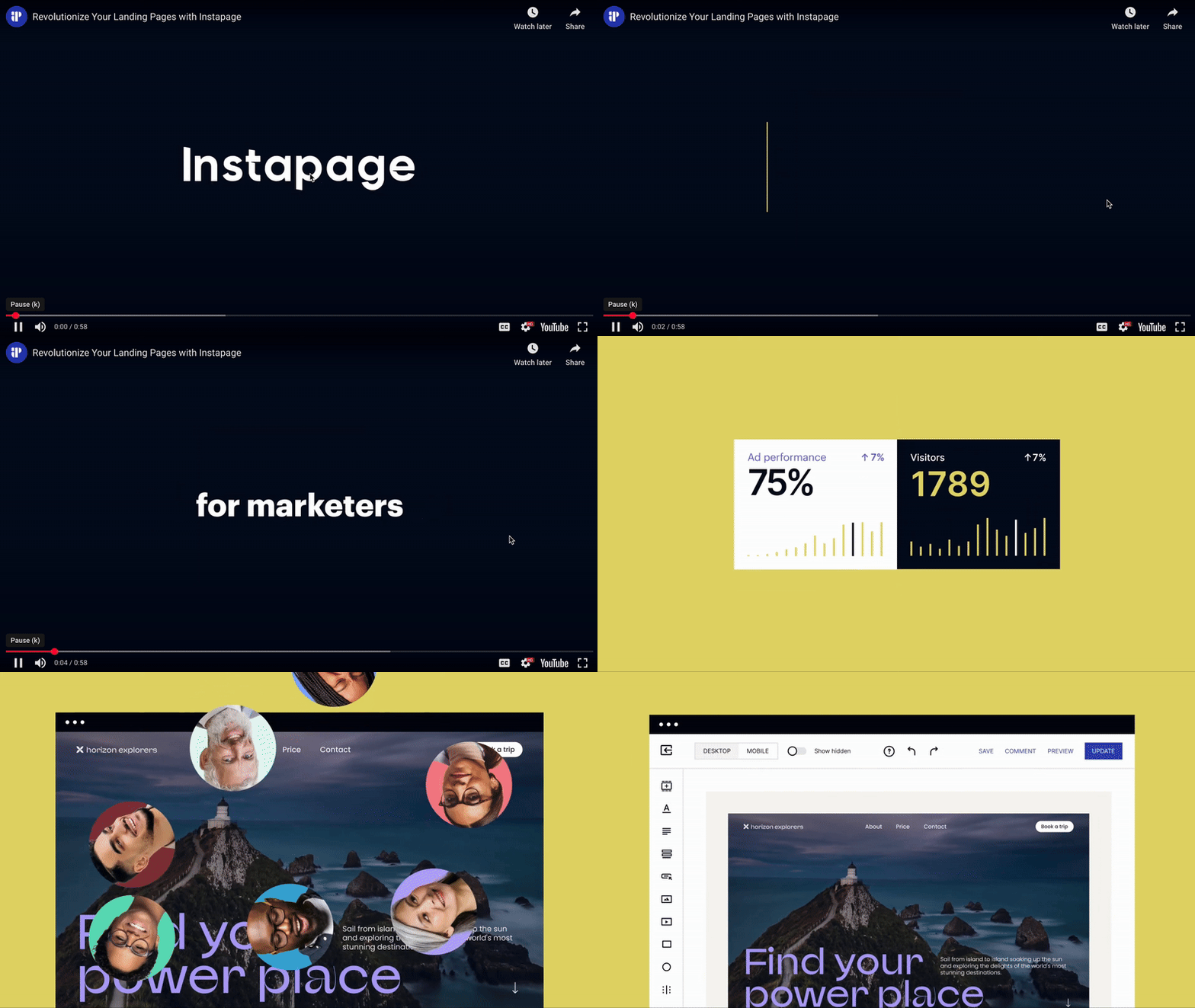
Best for: Enterprise marketers running high-converting ad campaigns
Instapage is positioned for advanced teams focused on design precision, A/B testing, and campaign analytics, making it ideal for high-budget ad spenders. While not a cheaper alternative to Unbounce, it serves users well.
Instapage works best for:
Enterprise teams or agencies that focus on high-converting landing pages for paid media
E-commerce that values analytics, speed, and scalability over lead validation
Key features
Category | Availability | Features |
Design flexibility | ⚠️ | Provides a drag‑and‑drop, pixel builder with 500+ customizable layouts, reusable Instablocks/Global Blocks, and on‑brand asset management |
CRM integrations | ✅ | Instapage’s integrations include HubSpot, Salesforce, and Zapier, with tools built to nurture and track leads like Agile CRM and amoCRM for lead scoring. |
Built-in Analytics & A/B testing | ⚠️ | Features native A/B testing and heatmaps with direct support for major tracking pixels, but lacks advanced third-party integrations like TikTok Pixel, Hotjar, Microsoft Clarity, Matomo, and detailed dashboard analytics for drop-offs per screen and device breakdowns. |
Data security | ⚠️ | SOC2 Type I & II certified with GDPR compliance, editable cookie consent banners, and Data Protection Agreement available. Lacks HIPAA and ISO 27001 certifications, EU-exclusive servers (uses global infrastructure), and specialized integrations like Trustedform, Jornaya Verisk, Openli, or Matomo. |
Custom code | ✅ | For customization beyond the standard drag-and-drop editor, Instapage uses HTML, JS, and CSS support. |
Logic & personalization | ❌ | Enables Dynamic Text Replacement for personalized content through URL parameters and conditional redirects via custom code, but does not offer built-in conditional logic, calculation variables, or visual logic-building features. |
Strengths and weaknesses
Pros | Cons |
Great for large teams | No built-in lead validation |
Celebrated A/B testing environment | Steep learning curve for beginners |
Integrates easily with Google Analytics and ad platforms | Expensive compared to other landing page builders |
Pricing
Plan | Price | Features |
|---|---|---|
Create | $99/month | For 15,000 unique visitors. Drag & drop builder, reusable page blocks and forms, AI content and more |
Optimize | $199/month | For 30,000 unique visitors. Server-side A/B testing, experimentation history, customizable traffic splitting and more |
Convert | Custom | Enterprise-ready platform, ad-to-page personalization, global blocks and forms, root domain publishing and more |
User reviews
Instapage is praised for professional, high converting landing pages, but often considered costly. Users highlight that while it’s powerful, there’s a steep learning curve before mastering it. Users report high responsiveness, appreciation of heatmaps, and helpful support.
#4. Leadpages
Leadpages is a classic Unbounce alternative offering an approachable landing page builder that includes pop-ups, alert bars, and website integrations. It’s great for small business owners looking to create landing pages without heavy technical skills. While it includes A/B testing and professionally designed templates, it lacks advanced logic or interactive multi-step flows.

Best for: Small businesses and B2B marketers seeking simplicity
For its ease of use and pre-built templates, Leadpages is a strong fit for small businesses creating landing pages and sales pages quick and easy.
Leadpages works best for:
Small businesses or solopreneurs seeking a dedicated landing page builder with built-in A/B testing
B2B marketers who want fast, conversion-focused templates
Agencies helping to generate leads for local businesses
Key features
Category | Availability | Features |
Design flexibility | ✅ | Includes an easy-to-use drag-and-drop builder and extensive template library, yet it does have some structural limitations like no "pixel-perfect" design control. |
CRM integrations | ✅ | Build integrated campaigns with Mailchimp and HubSpot, send contact information via Zapier, and close the deal with Salesforce, all seamless integrations included with Leadpages. |
Built-in Analytics & A/B testing | ⚠️ | Leadpages' native testing suite is a 'split-url' engine. It effectively handles the technical delivery of different page versions to different users without code. However, it provides zero behavioral context (no heatmaps, no session replays, no funnel drop-off points). To achieve an enterprise-grade CRO (Conversion Rate Optimization) stack, the native A/B tool must be supplemented with Microsoft Clarity or Hotjar via the Global Scripts menu. |
Data security | ⚠️ | GDPR and CCPA compliant, yet GDPR form fields from an integration cannot be added to a Leadpages form. To solve this, you can create custom GDPR form fields within your integration to be added to Leadpages. Also, Leadpages is hosted on SOC2 and ISO 27001 certified infrastructure (Google Cloud Platform and AWS), but the application itself does not maintain independent SOC2 Type II or ISO 27001 certifications. |
Custom code | ⚠️ | Advanced Conditional Redirects (multi-path logic) and Conditional Field Logic (show/hide) are not supported within the native Form Widget; forms are limited to a single, static destination URL. Additionally, the platform provides no native interface for Calculations (mathematical formulas) or Logic Visualization (flowchart mapping). The primary exception is the support for Variables via URL Parameter Mapping, which allows for the pre-population of form fields and the passing of data into hidden fields for lead tracking. For any requirement involving branching logic or real-time data processing, Leadpages requires the integration of third-party scripts or embedded HTML widgets. |
Logic & personalization | ❌ | Conditional logic is not a built-in feature, but does include device‑specific show/hide sections and audience enrichment support for tailored content and follow‑ups. Deeper logic is typically achieved via embedded third‑party forms. |
Strengths and weaknesses
Pros | Cons |
Customizable templates | No multi-step logic |
Intuitive drag and drop editor | Limited personalization |
Integrates with popular marketing tools | Steep learning curve for complete beginners |
Pricing
Plan | Price | Features |
|---|---|---|
Standard | $49/month | 5 Landing pages, Standard integrations, Unlimited Traffic & Leads |
Pro | $99/month | Unlimited Landing Pages, Unlimited A/B testing, Sales & Payments |
Custom | Custom | Customize your plan with Client Sub-accounts, Discounted Add-Ons, and more |
User reviews
Leadpages is considered great for B2B lead generation. They offer a 14-day free trial and clear templates that help businesses grow without high costs. Yet, it’s important to be aware of your subscription. This review reports, “Some users feel that the company's communication is lacking, especially concerning billing changes and renewal notifications.” A great way to keep cautious of that is to set a reminder on your calendar for renewal dates.
#5. ClickFunnels
ClickFunnels is one of the most feature-rich Unbounce alternatives. It’s designed for complete funnel building, from landing page design to follow-up automation. However, this comes with a price of admission.
It’s powerful for building sales pages, multi-step funnels, and upsell sequences. But it’s also known for its steep learning curve and higher cost tiers.
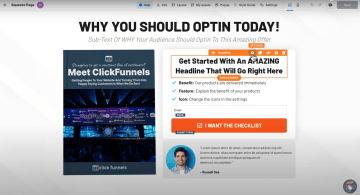
Best for: Building complete lead generation and sales funnels
ClickFunnels, like Heyflow, is ideal for users who need more than a landing page builder. Businesses and marketers who need a full funnel builder for multi-step lead generation campaigns and sales automation.
ClickFunnels works best for:
Agencies or marketers running complete lead generation campaigns through multiple channels
Businesses needing automation across complex funnel steps
Organizations with healthy marketing spending
Key features
Category | Availability | Features |
Design flexibility | ✅ | Clickfunnel’s drag-and-drop editor and user-friendly interface sacrifice a bit of design flexibility compared to competitors, particularly for those without technical experience able to customize through CSS. They prioritize conversions over creativity. |
CRM integrations | ⚠️ | Native CRM integrations only with HubSpot, Keap, and Pipedrive. |
Built-in Analytics & A/B testing | ✅ | Funnel-level A/B testing for real-time data and reporting. Use the performance dashboard for a clear overview of key metrics such as page views, conversions, and revenue and revenue metrics to track earnings, average order value, and revenue from specific traffic sources. |
Data security | ⚠️ | Handles GDPR/CCPA compliance through built-in cookie banners and DPAs, but it lacks enterprise-grade certifications like SOC2, HIPAA, or ISO 27001. |
Custom code | ✅ | Add scripts and integrations like “Custom JS/HTML” that allow adding own HTML/JS or third‑party embed widgets via an in-editor code editor, with options for code type and advanced settings |
Logic & personalization | ✅ | Workflow-level “Conditional Split Path” lets teams branch journeys based on contact attributes, tags, purchases, enrollments, and compound logic with AND/OR groups for targeted experiences, supporting personalization and conditional automation paths |
Strengths and weaknesses
Pros | Cons |
Full-funnel marketing tools | Super expensive |
Supports unlimited traffic and contacts | Steep learning curve for new users |
Strong A/B testing and conversion tracking | Lacks advanced lead validation tools such as phone number validation or integration with compliance tools like TrustedForm and Jornaya |
Pricing
Plan | Price | Features |
|---|---|---|
Launch | $97/month | Unlimited Funnels, 1 Workspace, 2 Team Members, 10K Contacts, 50K Emails per Month, 5 Custom Domains |
Scale | $197/month | Unlimited Funnels, 5 Workspaces, 5 Team Members, 10K Contacts, 75K Emails per Month, Unlimited Custom Domains |
Optimize | $297/month | Unlimited Funnels, 10 Workspaces, 10 Team Members, 150K Contacts, 750K Emails per Month, Unlimited Custom Domains |
User reviews
The general consensus is: it’s a powerful choice for complete funnel management, though not the cheapest. Great for lead generation campaigns with a healthy budget, ready to rock it. Lamar Tyler, verified ClickFunnels user, says, “By using ClickFunnels one of the main things we’ve been able to do is launch more and launch more, FASTER.”
Pick the funnel builder that fits your lead gen goals
Here’s a quick rule of thumb: If more than half of your paid traffic still comes from desktop channels like Google Search or B2B display, Unbounce remains a strong, feature-rich choice even at a higher price point. But if your campaigns rely on mobile-heavy platforms like Meta, TikTok, or YouTube, a mobile-first funnel builder such as Heyflow will deliver far better conversion results.
For marketers spending $5K+/month on Meta or TikTok ads, Heyflow's native server-side tracking (Meta CAPI, TikTok Events API) eliminates the data loss and middleware costs that every other alternative still requires.
Here’s a quick recap of the Unbounce alternatives we’ve covered:
Heyflow for paid ad funnels, lead validation, and interactive flows
Landingi for startups and agencies wanting a free plan and unlimited landing pages
Instapage for enterprise teams focused on design precision and A/B testing
Leadpages for SMBs looking for simplicity and built-in marketing tools
ClickFunnels for advanced users building complete marketing campaigns with automation
Among them, Heyflow stands out as the best Unbounce alternative for mobile-first marketers who need interactive experiences and validated leads. Try Heyflow for free and see how you can optimize conversion rates across every funnel touchpoint and let the good forms flow.
Try Heyflow for freeFAQs
Can I build multi-step forms in Unbounce?
Not natively. You can build a multi-step form in Unbounce using third-party scripts or custom workarounds, but the setup is clunky and not mobile-friendly. If interactive, mobile-optimized funnels are your goal, you’re better off with a tool like Heyflow.
Which platform is best for validating leads before they enter my CRM?
Heyflow offers carrier-level phone validation (via Twilio), SMS OTP verification, email SMTP validation, TrustedForm for TCPA compliance, and Jornaya/Verisk consent certification — more lead quality tools than any other Unbounce alternative.
Does Heyflow integrate with HubSpot and Salesforce?
Yes, Heyflow integrates natively with both. HubSpot is available as a direct, no-middleware integration on the Growth plan and above, with support for bi-directional sync and custom object mapping. Salesforce is available on the Scale plan and above. Beyond those, Heyflow connects natively with 50+ tools, including Pipedrive, Zoho CRM, HighLevel, ActiveCampaign, Google Sheets, Airtable, Zapier, and more — so your leads flow straight into whatever stack you're already running.
What's the cheapest alternative to Unbounce?
Heyflow is the most affordable option on this list, starting at $22/month — significantly cheaper than Unbounce's $99/month entry price. Landingi comes in at $29/month and Leadpages at $49/month, both offering simpler landing page functionality without the advanced lead gen features. If you're looking for the best value for paid ad campaigns specifically, Heyflow's $22/month Starter plan includes native CRM integrations, advanced conditional logic, and analytics and tracking — more conversion infrastructure than any other option at a comparable price point.
Does Unbounce have phone number verification?
No. Unbounce does not offer native phone number verification of any kind — no format validation beyond basic input fields, no carrier-level (HLR) network checks, and no SMS OTP verification. If you need to verify that a phone number is real and reachable before it hits your CRM, you'd have to build a custom solution using third-party scripts or middleware tools. Heyflow is the only tool in this comparison that offers carrier-level phone validation, SMS OTP, and email SMTP verification natively — without any external setup required.
Is Unbounce still a good option in 2026 for paid traffic?
If more than 50% of your paid traffic comes from desktop, Unbounce still offers powerful features that technical teams can work with. But, if your audience is mobile-first (as 90% of paid traffic is!), Unbounce’s limitations with multi-step flows, personalization, and mobile UX might hold you back. In that case, Heyflow is a better choice.
Recommended articles
The 5 Best AI Landing Page Builders 2026: Ranked by Use Case & Conversion Potential
Every AI tool can generate a page now. We compare the 5 best AI landing page builders on tracking, lead validation, testing, and compliance.
Read more
The 6 Best Lovable Alternatives for High-ROAS Funnels (2026)
Lovable is great for building apps, but not for funnels. Compare 6 Lovable alternatives, including Heyflow, built for high-ROAS forms and sign-ups.
Read more
Conversion Rate Optimization Tools: The 8 Best Platforms 2026
Most CRO lists compare tools built for different jobs. See which of 8 conversion rate optimization tools fits a paid-traffic funnel. Compare now.
Read more